3
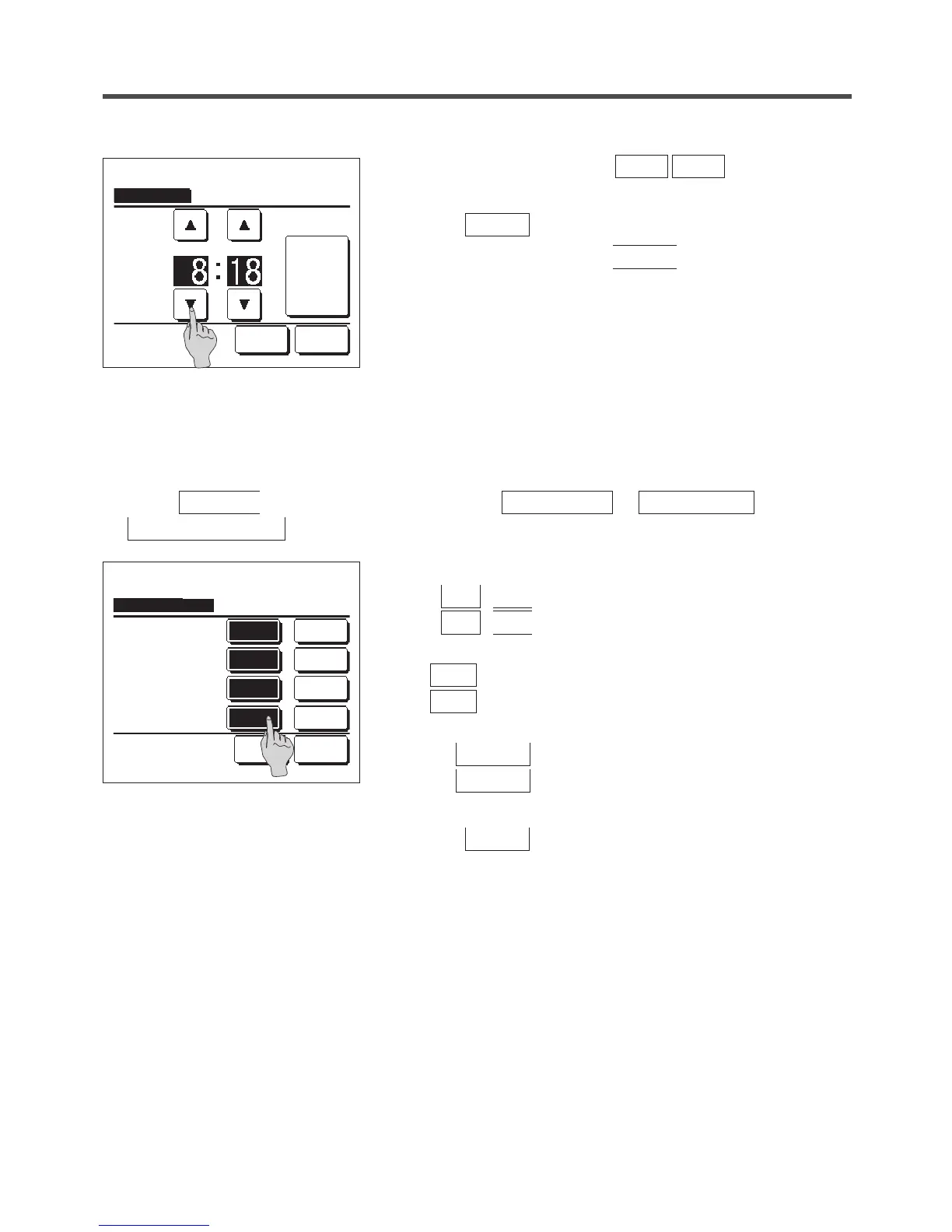
Set the “hour : minute” with the
▲
▼
buttons on the
clock setting screen.
Tap the
Set
button after the setting.
To change “dd/mm/yy” tap the
Date
button.
1
Tap the
Menu
button on the TOP screen and select
User setting
⇒
Initial settings
⇒
Date & time display
.
2
The Clock setting screen is displayed.
Tap
OFF
/
ON
for the Date and time.
Tap
OFF
/
ON
for A day of the week.
Tap Display method “12H or 24H”.
12H
Hours … If it is 3:50 PM, it displays “3:50PM”.
24H
Hours … If it is 3:50 PM, it displays “15:50”.
Set the position of AM/PM.
Set
Infront
... “PM3:50” is displayed.
Set
Back
... “3:50PM” is displayed.
3
Tap the
Set
button after the setting.
■Date & time display
You can set and correct the date & time display.
Clock setting
Date Back
Set the time.
Set
Date & time display
Set Back
Select setting
Infront
Position of AM / PM
12HDisplay method
ONA day of the week
ONDate & time
Back
24H
OFF
OFF
PM


 To Next Page
 Loading...