Moneris® Go Plus: Using Your Terminal 3
Moneris Go Plus
Use this wireless, all-in-one terminal and PINpad to process transactions virtually anywhere with cellular
coverage and/or Wi-Fi coverage. Both you and your customer will enter information and respond to prompts on
the terminal. When directed on screen, pass the terminal to the customer. When the customer has finished,
they will pass the terminal back to you as directed on screen. Simply respond to the prompts to complete a
transaction.
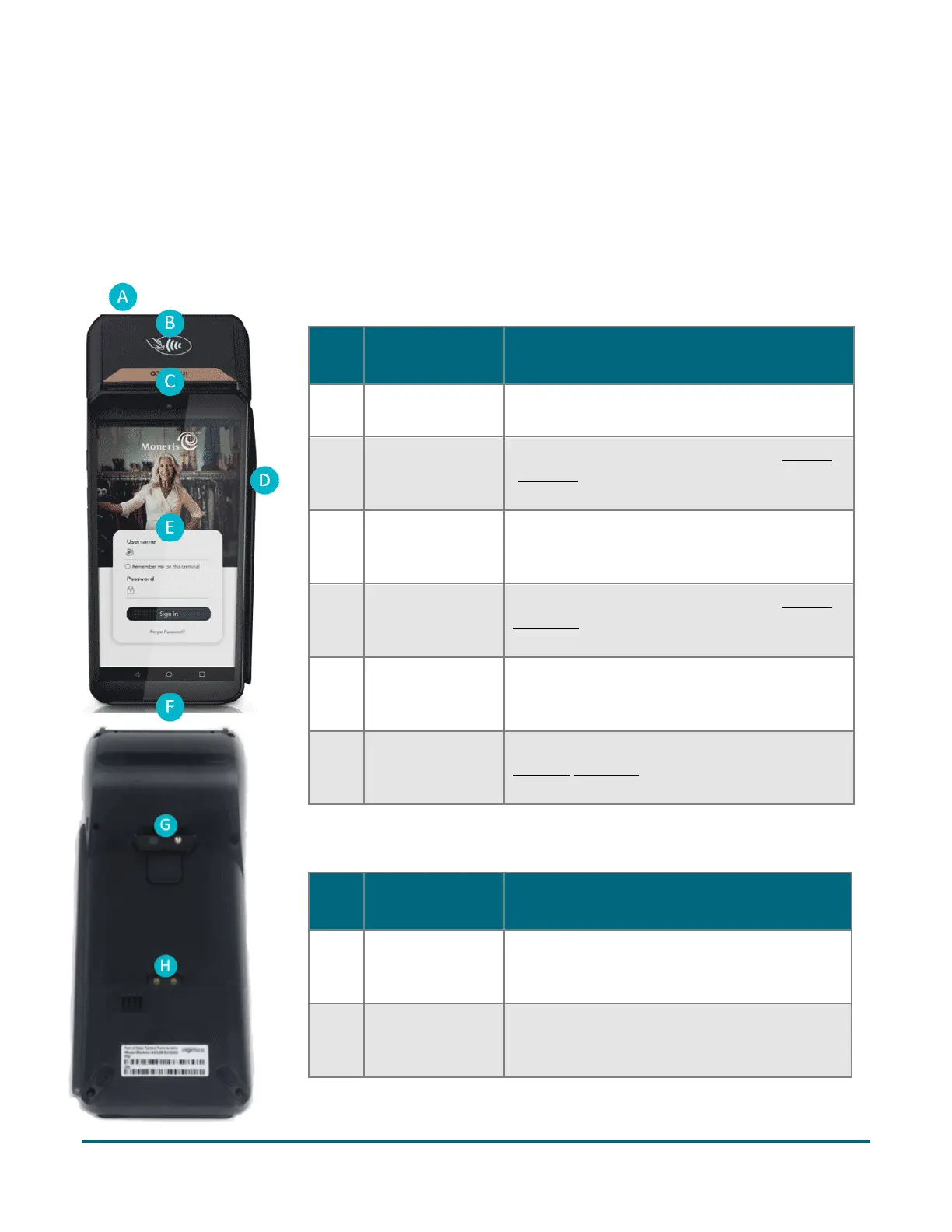
Hardware - Front of terminal
Label Hardware
element
Function
A
Printer
Prints receipts and reports.
B
Contactless
reader
Reads card information when a card is tapped
(page 11)
C Front camera
Scans QR codes on a receipt to help you find a
transaction to refund, void, or reprint receipts.
D
Magnetic stripe
reader
Reads card information when a card is swiped
(page 11).
E
Touch screen
display
Displays information and allows you to enter
information by touching the screen.
F Chip card reader
Reads card information when a chip card is
inserted (page 11).
Hardware - Rear of terminal
Label Hardware
element
Function
G Rear camera
Scans QR codes on a receipt to help you find a
transaction to refund, void, or reprint receipts.
H Metal contacts
Connect the terminal with the optional
charging base



 To Next Page