Moneris® Go Plus: Using Your Terminal 47
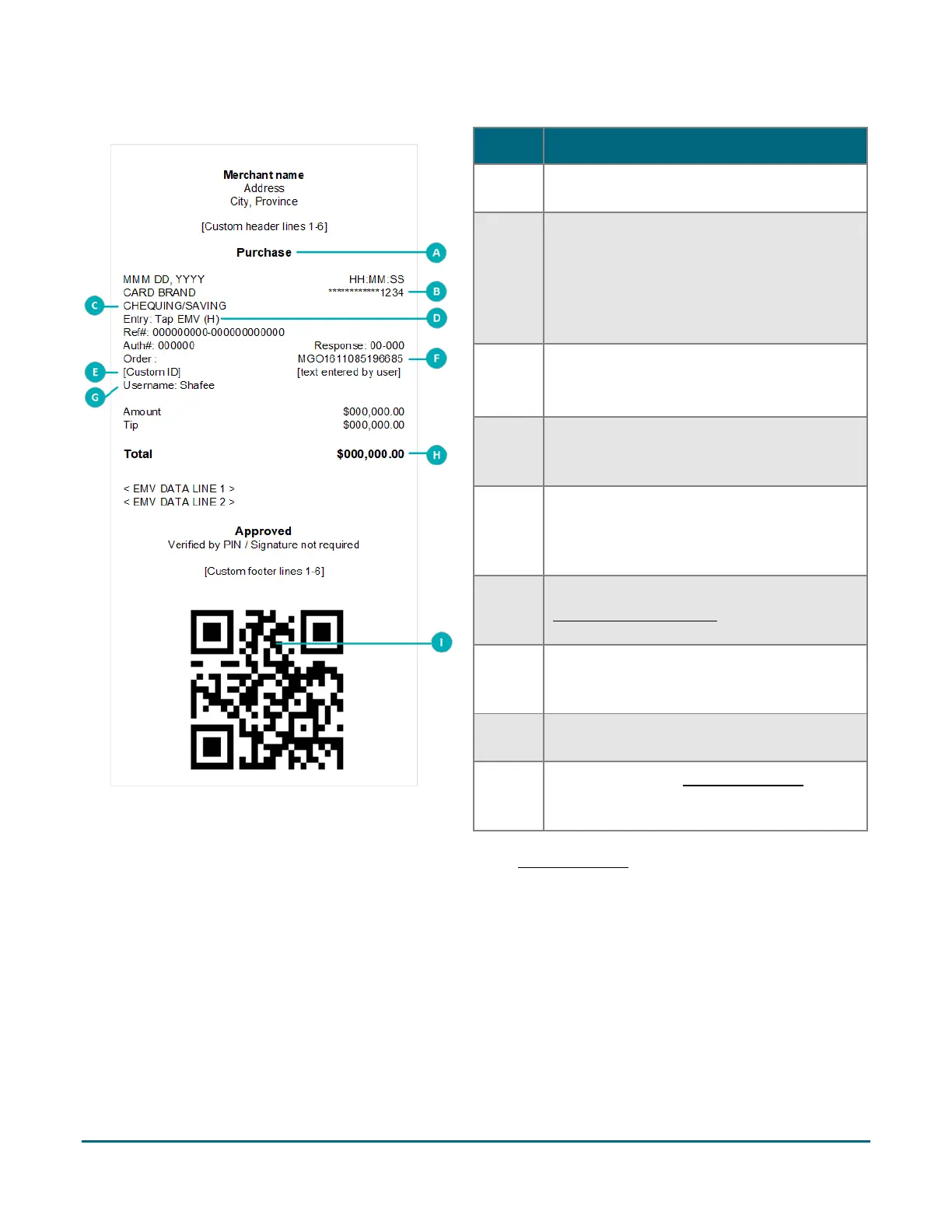
Purchase receipt example
Partial approval receipt
Once the customer has paid the total purchase
amount, the application generates a separate receipt for each partial approval
. If the customer used three pre-
paid cards, the application produces three partial approval receipts.
Card masking
The card numbers on a receipt are masked except for the last 4 digits. Masking replaces a card’s numbers with
asterisks (e.g., ************1234). The expiry date does not appear on any copy of any receipt. These
measures help to prevent fraud.
Item Description
A Transaction type. For example, Purchase,
B Card type and card number. Examples of
card type/brand include Interac, Visa,
Mastercard, and American Express®. The
card number is masked — an asterisk is
printed in place of the card number except
for the last four numbers.
C Chequing or Saving.
Indicates which account was selected by
the cardholder for an Interac card
D Entry. Indicates how the card information
was entered, for example, tap, insert, or
E Custom ID. You can customize the name of
this field. The value for this field is the
value that you enter on the terminal during
F Order ID. You can use the Order ID to
search for a transaction to void, to refund,
or to reprint the receipt.
G Username. Indicates which user was signed
in to the terminal when the transaction was
H Total. This is the total sale amount
I QR code. You can scan the QR code to
immediately find a transaction to void, to
refund, or to reprint the receipt.



 To Next Page