– 10 –
Oven Control and Timer
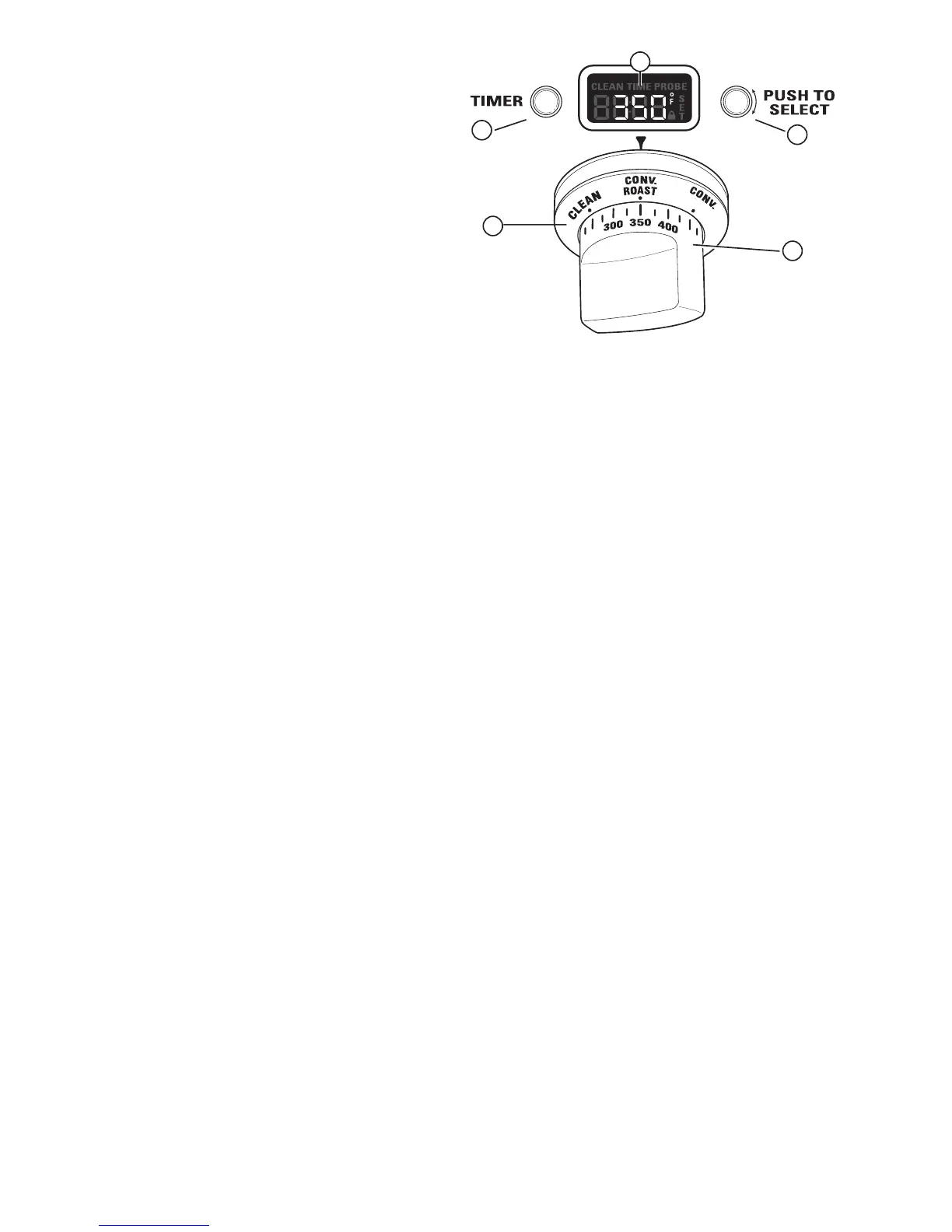
1. Oven Mode Selector – Turn outer ring to select:
PROOF – Maintains a warm environment useful
for rising yeast-leavened products.
BAKE – Select for traditional baking.
CONV BAKE – Use for convection baking.
CONV ROAST – Use for convection roasting.
BROIL – Select for broiling.
CLEAN – Select for the self-cleaning function.
See How to Set the Oven for Cleaning in this
section.
2. Temperature Knob – Turn to select:
Temperatures from 175°F to 550°F.
LOW BROIL – A lower broiling temperature is
automatically set.
HIGH BROIL – A higher broiling temperature is
automatically set.
CLEAN – The self-clean temperature is
automatically set.
3. Mini-Knob – Turn to select and push to enter
PROBE or TIMER settings, also to adjust CLEAN cycle
time.
4. Timer Button – Push to select the kitchen
timer function. The timer does not control oven
operations.
5. Oven Display – Displays oven functions such as
oven and probe temperatures and kitchen timer.
1
4
2
5
3
BAKE
The Oven Mode Selector (1) AND the Temperature
Knob (2) must be set together in one of the following
valid pairings:
To cancel a feature, turn either the Oven Mode
Selector or the Temperature knob to O
FF.
To cancel PROOF, turn the Oven Mode Selector to OFF.
Temperature Knob
175º to 550°F
175º to 550°F
175º to 550°F
HIGH or LOW BROIL
CLEAN
――
Oven Mode Selector
BAKE
CONV BAKE
CONVECTION/ROAST
BROIL
CLEAN
PROOF
(Continued next page)


 To Next Page