– 45 –
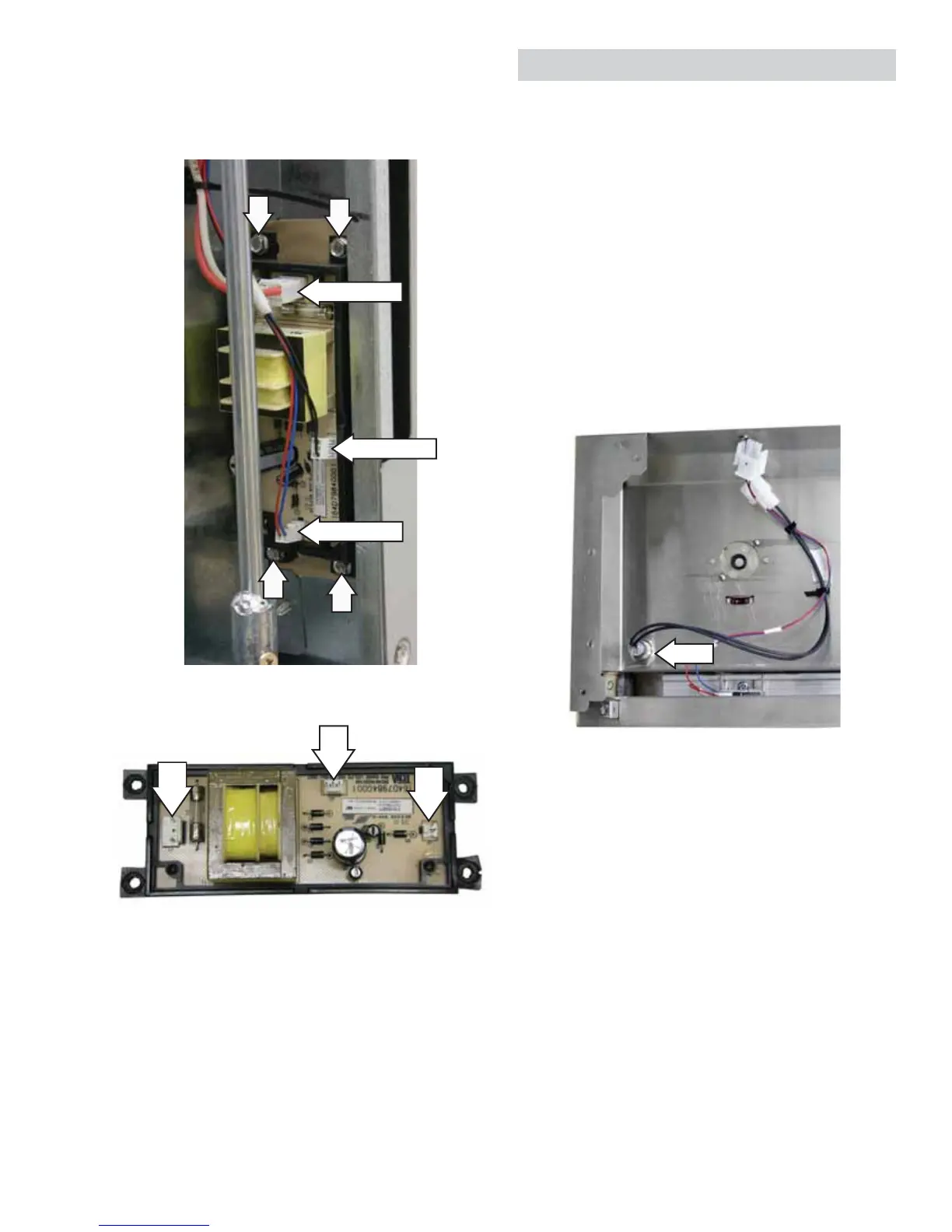
J1
J2
J3
J1 - Input (120 VAC)
J2 - LED Output (32 VDC)
J3 - Light Switch (28 VDC)
Power Supply Connections
The LED power supply is located in the lower right
corner behind the back panel. (See Back Panel.)
Remove three harness connectors from the power
supply, then remove the four 1/4-in. hex-head
screws from the power supply.
Disconnect
Disconnect
Disconnect
Nut
Task Light Switch
The task light switch is attached to the left side of
the control panel with a 3/4-in. hex nut.
To replace the task light switch:
1. Place the control panel in the service position.
(See Control Panel.)
2. Disconnect the task light switch wire harness.
3. Remove the wire ties that attach the switch wire
harness to the LED wire harness.
4. Remove the 3/4-in. hex nut from the switch.
5. Slip the nut over the harness connector, then
remove the switch from the control panel.


 To Next Page