LinkCom 5 User Manual
Page 74
13 Enabling/disabling hidden features
Some LinkCom 5 options cannot be reached from PrintGuide. These settings can
only be changed manually directly in the configuration file. These are called hidden
features
13.1 How to enable/disable options
Any of the hidden options are manipulated the following way:
1. Use PrintGuide to make a configuration backup
2. Open the backup file in a text editor, e.g. Notepad
3. Locate the setting you need to change and change the value
4. Save changes to the configuration file
5. Use PrintGuide to upload the manipulated configuration file to the
PrintServer
6. From PrintGuide save changes and restart the PrintServer
13.2 Disabling IPv6 and DHCPv6
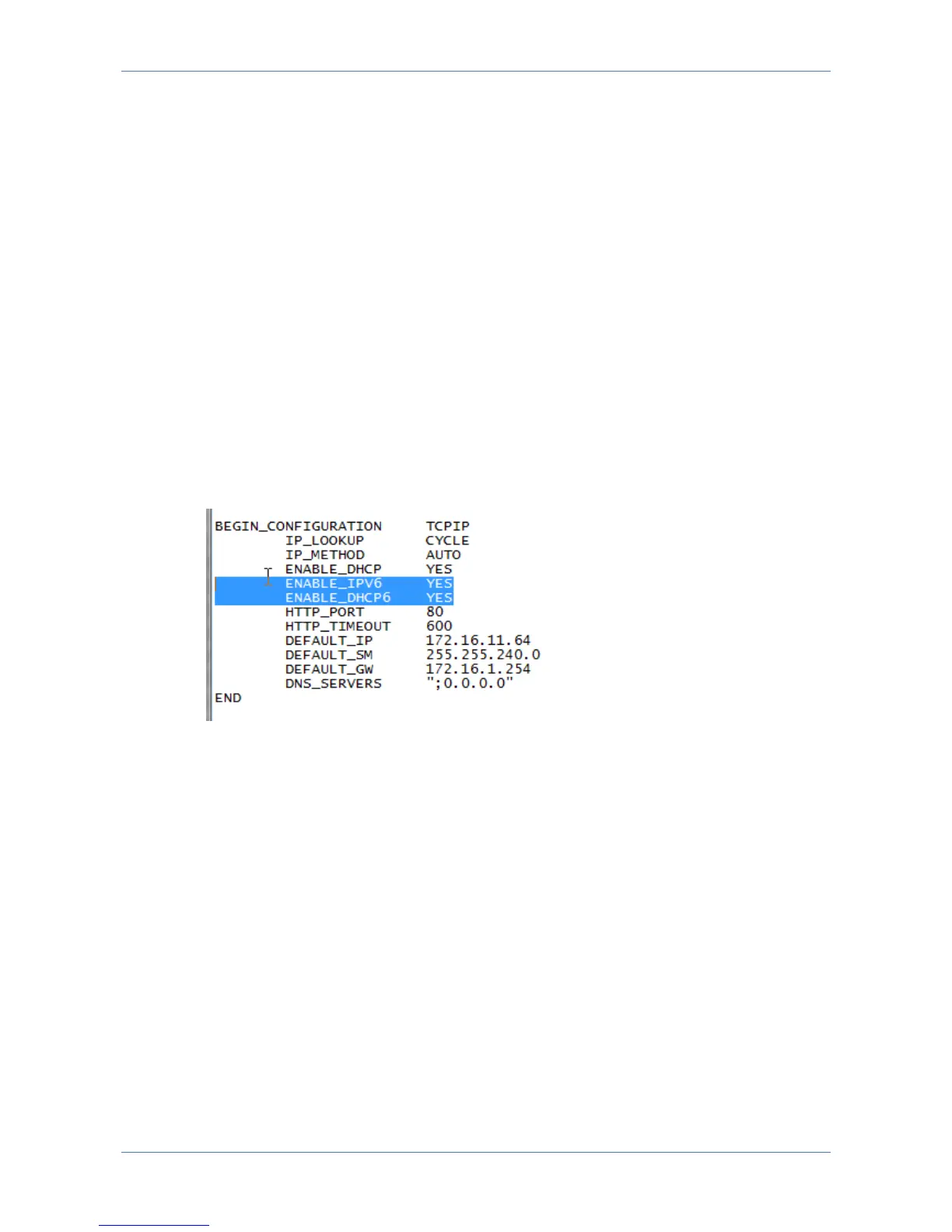
In the backup configuration file, locate the section
“BEGIN_CONFIGURATION TCPIP”
In the default settings IPv6 and DHCP 6 support is enabled.
Disable DHCPv6
Change “ENABLE_DHCP6” from YES to NO
Ordinary IPv6 DHCP support is disabled. The ability to get up an IPv6 address will
be limited to support by IPv6 capable routers. Disabling DHCP6 does not mean that
a static manual IPv6 address can be entered.
Disable IPv6
Change “ENABLE_IPV6” from YES to NO to completely disable IPv6 support.



 To Next Page