LinkCom 5 User Manual
Page 80
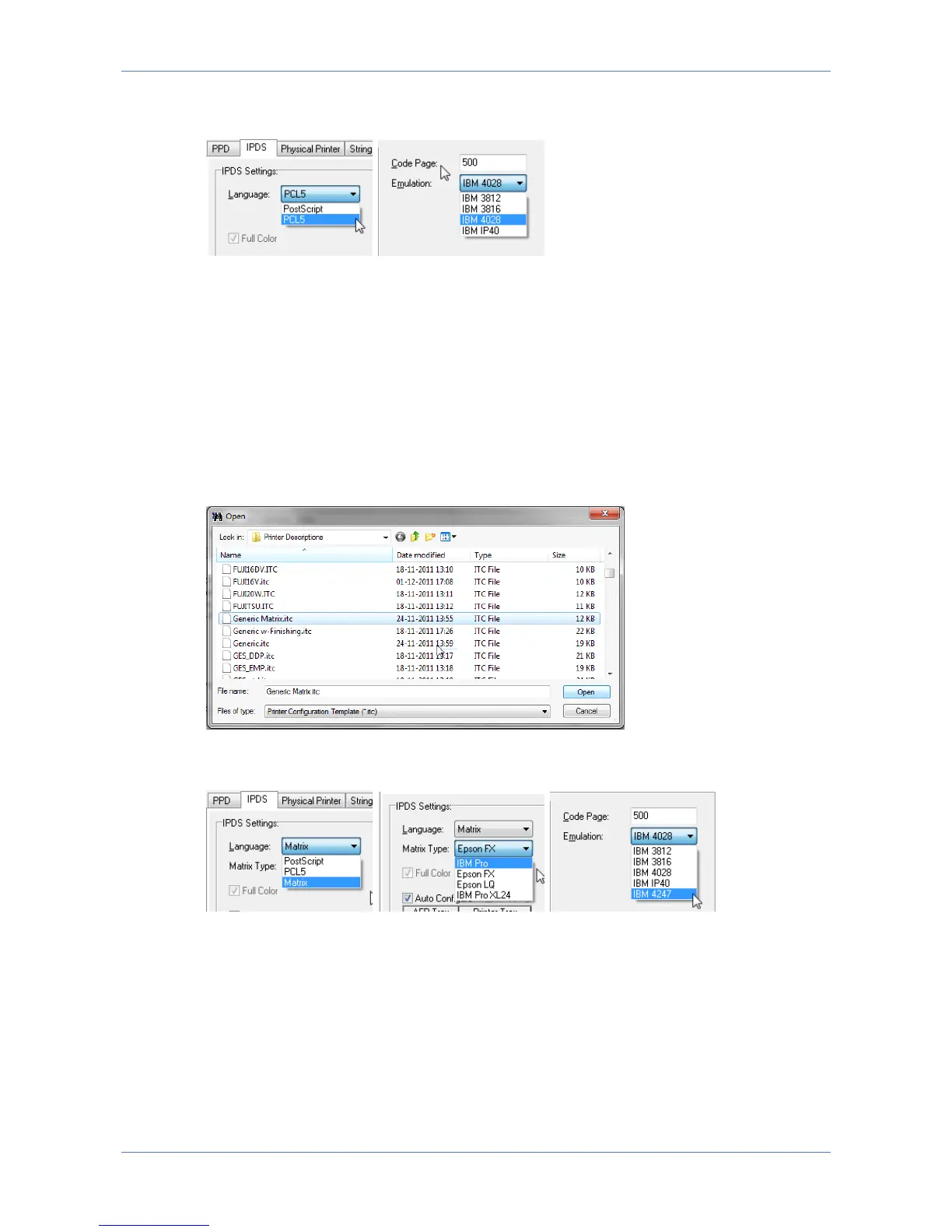
A matrix printer is to be used as output device, but no matrix options are visible for
the LinkCom 5 PrintServer in PrintGuide.
Solution:
Per default LinkCom 5 PrintServer will display PostScript or PCL5 but not Matrix as
possible output transform languages. If Matrix and Epson/IBM Proprinter
emulations are required to be visible and optional in PrintGuide a printer defintion
file for a matrix printer has to be loaded into PrintGuide first.
This is done from the menu “PrintServer”, “Upload Configuration”. Change “Files of
type” to “Printer Configuration Template” and browse to the location of the ITC
files.
Find and select a suitable matrix printer model definition file. It will be applied to
the selected LinkCom 5 PrintServer.
Upon restart of the LinkCom 5 PrintServer, the Matrix options will appear as
optional for the IPDS, DCA and SCS logical printers.
15.4 Not able to see finishing options in PrintGuide
Problem:



 To Next Page