Configuring the job computer
Vario and Select mode - configuring multiple nozzle holders
Vario mode - Automatic nozzle selection
In Vario mode, the system automatically activates one or several of the installed nozzles to achieve
the defined drop size.
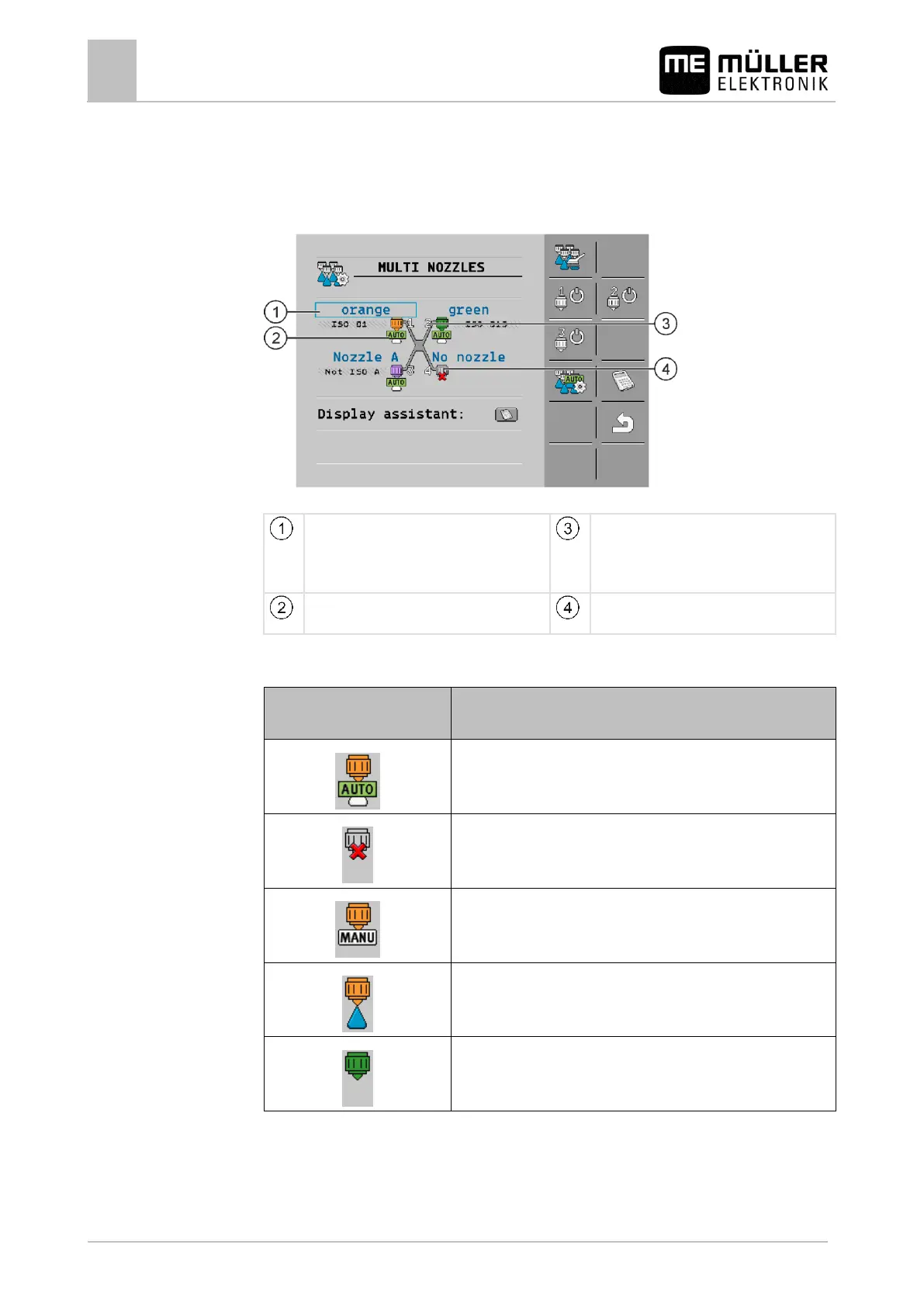
"MULTI NOZZLES" screen in Vario mode
Nozzle designation
Most nozzles in the list are configured. Non-
standard nozzles A, B, C, D can be calibrated.
See: Nozzle assistant [➙ 67]
Position of the nozzles on the nozzle holder.
Make sure that the nozzles are mounted in the
right position on each nozzle holder.
Nozzle status
See the table below
Nozzle carrier without nozzles
Possible nozzle status
Icon for the Multi-nozzles
screen
Nozzle is automatically switched
No nozzle mounted on the nozzle carrier
Nozzle excluded from Vario mode
Vario mode deactivated. This nozzle is activated.
Vario mode deactivated. This nozzle is deactivated.
A group of icons appears on the work screen, showing the status of each individual nozzle on the
nozzle holder.



 To Next Page