VS1 Operations and Maintenance Manual Operating the transmitter
Issue 3.1 2013-10-01 Page 2-115
Email Configuration
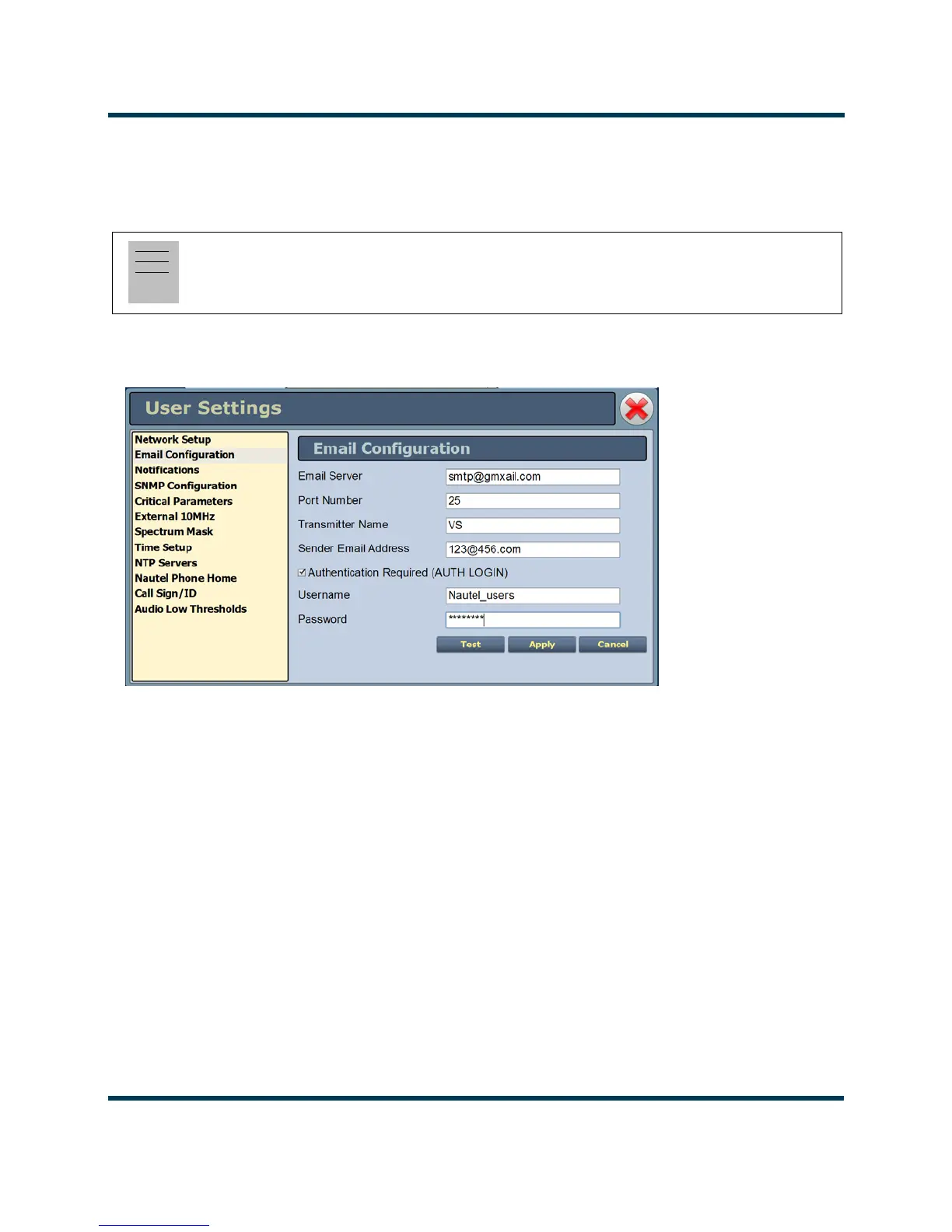
Email configuration (see Figure 2.99) allows you to configure email parameters (e.g., email server and
port number), and is required if the notification feature is used (see Notifications on page 2-116).
Figure 2.99: Email Configuration Page
To configure the email feature, perform the following steps:
1. Enter the four fields, noting the following:
•
Email Server: In order to enter a server name (e.g., mail.nautel.com), at least one
nameserver IP address must be entered (see Network Setup on page 2-111).
•
Port Number: This logical connection end point uses a number to identify the type of
process to which an internet or other network message is to be forwarded to when it
arrives at a server. Typically, this is set to 25 for unencrypted SMTP systems and 843 for
encrypted email.
Note:
Nautel recommends that the following settings be entered/vetted by a qualified Network
Administrator.
All IP addresses
shown are for
reference
purposes only



 To Next Page