NMC-Junior Pro Installation Manual
Page 42
SYSTEM CONFIGURATION PROCEDURE
Note: It is very important to choose the correct flow meter for the application. Choosing a wrong flow meter might
result in measurement errors or an inaccurate control. For instructions regarding how to choose the correct water
meter see NMC-Junior Pro Irrigation > General > Flow meter determination.
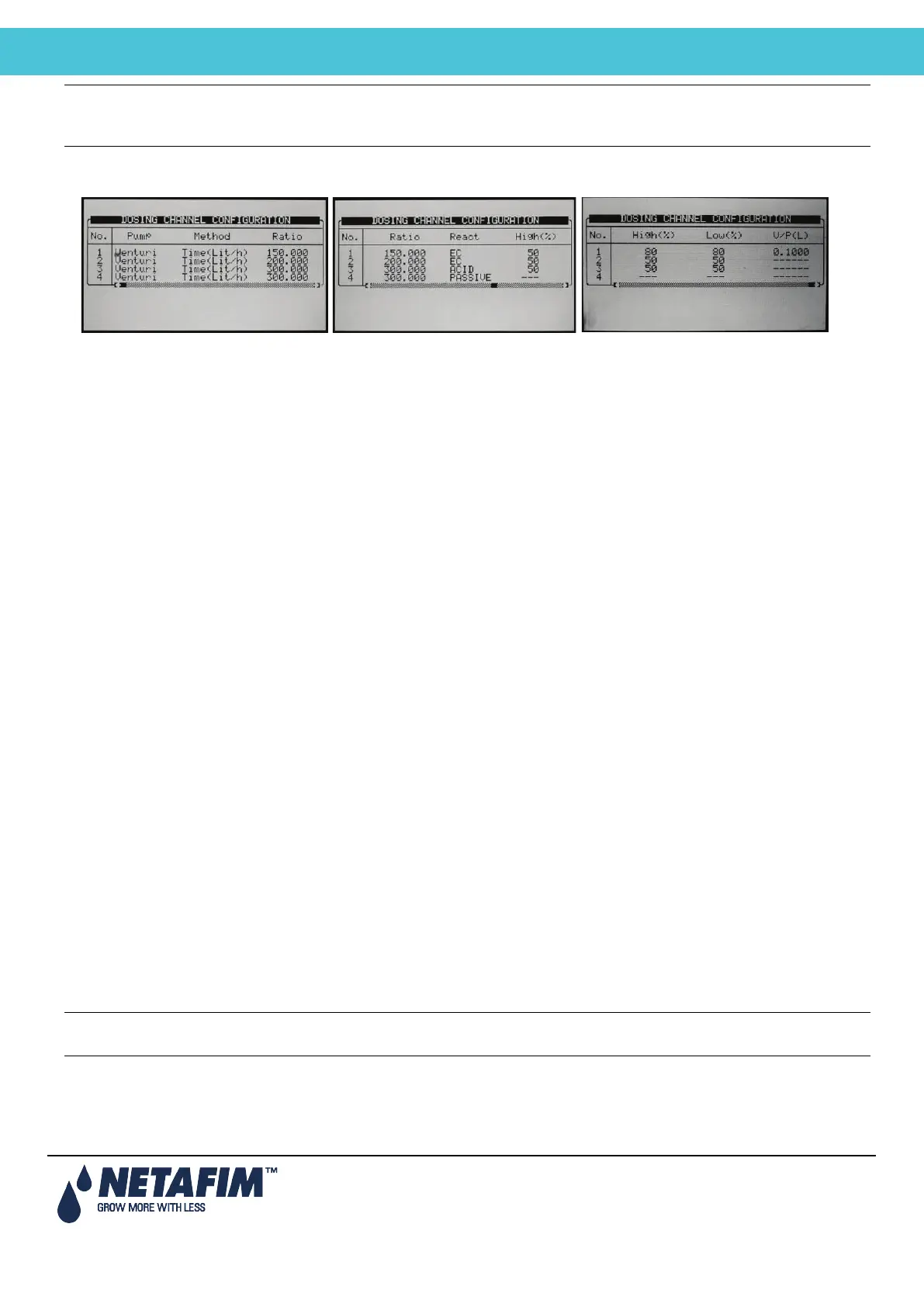
7.6 Dosing Channel Configuration
• Pump: Select the type of dosing pump:
Venturi: The dosing unit consists of Venturi driven injectors. The dosing booster will be turned on when
fertigation is active.
Hydraulic: The dosing unit consists of hydraulic fertilizer pumps. The dosing booster is not needed and
will not be turned on when Fertigation is active. When working with hydraulic pump, the method can
only be Liter/Pulse and EC & pH control is not possible.
Electric: The dosing unit consists of electrical fertilizer pumps. The dosing booster is not needed and
will not be turned on when Fertigation is active.
• Method: Select the operating method:
Liter/Pulse: Define whether a dosing meter is connected to this channel and used for control purposes.
Set the volume per pulse on the Ratio column.
Time (cc/sec): Define whether the calculated flow rate of the dosing channel is in CC (gallons) of
fertilizer per second.
Time (Liter/min): Define whether the calculated flow rate of the dosing channel is in liters (gallons) per
minute.
Time (Liter/Hour): Define whether the calculated flow rate of the dosing channel is in liters (gallons) per
Hour.
• Ratio
Method is Time: Define calculated flow rate, this will be the flow rate of the channel when completely
open.
Method is Liter/Pulse: Define the volume per pulse.
• React: Set the required use of the channel:
EC: The channel is used to increase measured EC, meaning it will be opened more when the measured
EC is lower than the set EC.
pH: The channel is used to decrease measured pH, meaning it will be opened more when the
measured pH is higher than the set pH.
Passive: The channel does not respond to changes in measured EC/pH, meaning it will be opened as
set in the dosing program regardless of the EC/pH values.
Alkali: The channel is used to increase measured pH, meaning it will be opened more when the
measured pH is lower than the set pH.
Note: If EC/pH control is off, or the channel is used for proportional injection only (for example in order to inject
chemicals) set reaction to passive.
• High %: set an injection percentage limit. This percentage will limit the deviation from set dosing recipe when
NMC-Junior Pro is injecting more than specified in order to try and reach the target EC/pH values.
• Low %: set an injection percentage limit. This percentage will limit the deviation from set dosing recipe when
NMC-Junior Pro is injecting less than defined in order to try and reach the target EC/pH values.



 To Next Page