NMC-Junior Pro Installation Manual
Page 68
• On (hh:mm:ss): Define the On time of the Cooling valve. If On time is set to zero the Cooling valve will not be
opened.
• Off (hh:mm:ss): Define the Off time of the Cooling valve. If Off time is set to zero the Cooling valve will be
constantly On.
• Cool #: Assign cooling valves to this program. The assigned cooling valves will be operated sequentially in
groups. The number of groups (different cooling programs) which can be operated simultaneously (maximum
cooling parallel) is defined in screen 6.2 SYSTEM SETUP
.
• Temp. Sens.: Assign Up to two temperature sensors for this program.
• Hum. Sens.: Assign up to two humidity sensor to this program.
If there is a malfunction in one of the temperature sensors, a message will be displayed, and that sensor will be taken
out of the average temperature calculation. If all the temperature sensors are out of order, the controller will operate
according to the first active line. If you would like to operate the program by time only, set as follows:
Set Status to cooling or humidification (not important). Set the Above t°. and Below RH to '0'. Define the required On
and Off times and the program will work accordingly within the set time frame.
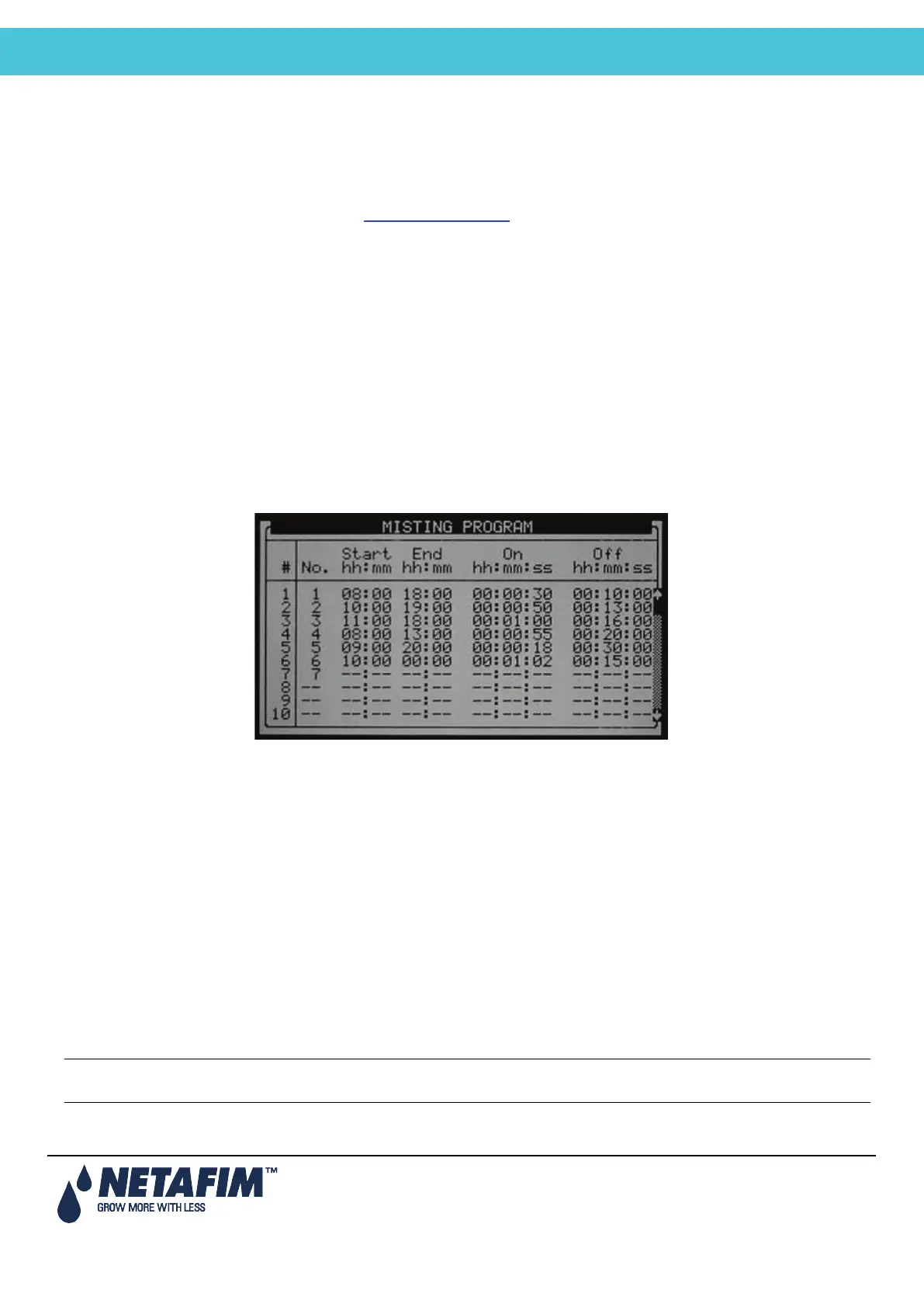
9.10 Misting
The misting program is a time scheduler used to open/close a misting valve or any other device that is operated
sequentially. Up to 40 misting programs can be preset.
Note that there are a few steps that should be defined prior to this screen, see the Misting Configuration Table on
page 45.
• Mist No.: Assign a mist valve to the program. It is possible to associate the same misting valve to several
programs.
• Start (hh:mm): Set the start time of the Misting program. If start time is set to 00:00, it will automatically be
changed to --:--, meaning the program is not operational.
• End (hh:mm): Set the end time of the Misting program. The Misting program will only be operational in the
defined time window (between Start to End times). Each Misting program can be operational on different
hours.
• On: Define the On time of the misting valve. If On time is set to zero the MISTING valve will not be opened.
• Off: Define the Off time of the MISTING valve. If Off time is set to zero the MISTING valve will be constantly
On.
The table is sorted according to mist number as the first priority, and start time as the second priority. The Mist No. will
always appear in groups in an increasing order so that the orientation is quick and easy.
Each mist group has an inside start time sorting, so that a later start is moved to the end of the group. If you delete a
row (by zeroing the Mist .No.) it will be moved to the end of the table and the rest of the rows will move one step up.
Pressing the menu key does this sorting.
Note: When misting is on all related devices (e.g. misting valve, main valve and pump) are operational. When
misting is off, only the pump continues to operate



 To Next Page