30
X-COM2
1st intercom
friend
2nd intercom
friend
3rd~9thintercomfriend
Start intercom
Single tap the
Center Button
Double tap the
Center Button
Triple tap the Center Button
→
Tap the (+) Button or the
(-) Button to select friend
→
Single tap the Center Button
End intercom
Single tap the
Center Button
Double tap the
Center Button
Triple tap the Center Button
→
Tap the (+) Button or the
(-) Button to select friend
→
Single tap the Center Button
End any intercom Press the Center Button for 1 second
Start & End Two-way Intercom
14.2 Multi-way Intercom
14.2.1 Start Three-way Intercom
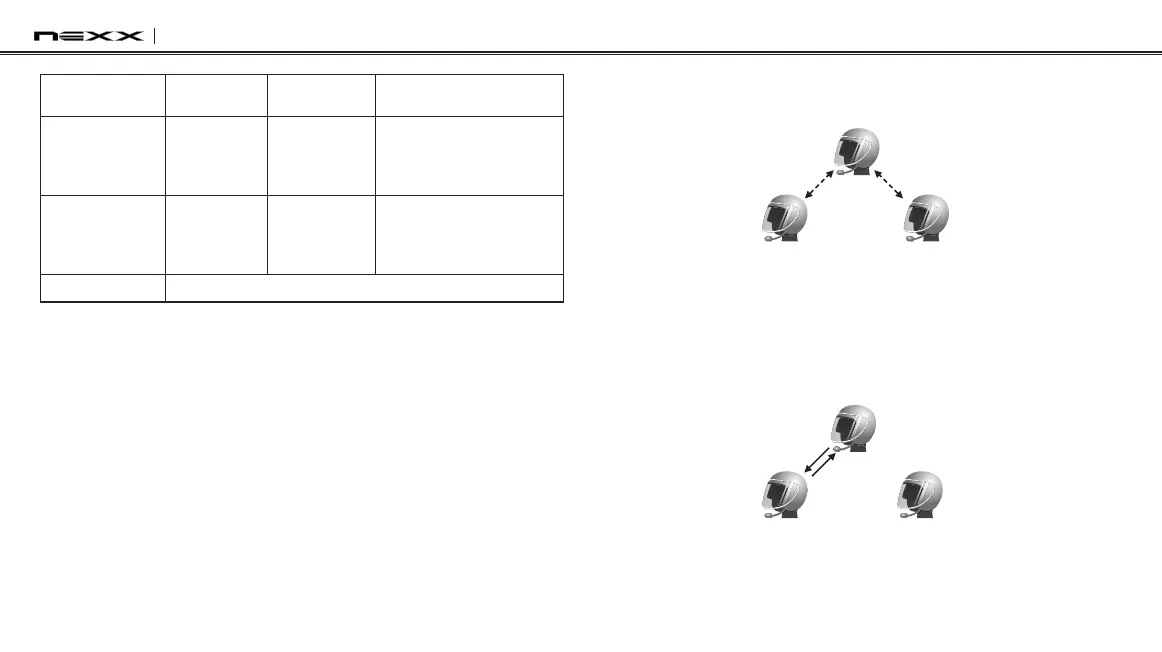
You (A) can have a three-way intercom with two other X-COM2 friends
(B & C) by establishing two intercom connections at the same time.
1. You (A) need to be paired with two other friends (B & C) for three-
way intercom.
(A)
(B)
First Friend Second Friend
(C)
Pairing
Pairing
2. Start an intercom conversation with one of the two friends in
your intercom group. For example, you (A) may start an intercom
conversation with the intercom friend (B). Or intercom friend (B)
may start an intercom call with you (A).
(A)
(B)
First Friend Second Friend
(C)



 To Next Page