16
X-COM2
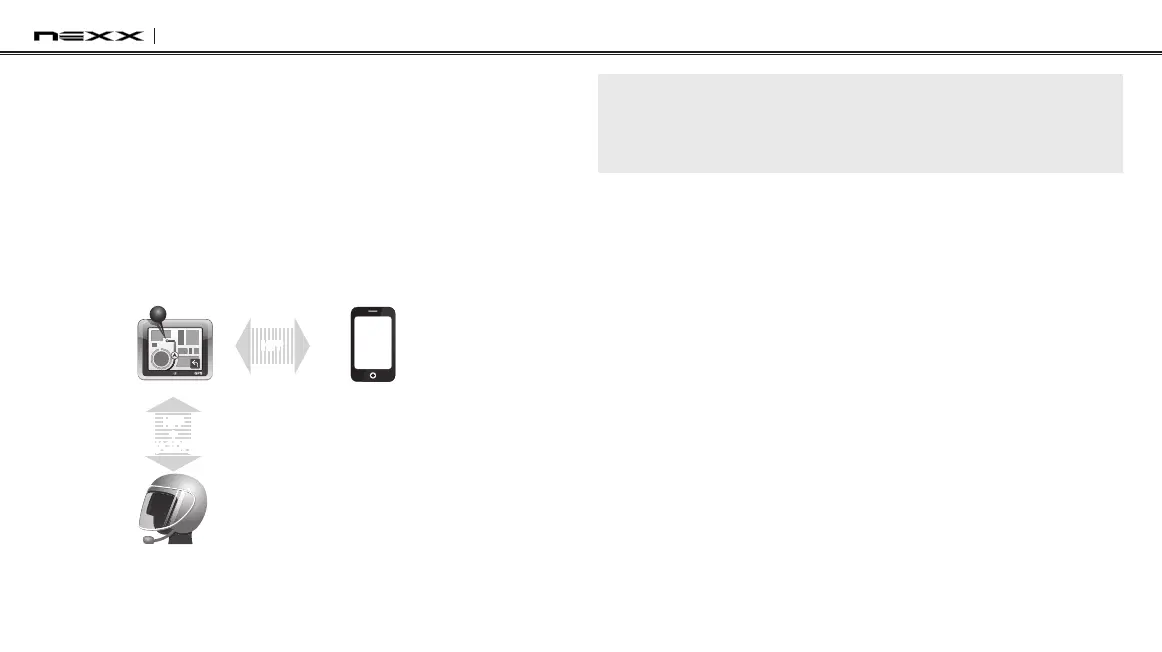
5.4.2 GPS Pairing as Mobile Phone
If a GPS is not only used for turn-by-turn voice instructions but also is
your preferred Bluetooth stereo music source, you can pair the GPS to
the X-COM2 by following the simple procedures in
section 5.1, “Mobile
Phone Pairing”
. However, since some GPS systems support mobile
phone bridging over Bluetooth, you can pair the mobile phone to the
GPS to use your mobile phone. When you do this, the X-COM2 thinks
the GPS is a mobile phone so you can no longer pair your mobile
phone to the X-COM2 directly. Please refer to the user’s guide of your
GPS for details.
Mobile Phone
X-COM2
GPS
HFP
+
(A2DP)
Mobile Phone
Pairing
HFP
GPS Pairing as Mobile Phone
Note:
You have to use a motorcycle specific GPS which transmits turn-by-turn
voice instruction to the headset by Bluetooth. Most automotive GPS systems
don’t have this feature.
5.5 Pairing with the Sena SR10, Bluetooth Two-way
Radio Adapter
The Sena SR10 is a Bluetooth two-way radio adapter for group
communication,anduses HFP as do mostmotorcyclespecic GPS
navigation systems. If you pair the X-COM2 with an SR10 by second
mobile phone pairing, the X-COM2 is able to have two HFP devices at
the same time: a mobile phone and the Sena SR10.
1. Turn on the headset and press the Center Button for 12 seconds
until you hear high-toned double beeps. You will hear a voice
prompt saying “Conguration menu”.
2. Within 2 seconds, double tap the (+) Button, then the LED turns to
blueashingandthebeepsturntohigh-toneddoublebeeps.You
will hear a voice prompt saying “Second mobile phone pairing”.
3. Turn on the SR10 and follow the SR10’s “Bluetooth Headset
Pairing” procedure to complete the process. Please refer to the
SR10 User's Guide for details.


 To Next Page