38
X-COM2
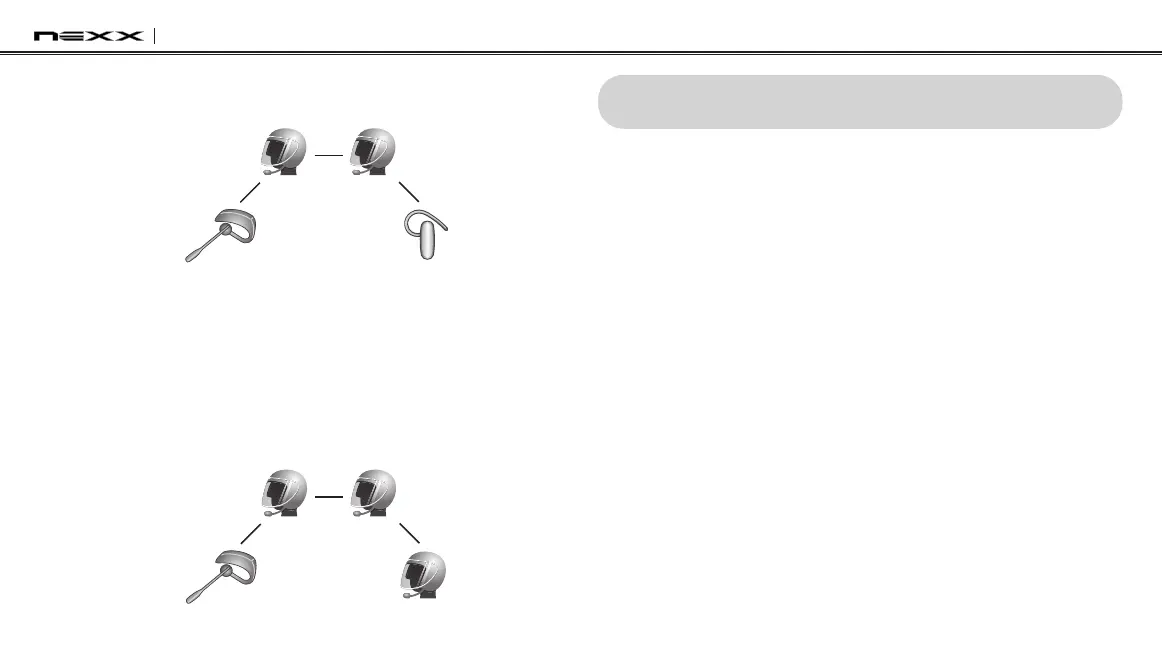
4. Now two X-COM2 headsets (A & C) and two non-Sena Bluetooth
headsets (B & D) are connected with the four-way Universal Intercom.
(B)
(D)
(A)
(C)
You may disconnect a four-way Universal Intercom using the same
way as you do in a normal four-way intercom. Please refer to
section
14.2.4, “End Multi-way Intercom”
.
17.4.2 Four-way Universal Intercom Case 2
Three X-COM2 headsets (A, C and D) and one non-Sena Bluetooth headset
(B). The procedure is the same as case 1 described in
section 17.4.1
.
(B)
(D)
(A)
(C)
18 ADDITIONAL INTERCOM SETTINGS
18.1 Audio Multitasking™ (Default: Enable)
You can enable or disable Audio Multitasking through the Device
Manager or the Smartphone App. Audio Multitasking allows you to
have an intercom conversation while simultaneously listening to music,
FM radio, or GPS instructions. The overlaid audio is played in the
background with reduced volume whenever there is an intercom
conversation and will return to normal volume once the conversation is
nished.Ifthisfeatureisdisabled,anyincomingoroutgoingintercom
will interrupt your audio channel.
18.2 Intercom-Audio Overlay Sensitivity (Default: 6)
You can adjust Intercom-audio overlay sensitivity through the Device
Manager or the Smartphone App. The music, FM radio and GPS
volume will be lowered to play in the background if you talk over the
intercom while the overlaid audio is playing. You can adjust the
intercom sensitivity to activate this background audio mode. Level 1
has the lowest sensitivity and level 10 has the highest sensitivity.


 To Next Page