4.8 Sweep Setting and Manipulation
97
WF1973/WF1974
4.8.5 Setting phase sweep
For the manipulation methods that are common with the sweep setting screen, refer to
pp. 83 and 86.
a) Phase sweep example
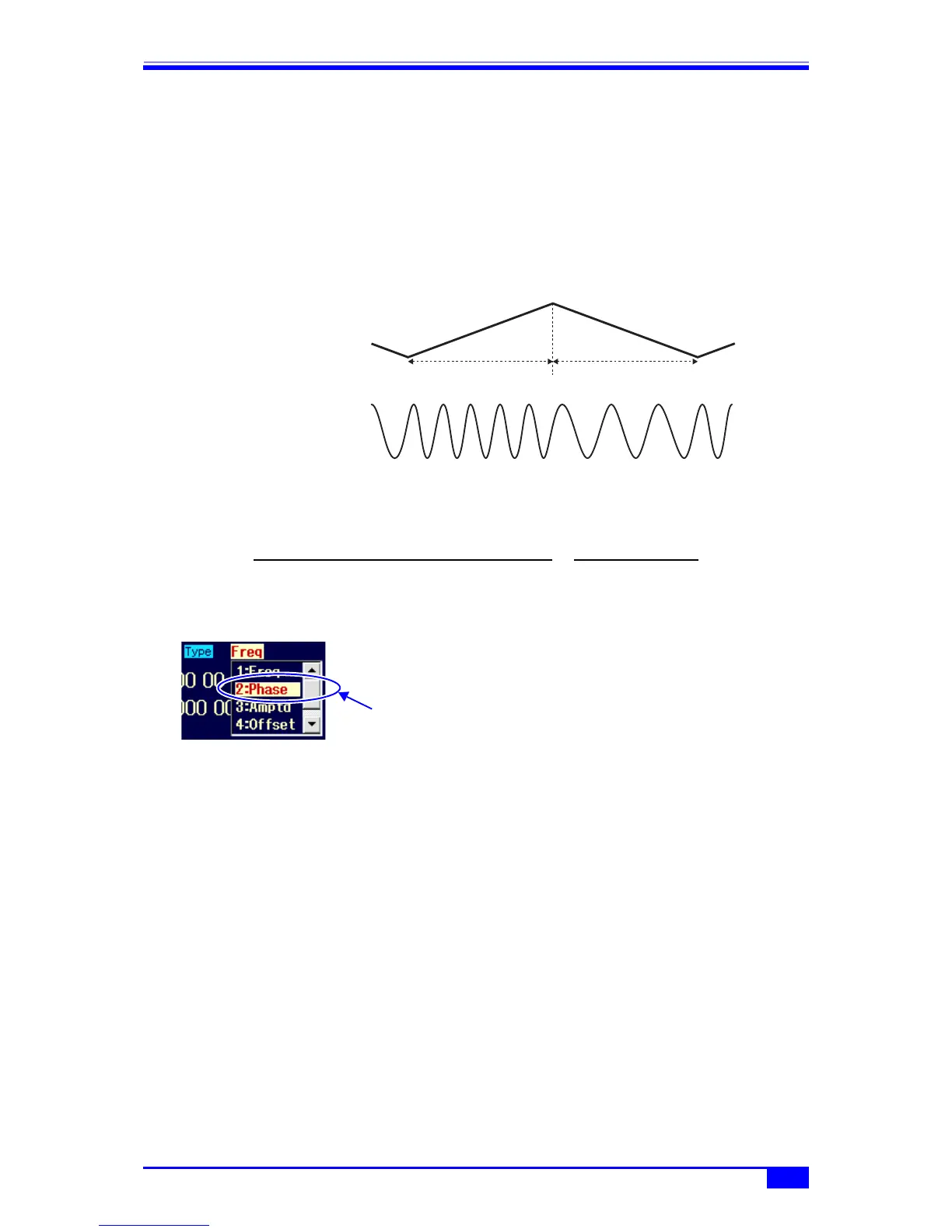
The following is an example of continuous, linear shuttle sweep.
Shuttle sweep
As the phase increases, the frequency rises by the value below, and as the phase decreases,
the frequency drops by the value below.
b) Selecting phase sweep
When [Mode] (oscillation mode) is set to
[Sweep] (sweep), set [Type] (sweep type)
on the 2nd page of the setting screen to
[Phase] (phase).
c) Waveforms for which phase sweep is not possible
Phase sweep is not possible for noise and DC.
d) Setting items required for phase sweep
Set the following items on the 2nd page of the setting screen. The phase settings on the 1st
page of the setting screen are disabled.
• Start phase [Start]
• Stop phase [Stop]
•Sweep time [Time]
This is the transition time from the start phase to the stop phase. ) p. 87
• Sweep mode [SwpMode]
Continuous, single-shot, and gated single-shot can be chosen from. ) p. 87
Sweep time Sweep time
Sweep value
Output signal
Start value
Stop value
| Stop phase (deg) - Start phase (deg) |
1
Sweep time (s)360
×
Select [Phase] in
[Type] and then
press the ENTER
key.



 To Next Page