4.3 Basic Settings and Operations
39
WF1973/WF1974
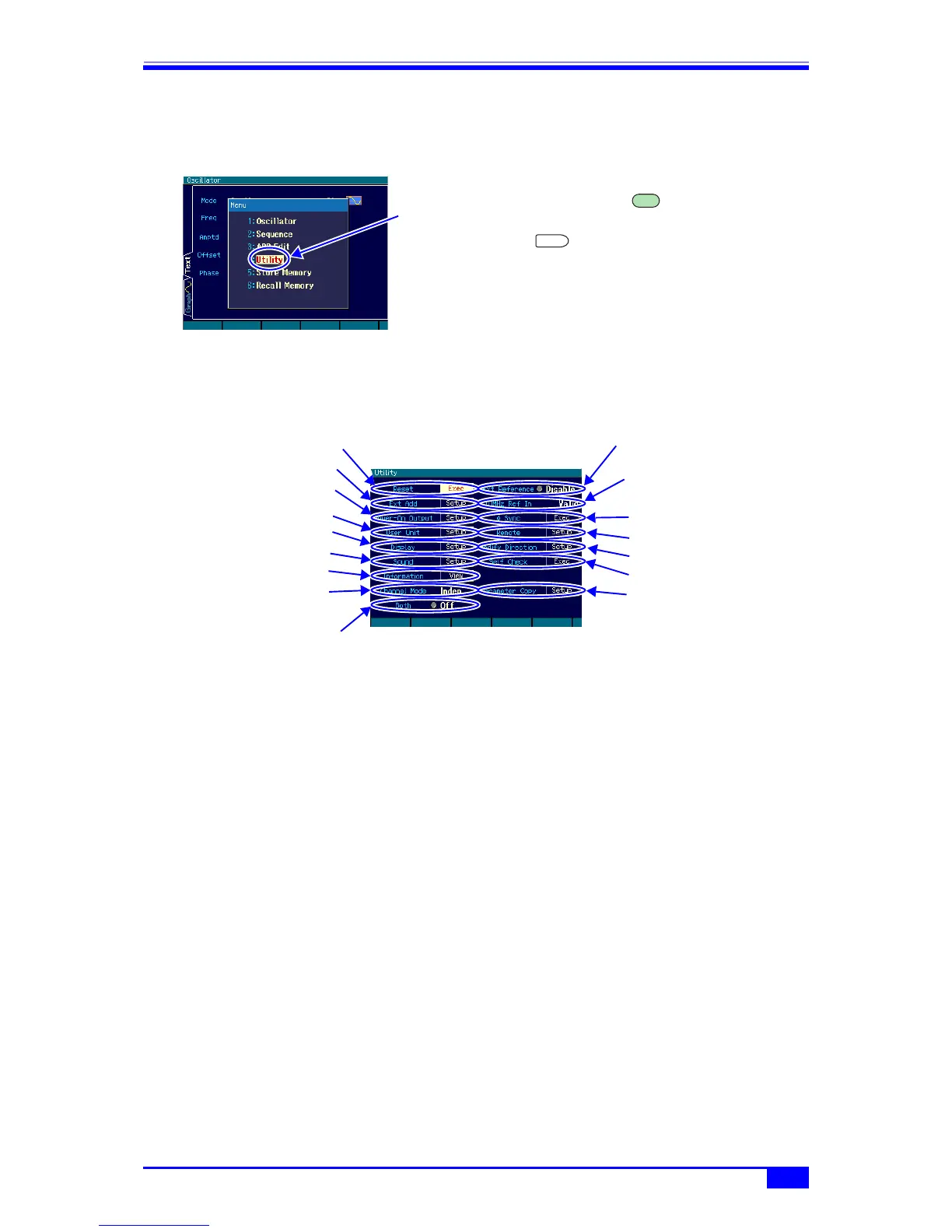
4.3.7 Actions possible in the Utility screen
a) Displaying the Utility screen
The top menu window is displayed by
pressing the MENU key. In this
window, select [Utility] and then press the
ENTER key to display the Utility
screen.
b) Utility screen configuration
Setting initialization [Reset]
Initializes the settings. The initial settings are continuous oscillation, sine wave, 1 kHz, 0.1
Vp-p/open, and output off. ) p. 41
External 10 MHz frequency reference enable/disable [Ext Reference]
Enables/disables the external 10 MHz frequency reference. ) “5. USING EXTERNAL
FREQUENCY REFERENCE” in the Application Instruction Manual
External addition setting [Ext Add]
Sets external addition gain. The setting can be selected from off, ×2, and ×10. ) p. 57
External 10 MHz frequency reference input status display [10MHz Ref In]
Displays whether a valid signal for external 10 MHz frequency reference input is available.
) “5. USING EXTERNAL FREQUENCY REFERENCE” in the Application Instruction
Manual
Power-on output setting [Power-On Output]
Sets the output on/off setting at power-on. ) p. 41
Phase synchronization[φ Sync]
Performs inter-unit synchronization during multiple unit synchronization connection and
inter-channel synchronization of the WF1974.
) “3.3 Phase Synchronization Between Channels” and “4. SYNCHRONIZING MULTIPLE
UNITS” in the Application Instruction Manual.
User-defined unit setting [User Unit]
Sets user-defined units. ) “7. USING USER-DEFINED UNITS” in the Application
Instruction Manual.
Select [Utility] in
the top menu and
press the ENTER
key
MENU
ENTER
Setting initialization
External addition setting
User-defined unit setting
Display setting
Operation sound setting
Internal information display
Channel mode setting
(WF1974 only)
2-channel same value setting On/Off
(WF1974 only)
External 10 MHz frequency
reference enable/disable
Phase synchronization
Remote setting
Self check
External 10 MHz frequency
reference input status display
Inter-channel
parameter copy
(WF1974 only)
Power-on output setting
Modify direction setting



 To Next Page