4.4 Setting Methods for Main Items
57
WF1973/WF1974
4.4.13 Adding external signal
An external signal can be added to the waveform output of this equipment.
a) Connecting the addition signal
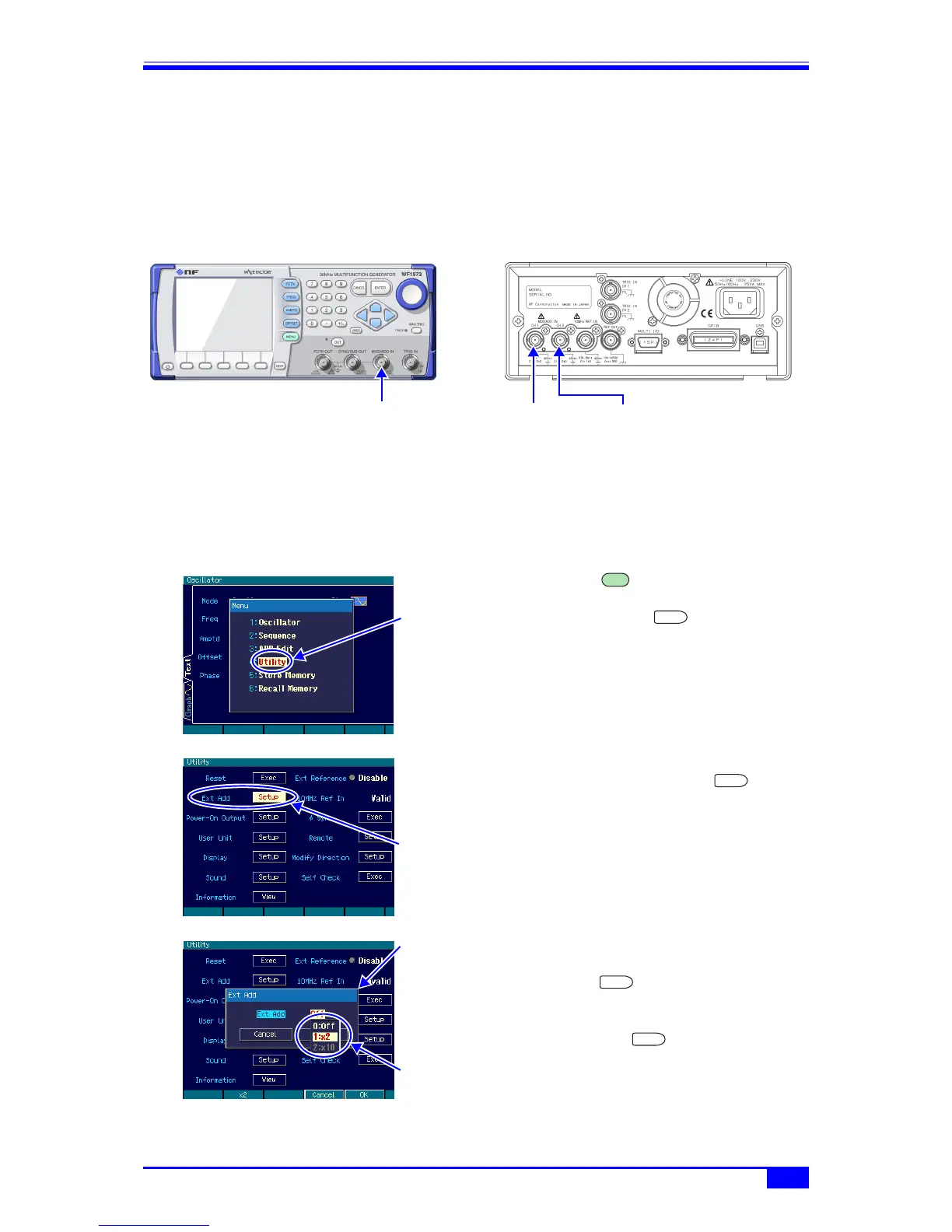
Connect the addition signal to the external modulation/addition input (MOD/ADD IN) BNC
terminal on the front panel and the rear panel in the WF1973 and WF1974, respectively.
For the input characteristics, ) p. 14.
This BNC terminal is insulated from the housing and has the same ground potential as the
waveform output of the same channel. For the floating ground connection, ) p. 19.
b) Enabling the addition signal
The external addition setting is done on the Utility screen.
1. Press the MENU key to open the top
menu window. There, select [Utility] and
then press the ENTER key to
display the Utility screen.
2. On the Utility screen, select the [Ext Add]
field and then press the ENTER
key.
3. The external addition setting window
opens, so select the desired item and then
press the ENTER key.
The external addition condition choice list
opens, so select the desired condition and
then press the ENTER key. [×2] and
[x10] represent the addition gain.
CH1
addition signal
Addition signal CH2
addition signal
WF1974WF1973
Select [Utility] in
the top menu and
then press the
ENTER key
MENU
ENTER
Select [Ext Add]
on the Utility
screen and then
press the ENTER
key
ENTER
The external
addition setting
window opens
Set the external
addition condition
ENTER
ENTER



 To Next Page