4.3 Basic Settings and Operations
33
WF1973/WF1974
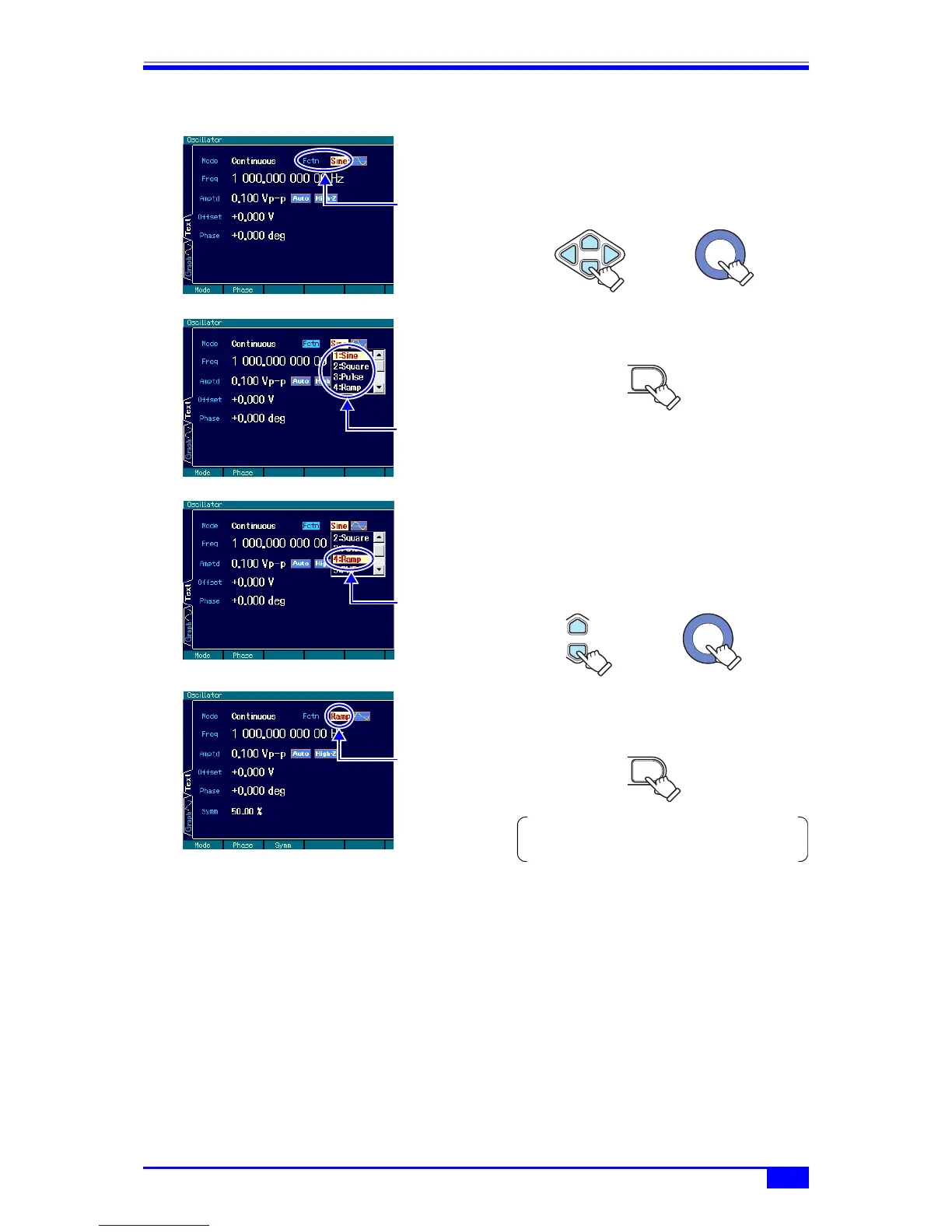
4.3.2 Changing the waveform and oscillation mode
1. Select the desired item with the arrow
keys or the modify knob.
In the example on the left, the [Fctn]
(waveform) field is selected.
2. Press the ENTER key to open the list of
choices.
3. Scroll the choice list with the up/down
arrow keys or the modify knob.
In this state, the desired item can also be
selected by inputting a number from the
numeric keypad.
4. Press the ENTER key to set the selected
item and reflect it to the output. The list of
choices closes.
The waveform is
selected.
The current
waveform is
displayed.
Item selection
or
The choice list
opens.
ENTER
“Ramp” is
selected.
Item selection
or
The setting is
changed and the
choice list closes.
ENTER
If the CANCEL key is pressed instead of the ENTER
key, the setting remains unchanged and the status
of step 1 is returned to.



 To Next Page