4.4 Setting Methods for Main Items
55
WF1973/WF1974
4.4.12 Setting the load impedance
When the load impedance setting value is made the same as the actual load condition, the
amplitude and DC offset (including setting with high level, low level) can be set with the
voltage value that appears at load end.
The load impedance value can be set in the range of 1 Ω to 10 kΩ, 50 Ω, or open (High-Z).
However, even if the load impedance setting value is changed, only the displayed amplitude
setting value and DC offset setting value change, and the load-open output voltage remains
unchanged.
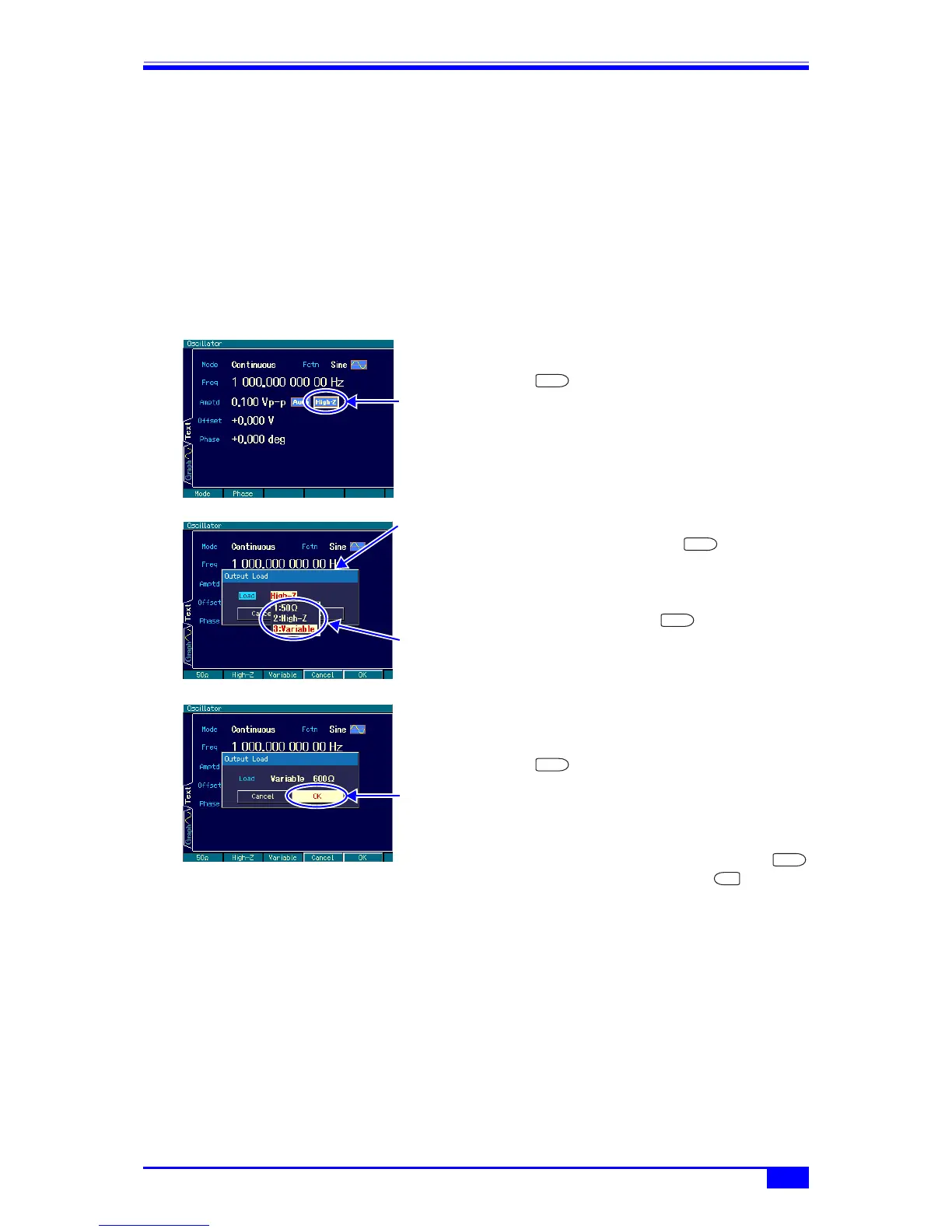
a) Setting method
1. Select the load impedance icon on the
right of the range icon and then press the
ENTER key.
2. The load impedance setting window
opens, so press the ENTER key
again.
The load impedance condition choice list
opens. Select the desired load impedance
and then press the ENTER key.
When [Variable] is selected, the load
impedance value can be set.
3. Once the load impedance setting has
been completed, select [OK] in the lower
part of the window and then press the
ENTER key to apply the load
impedance setting change and close the
window.
To not change the load impedance
setting, select [Cancel] in the lower part of
the window and then press the
ENTER key, or press the CANCEL
key.
b) Conversion formula
Conversion is done with the following formula.
Load impedance setting value: R
load
(Ω)
Load-open output voltage: V
open
Output voltage setting value (load-end voltage): V
load
Select the load
impedance icon
and then press
the ENTER key
ENTER



 To Next Page