114
4. BASIC OPERATION
MULTIFUNCTION GENERATOR
c) Gate oscillation setting screen
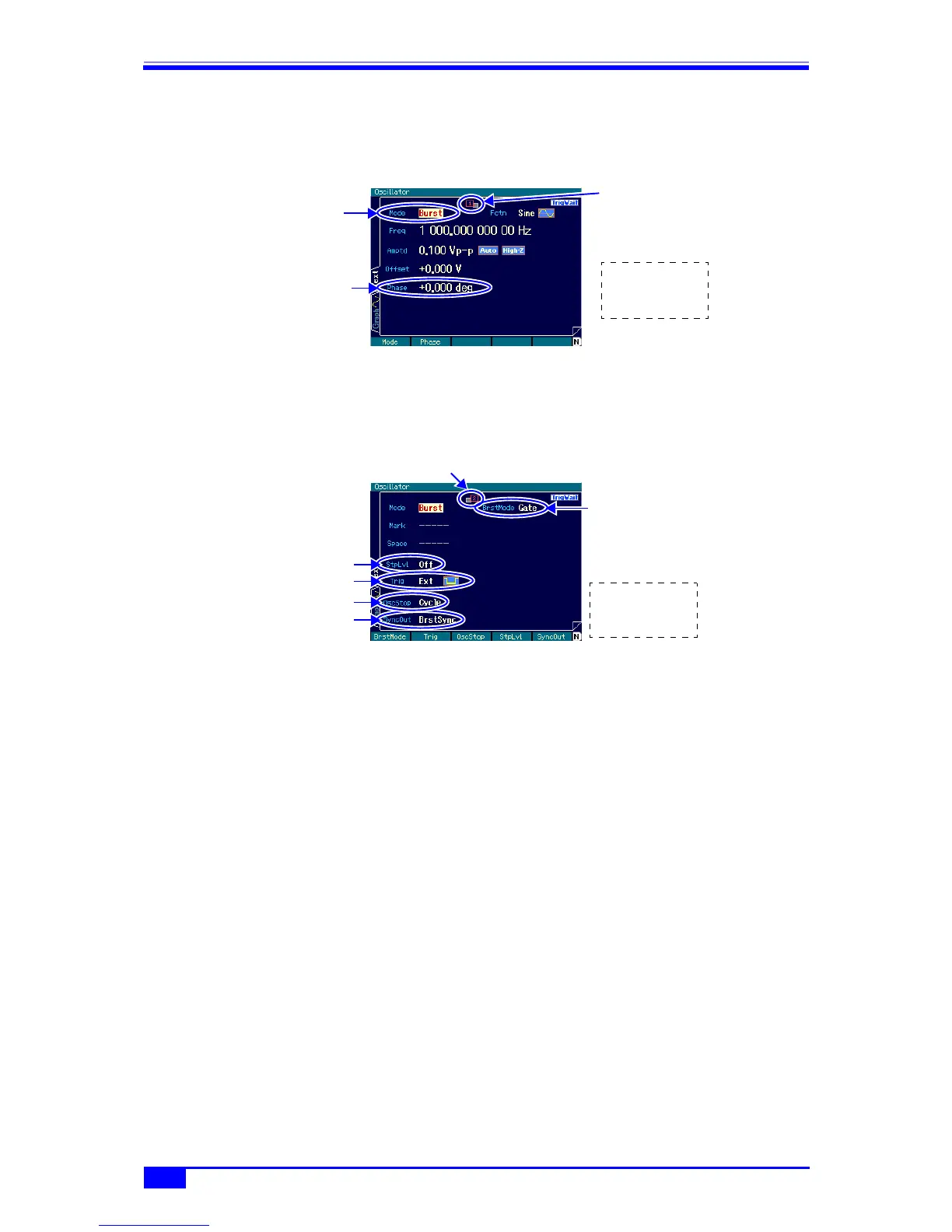
■ 1st page: Screen for the basic parameters
These are the common setting items that are common to all the oscillation modes.
Oscillation start/stop phase [Phase]
This is the phase at which oscillation starts and stops.
■ 2nd page: Screen for the gate oscillation settings
Stop level [StpLvl]
This is the signal level during oscillation stop. The level can be set to either off or on.
Normally, it is set to off. ) p. 116
Trigger [Trig]
This is the trigger condition (gate condition). Internal and external can be chosen as the
trigger source. ) p. 115
Oscillation stop unit [OscStop]
This is the oscillation stop unit. One cycle and 0.5 cycles can be chosen from. Normally,
1 cycle is set. ) p. 116
Sync output [SyncOut]
This is the output signal from the sync/sub-output terminal. Waveform reference phase
synchronization and burst synchronization can be chosen from. ) p. 115
d) Waveforms for which auto burst is not possible
Gate oscillation is not possible for DC.
Gate oscillation can be done for noise, but the operation differs from that of other
waveforms. ) p. 117
e) Setting items required for gate oscillation
On the 1st page of the setting screen, set [Phase] (oscillation start/stop phase).
Normally, set [StepLvl] (stop level) on the 2nd page of the setting screen to [Off]. ) p. 116
Set [OscStop] (oscillation stop unit) on the 2nd page of the setting screen to [Cycle] (1 cycle)
Set the oscillation
mode to [Burst]
Press the NEXT
key to display
the 2nd page
Oscillation start/stop
phase setting
Indicates that the 1st page
is displayed
Press the NEXT
key to display
the 1st page
Stop level
Indicates that the 2nd
page is displayed
Set burst mode to
[Gate].
Sync output
Sync output Oscillation stop unit
Trigger



 To Next Page