4.3 Basic Settings and Operations
37
WF1973/WF1974
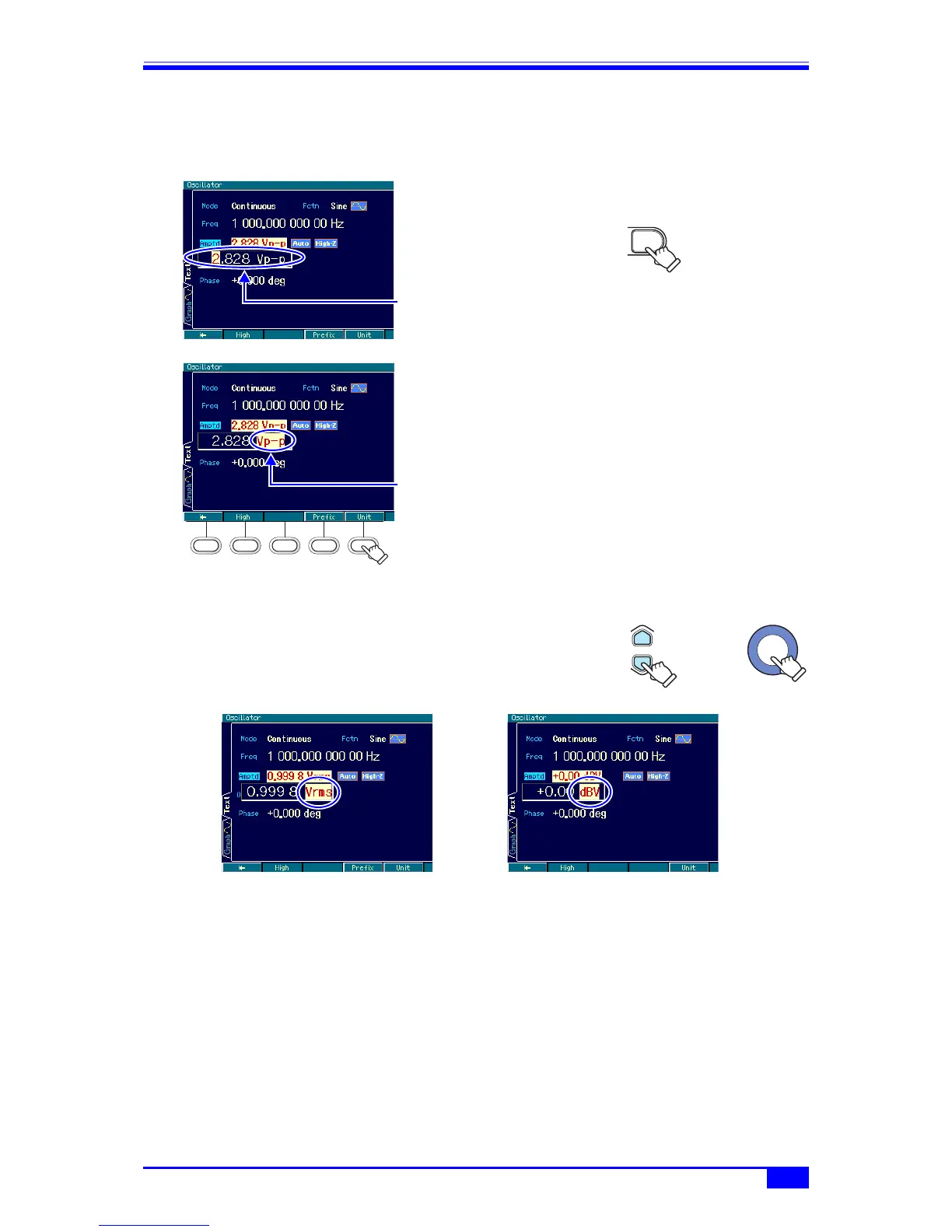
b) Changing Vp-p, Vrms, user-defined unit, etc.
Amplitude is used as an example below. The frequency and pulse width can be changed in a
similar manner.
1. Select amplitude and then press the
ENTER key to open the input field.
2. Press the [Unit] soft key and the cursor will
move to “Vp-p”.
The right arrow key can also be used to
move the cursor to “Vp-p”.
3. The unit can be changed to Vrms, dBV, or a user-
defined unit with the up/down arrow keys or the modify
knob (in the case of sine wave, load impedance High-
Z). Even when the display unit is changed, the output
value remains unchanged.
Also refer to the following sections:
• Changing the frequency and period settings ) p. 45.
• Changing the amplitude unit (Vp-p, Vpk, Vrms, dBm, dBV) ) p. 48.
• Changing the pulse width time and duty settings ) p. 61.
• Setting the user-defined unit ) “7. USING USER-DEFINED UNITS” in the Application
Instruction Manual
The input field
opens.
ENTER
The cursor
moves to “Vp-p”
when [Unit] is
pressed.
Unit change
or
Vrms display dBV display



 To Next Page