▪ Auto – The D300(S) decides through its capless lens or
uncovered eyepiece how much ambient light there is and
changes the color and contrast of the Information display
(Shooting info display) screen accordingly.
▪ Manual – This manual setting allows you to select the
light or dark versions of the Information display
(Shooting info display) screen manually. The two
screens are B-dark on light (normal bright screen) and
W-light on dark (for darker areas).
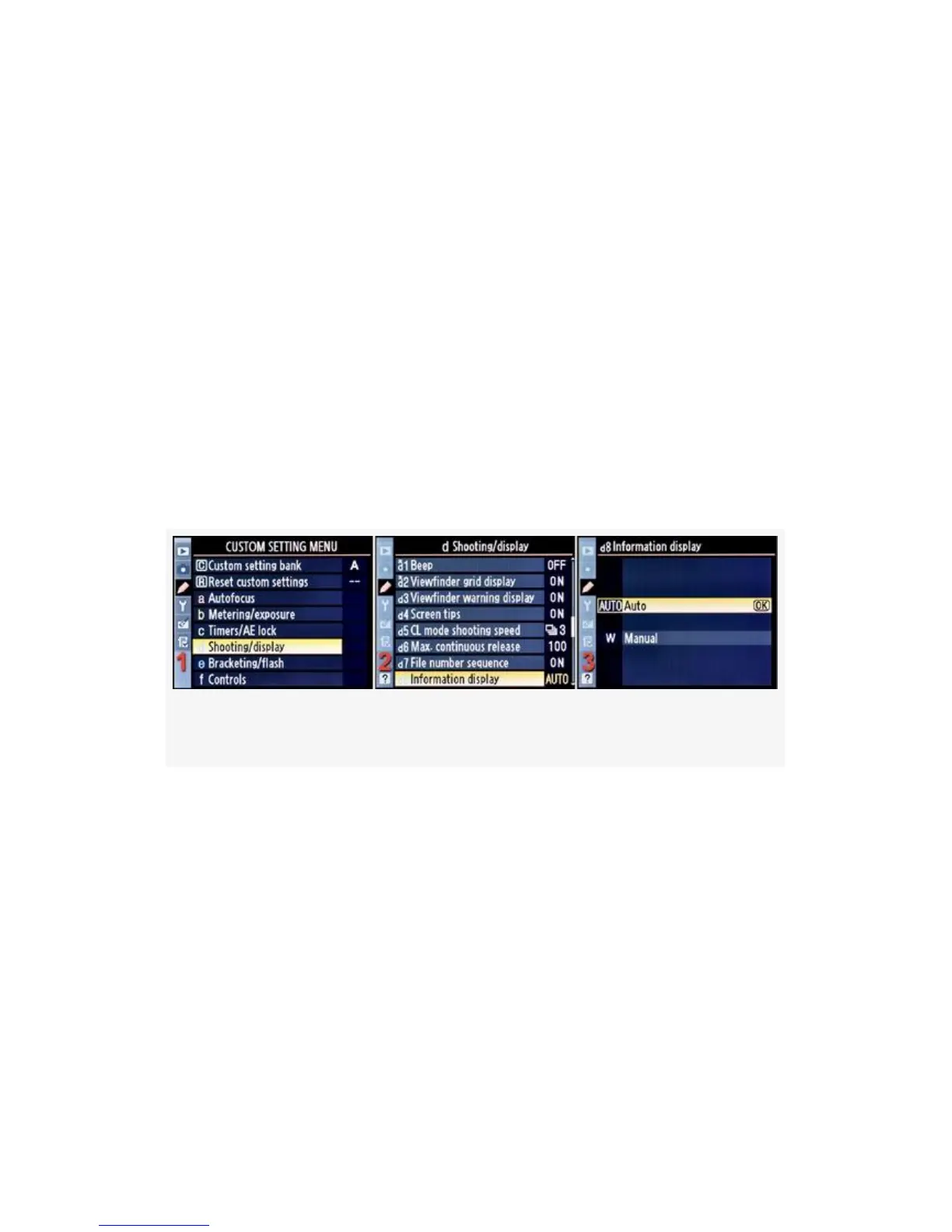
Here are the screens and steps used to configure the
Information display (Shooting info display) screen (see
Figure 4-41):
Figure 4-41. Information or Shooting info display
1. Select d Shooting/display from the Custom Setting Menu
and scroll to the right (see Figure 4-41, image 1).
2. Highlight Information display (D300S) or Shooting info
display (D300) and scroll to the right (see Figure 4-41,
image 2). I’ve shown the D300S screens. The only
difference is in the text of the highlighted name.
3. Choose one of the two choices on the list. In
Figure 4-41, image 3, Auto has been selected.
4. Press the OK button to lock in the setting.
335



 To Next Page