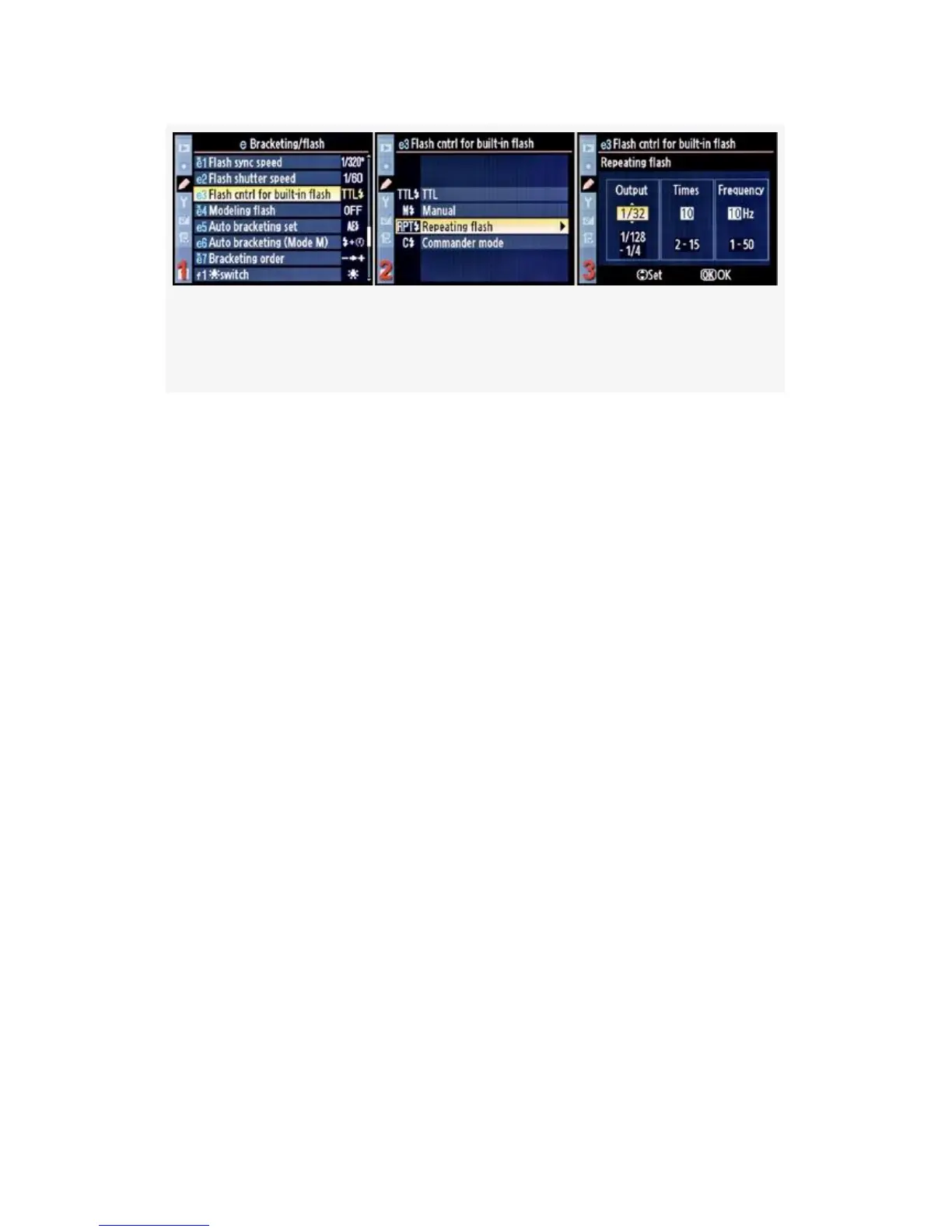
Figure 4-52. Flash cntrl for built-in flash – Repeating flash
mode
RPT – Repeating flash (see Figure 4-52) – This setting turns
your flash into a strobe unit that you can see pulsing (unlike
Auto FP high-speed sync mode), allowing you to get creative
with stroboscopic multiple flashes. Using the screen shown in
Figure 4-52, image 3, you’ll use the Multi Selector to scroll
up and down to set the values or scroll left and right to move
between Output, Times, and Frequency. Press the OK button
when you have it configured. There are three settings as
shown in Figure 4-52, image 3:
▪ Output – You can vary the power of the flash from 1/4 to
1/128 of full power. The more power the flash uses, the
fewer times it can fire. Here is a table of how many
times the built-in pop-up flash can fire using the various
Output levels:
• 1/4: 2 times
• 1/8: 2–5 times
• 1/16: 2–10 times
• 1/32: 2–10 or 15 times
• 1/64: 2–10, 15, 20, or 25 times
355



 To Next Page