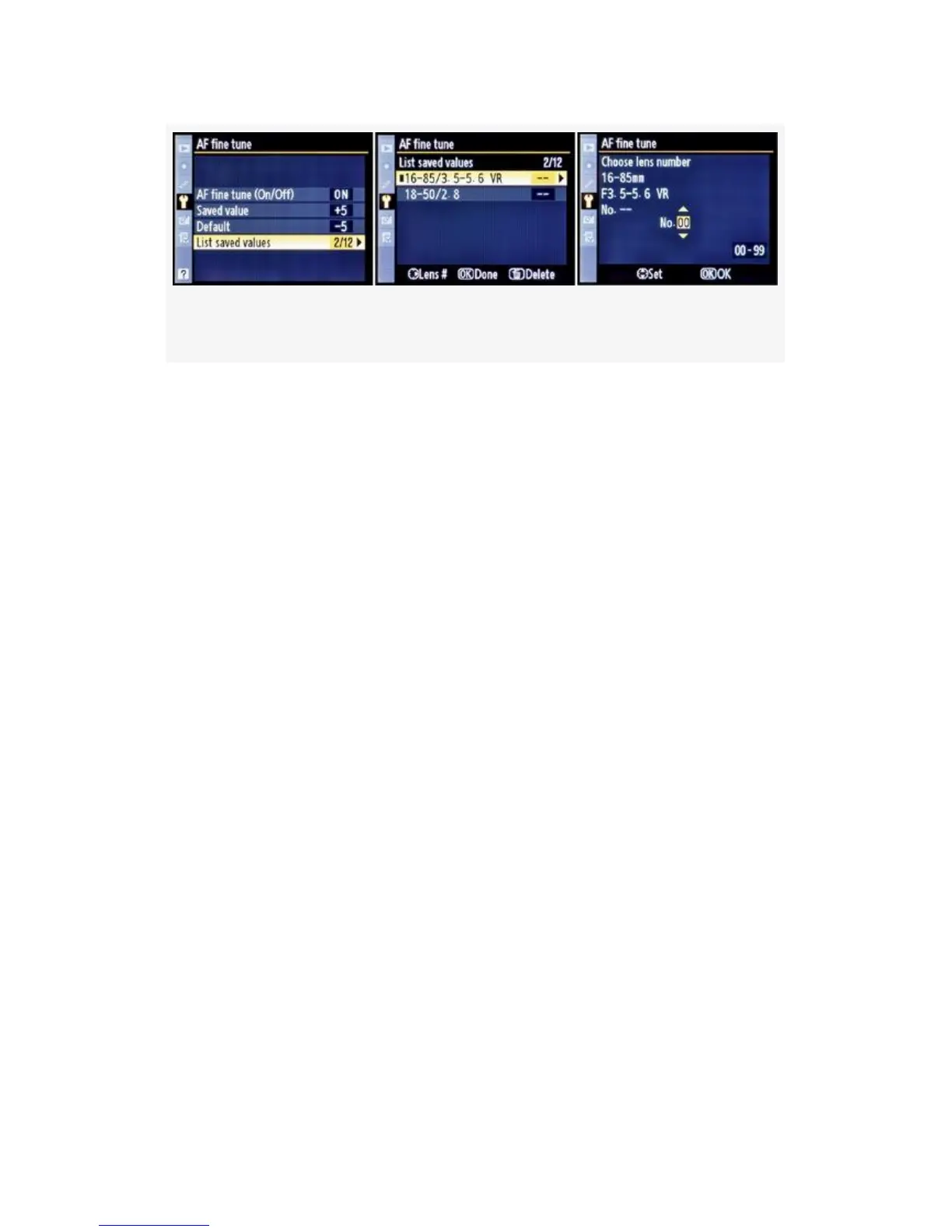
Figure 5-43. List saved values configuration screens
List saved values – Notice in Figure 5-43 that there are
several screens used to configure the list of saved values. List
saved values helps you remember which lenses you’ve
fine-tuned the D300(S) to use. It also allows you to set an
identification number for a particular lens.
Many people use the last two digits of the lens’s serial
number as the List saved values number for that lens. Or, you
can just select a sequential number from 1-12.
In the second screen of Figure 5-43, you’ll see a list of lenses.
If you’ll notice in the third screen, there is a little box in the
middle after “No”. This little box is a scroll box that allows
you to use your camera’s Multi Selector to scroll up or down
from 00 to 99. That way, you can set whatever number you
want to use for each particular lens.
My Recommendation: AF fine tune is good to have! If I
buy a new lens and it has focus problems, I don’t keep it.
Back it goes to the manufacturer for a replacement. However,
if I buy a used lens, or have had one long enough to go out of
warranty—and it later develops front or back focus—the
camera allows me to fine-tune the autofocus for that lens. A
professional camera has these little necessities to keep you
out of trouble when shooting commercially.
517



 To Next Page