Preparations
Preparations
24 25
Turning the power on and o
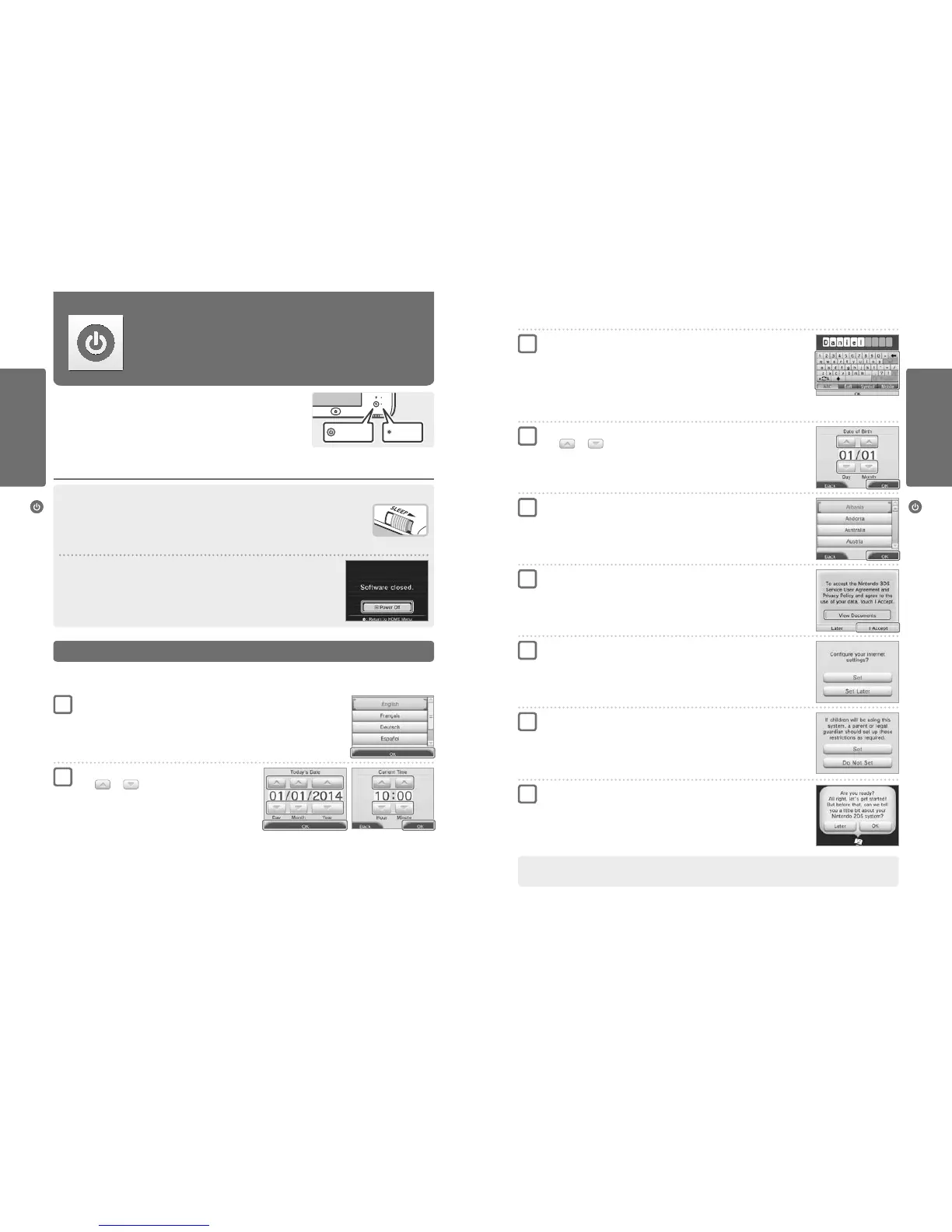
Enter your date of birth
Touch and to enter your date of birth.
Select your country of residence, then your region
Touch OK to conrm.
Accept the Nintendo 3DS Service User Agreement
and Privacy Policy
After reading the information, touch I ACCEPT. If you would rather accept these terms later,
touch LATER.
Congure your internet settings (page 56)
Connecting to the internet allows various types of data to be exchanged via SpotPass and wireless
play to be used with supported software titles. To set this later, touch SET LATER.
Set Parental Controls (page 61)
Set up Parental Controls to limit children’s access to certain content and functionality, such as
browsing the internet and interacting with other users.
If the system is to be used by children, parents and guardians should congure Parental Controls
settings as required.
Read the introduction to the system
Touch OK to start the introduction. Even if you touch LATER you can view the introduction by
selecting ABOUT THIS SYSTEM in Other Settings, in the System Settings (page 65).
Your system is now ready to be used. Press the HOME Button to enter the HOME Menu (page 30) and begin using your
Nintendo 2DS system.
4
5
6
7
8
9
Enter a user name
Note:
•
For information on keyboard usage, see page 26.
•
Names can be a maximum of 10 characters.
•
The name you choose will be visible on other Nintendo 3DS/Nintendo 3DS XL/Nintendo 2DS systems and
Nintendo DS systems via wireless communication, so do not include words or phrases that others may
nd oensive. The use of inappropriate language may result in the display of your name being restricted
on other Nintendo 3DS/Nintendo 3DS XL/Nintendo 2DS systems.
3
Conguring the System for the First Time
Turning the power on and o
Turning the power on and o
The POWER Button is used to turn the system both on and o. You must congure
the System Settings the rst time the power is turned on.
Turn the system on by pressing the POWER Button. The power LED will light up when the system
has been turned on.
Note:
•
If the sleep switch is moved to the right, the power cannot be turned o or on.
•
It may take several seconds for the HOME Menu to display after the power is turned on.
•
For information about the power LED and battery life, see page 27.
Sleep Mode and Turning the Power O
Sleep Mode
Move the sleep switch to the right while the power is on to pause the game and activate Sleep Mode. While in
Sleep Mode, the screens will turn o and button controls will become inactive. SpotPass (page 6) and StreetPass
(page 7) remain active when the system is in Sleep Mode, but power consumption is greatly reduced.
Note: Some software cannot enter Sleep Mode while in use or while carrying out specic tasks. For example,
Nintendo 3DS Sound cannot enter Sleep Mode during playback.
Turning the power o
Press the POWER Button to display the POWER Menu. From here, touch POWER OFF to turn the power o.
Alternatively, pressing and holding the POWER Button has the same eect.
Set the system language
Touch the language you would like to use, then touch OK.
•
At the beginning, information about the system will be displayed. Touch OK after reading it to continue.
You must congure the system after turning it on for the rst time. If this system is to be used by children, an adult should make sure
to perform these steps. The following steps should be performed with the stylus on the Touch Screen (page 21).
Set the date and time
Touch and to set the date and time, then
touch OK.
Power on Lit
1
2



 To Next Page