Adjusting System Settings
Adjusting System Settings
54 55
Nintendo Network ID Settings
Nintendo Network ID Settings
Nintendo Network ID Settings
Create or link a Nintendo Network ID and congure your user information.
A Nintendo Network ID allows you to enjoy various features of Nintendo Network™.
•
An internet connection (page 56) and an email address are required to create a Nintendo Network ID and link it to your system.
•
A Nintendo Network ID is dierent to a Club Nintendo account.
•
Adults should create or link a Nintendo Network ID for their children.
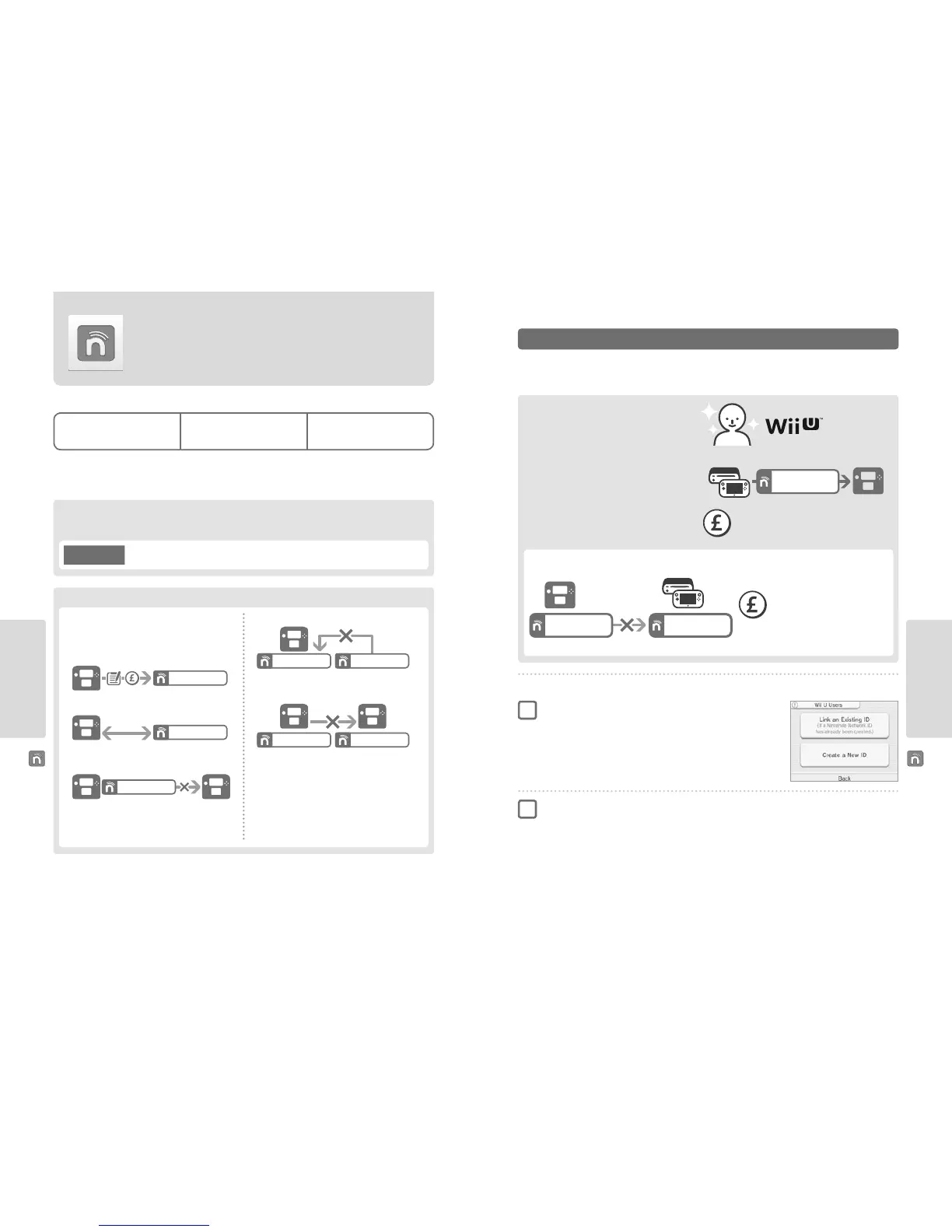
Points to Note Regarding Nintendo Network IDs
If you own another Nintendo 3DS system and want to transfer data to your new system...
Congure the initial settings for the new system and then perform the system transfer (page 66). Do not create or link a Nintendo
Network ID to the new system before the transfer.
•
You will need to sign in with your ID each time you use
Nintendo eShop.
•
Once you have created or linked a Nintendo Network ID, your
system’s Nintendo eShop account activity and funds will be
merged with those of your Nintendo Network ID.
NintendoMario123
•
Only one ID can be linked per system.
NintendoMario123
1
•
You cannot link a Nintendo Network ID to multiple
Nintendo 3DS systems.
NintendoMario123
Note: You can, however, transfer all of your data to another system
which has not been linked to a Nintendo Network ID using System
Transfer (page 66).
•
You cannot merge two Nintendo Network IDs.
NintendoMario123 NintendoLuigi123
•
You cannot perform system transfers to a system that is
already linked to a Nintendo Network ID.
NintendoMario123 NintendoLuigi123
•
Friend data stored by your Nintendo Network ID and friend
data stored on this system are kept separately. Friend data
stored by your Nintendo Network ID can only be deleted or
changed using a Wii U console, and will only be needed in
software that requires you to sign in with your ID.
If you link a new Nintendo Network ID to this system, you will be unable to transfer data from another
Nintendo 3DS system.
Caution
If you own a Wii U console...
You can link the existing ID from your Wii U console to
this system. Doing so allows you to share your existing
Nintendo eShop funds between devices, and to post to
Miiverse as the same user.
Touch NINTENDO NETWORK ID SETTINGS in the System Settings
(page 53) to begin.
There are two methods:
•
Create a new Nintendo Network ID.
•
Use an ID already linked to a Wii U console.
Creating or Linking a Nintendo Network ID
Select LINK AN EXISTING ID or CREATE A NEW ID
•
If you create a new ID on your system, you will not be able to merge it with an existing
ID in use on a Wii U console. You will need to select LINK AN EXISTING ID if you would
like to use the same ID across both devices.
1
Follow the on-screen instructions
•
There are certain services which require you to sign in with your Nintendo Network ID in order to use them. If you forget your
password, select I FORGOT or I FORGOT MY PASSWORD, then follow the on-screen instructions.
2
Recommended for owners of
Nintendo eShop funds can be shared!
Nintendo eShop funds cannot be shared!
Wii U
Link
Nintendo 2DS
Nintendo Network ID
on Wii U
Please be aware that if you create a new Nintendo Network ID on your system, you will not be able to combine or share Nintendo eShop
funds linked to the existing Nintendo Network ID on your Wii U console.
Please be aware that is it not possible to combine two
existing Nintendo Network IDs.
Cannot combine
Newly created ID ID linked to Wii U
Nintendo Network ID
on Nintendo 2DS
Nintendo Network ID
on Wii U



 To Next Page