Using Software
Using Software
40 41
Card-Based Software
Card-Based Software
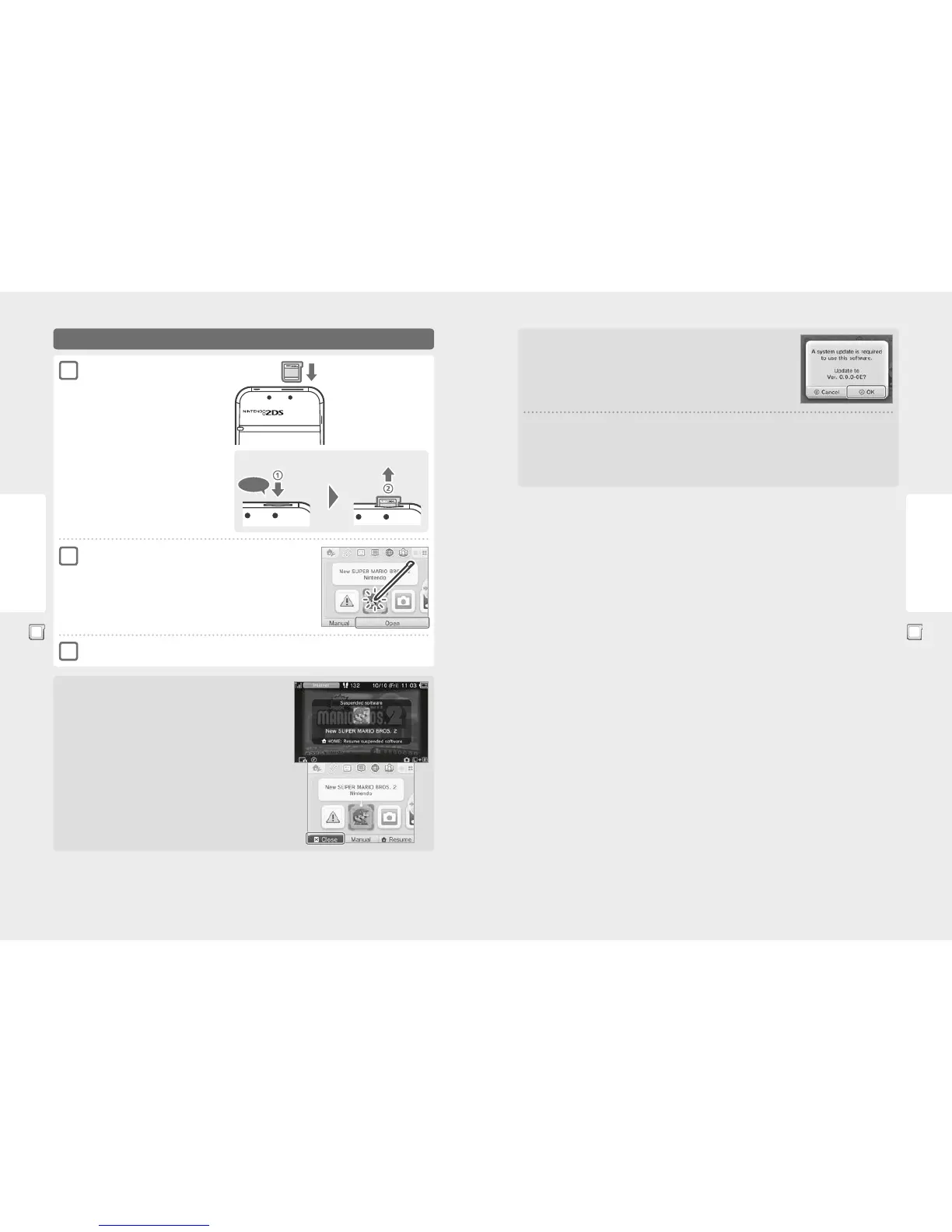
Using Game Cards
Push the Game Card in, then remove it
Click
For further information, refer to the instruction manual for the software you are using.
Closing Software
Press the HOME Button to bring up the HOME Menu, then touch CLOSE to end a soft-
ware title. (Any unsaved data will be lost if you close a software title without saving.)
•
Touch RESUME to return to the point where the software title was suspended.
•
To close Nintendo DS / Nintendo DSi software titles, rst save your data, then press
the HOME Button and touch OK.
Note: If you press the POWER Button, the software title will close and the POWER Menu will
be displayed.
Check which way the
Game Card is facing
The Nintendo 3DS, Nintendo DS
or Nintendo DSi logo on the card
and the Nintendo 2DS logo on the
system should both face in the
same direction.
Insert a Game Card into the
Game Card slot
Note:
•
If you have trouble inserting the Game Card, remove it
and check that it is facing the right direction with the
label facing away from the system.
Forcing the card in when it is facing the wrong
direction could lead to damage.
•
Only insert or remove Game Cards from the Game Card
slot while the HOME Menu is displayed or the power is
o. (If you have suspended a software title, make sure
you have closed it before removing its Game Card.)
Touch the Game Card icon, then touch OPEN
Nintendo DS / Nintendo DSi titles are displayed in an expanded format by default.
To load the software at its original resolution, hold down either START or SELECT,
then touch OPEN to launch the software. Keep START or SELECT held down until
the software has started.
1
2
3
Game Card System Updates
Some Game Cards contain system update data. Such Game Cards will display a message if a system
update is required in order to use the Game Card. Follow the instructions to update your system
(page 74).
Incompatible software and accessories
The Nintendo 3DS charging cradle, Nintendo 3DS XL charging cradle, Nintendo 3DS Circle Pad Pro and Nintendo 3DS XL Circle Pad Pro are
not compatible with this system.
In addition to these products, it is not possible to use any accessories that would connect to the Nintendo DS or Nintendo DS Lite systems
via the Game Boy Advance™ Game Pak slot or anything that functions in conjunction with a Game Boy Advance Game Pak. For more details,
visit support.nintendo.com.



 To Next Page