Adjusting System Settings
Adjusting System Settings
60 61
Internet Settings
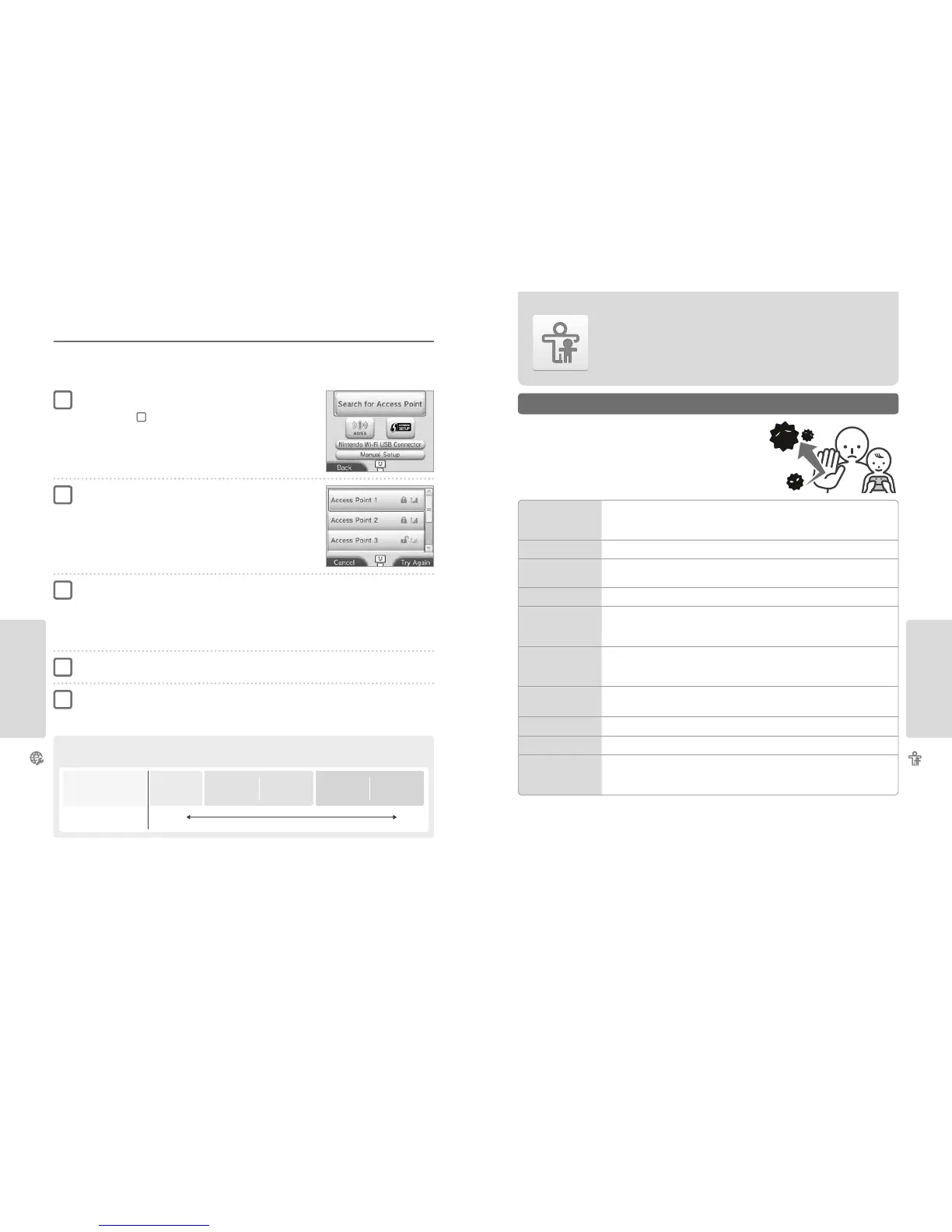
Searching for and Connecting to an Access Point
You can use this method to search for and connect to an access point if your access point does not support AOSS or Wi-Fi Protected Setup. You
should also consult the instruction manual that came with your access point.
Note: If the security type for your access point (see below) is set to WPA2™-PSK (TKIP), you will not be able to connect by searching for an access point.
Select an access point
Note: Touch the name of the access point you want to connect to (its SSID, ESSID or network
name). If you do not know this name, please consult the settings of the access point you are using.
Touch SEARCH FOR ACCESS POINT
Note: If you are using the tutorial and have selected DON’T KNOW / NONE OF THESE or
OTHER, start from step
2
.
Enter the security key and touch OK
•
This step only applies if the access point is secured. If you do not know the security key, please consult the settings of the access
point you are using.
•
The characters for the key you entered will be hidden by asterisks (*).
Note: A security key is the password set for your access point and is required to enable your Nintendo 2DS system to make an internet connection.
It may also be called an encryption key or network password.
Touch OK to save your settings
Touch OK to perform a connection test
•
If the test is successful, setup is complete.
•
If connection fails and an error appears, follow the instructions given in the error message.
1
2
3
4
5
Security Types
These are the most common types of security for wireless networks:
Encryption
method
Security
strength
WEP
WPA™-PSK
(TKIP)
WPA2-PSK
(TKIP)
WPA-PSK
(AES)
WPA2-PSK
(AES)
Weak Strong
Parental Controls
Options That Can Be Restricted
Parental Controls
Use this option to restrict children from playing games, making purchases or using certain
functions of the Nintendo 2DS system (such as the internet browser).
The following options can be restricted. Please congure these options as necessary
when allowing children to use the Nintendo 2DS system.
Note: Setting Parental Controls restrictions for any of the options below will also restrict part
of the Nintendo Network ID Settings, Internet Settings, Region Settings, Outer Cameras,
System Transfer and Format System Memory functions. You will have to enter the Parental
Controls PIN in order to use these functions.
Note: If this Nintendo 2DS system is used by several children, we suggest setting up Parental Controls for the youngest child.
SOFTWARE RATING
Restricts the use of Nintendo 3DS and Nintendo DSi software based on software rating systems (page 39).
Note: Nintendo 3DS software received via Download Play is also restricted, but this setting cannot restrict
Nintendo DS software or software received via DS Download Play.
INTERNET BROWSER
Restricts use of the internet browser and prevents the viewing of web pages.
NINTENDO 3DS
SHOPPING SERVICES
Prevents the purchase of goods and services, and the use of credit cards with Nintendo 3DS shopping services.
MIIVERSE
Restricts users from viewing or posting content on Miiverse.
SHARING IMAGES /
AUDIO / VIDEO /
LONG TEXT DATA
Restricts the transfer of data that could be used to carry personal information, such as photos, images,
sounds, videos and long messages.
Note: This setting cannot restrict Nintendo DS software or Miiverse.
ONLINE INTERACTION
Restricts communication with other Nintendo 3DS, Nintendo 3DS XL, Nintendo 2DS, Nintendo DSi and
Nintendo DSi XL systems over the internet.
Note: This setting cannot restrict Nintendo DS software or Miiverse.
StreetPass
Restricts communication with other Nintendo 3DS / Nintendo 3DS XL / Nintendo 2DS systems using StreetPass.
Note: This setting cannot restrict Nintendo DS / Nintendo DSi software.
FRIEND REGISTRATION
Restricts the registration of new friends.
DS DOWNLOAD PLAY
Restricts the use of DS Download Play.
VIEWING DISTRIBUTED
VIDEOS
Restricts viewing of distributed videos to those suitable for all ages. This setting does not apply to game-
related videos found on Nintendo eShop, which can be restricted using the separate Software Rating setting.
Note: For some distributed video playback software, this setting may also restrict the use of the software itself.



 To Next Page