Adjusting System Settings
Adjusting System Settings
62 63
Parental Controls
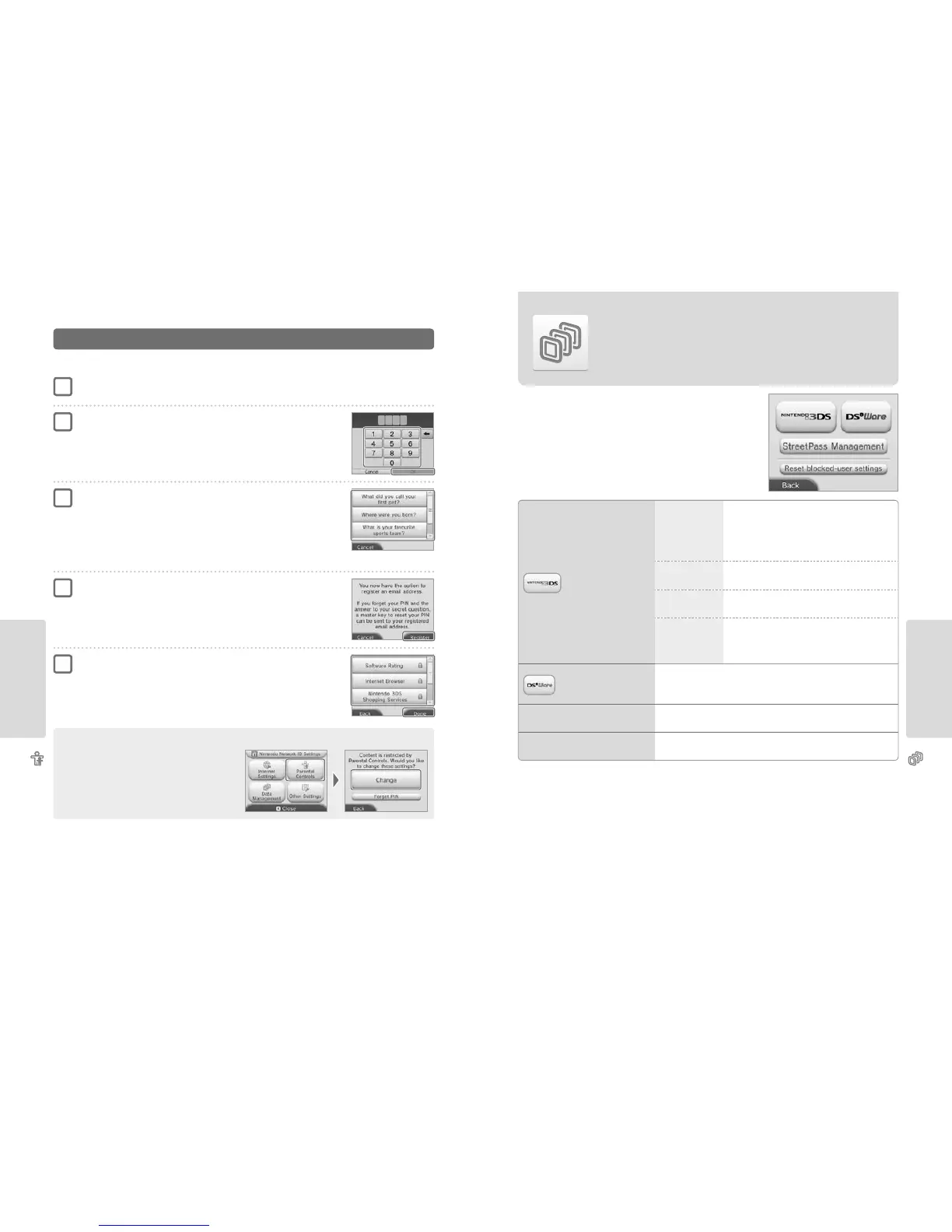
Conguring Parental Controls
Touch PARENTAL CONTROLS to begin the conguration (page 53).
Follow the instructions on the screen
Information about Parental Controls will appear on the screen. Follow the instructions to proceed with conguration.
Enter a four-digit PIN, then touch OK
To ensure the information entered is correct, you will be asked to enter your PIN twice.
Note: Your PIN is required to change Parental Controls settings as well as remove them
temporarily.
Be careful not to forget it.
Select a secret question, then enter an answer of at least
four characters
If you wish to create your own secret question, select (CREATE YOUR OWN SECRET QUESTION) and
enter a question and answer. Each should be at least four characters in length.
Note:
•
You must answer the secret question if you forget the PIN. Be careful not to forget your answer.
•
See page 26 for details on using the keyboard.
Register an email address
If you forget your PIN and the answer to your secret question later, a master key to reset your PIN
can be sent to the email address you have registered.
Please use an email address that only parents or guardians can access, to prevent children from
seeing the master key that is sent.
Touch the setting you want to adjust and follow the instructions
on screen
If you are setting up Parental Controls for the rst time, restrictions will initially be in place for all
options.
Touch DONE to nish conguring Parental Controls settings.
1
2
3
4
5
Changing the Parental Controls settings later
To change your restriction settings later on, select PARENTAL
CONTROLS from the System Settings, then select CHANGE.
Note: If you have forgotten your PIN or secret question answer, touch
I FORGOT on the PIN entry screen (page 84).
Data Management
Data Management
Check or organise software, data and settings saved to the system memory or the SD card.
You can manage downloaded software, check or congure software using StreetPass functionality
and reset the blocked-user settings. Select DATA MANAGEMENT from System Settings, then
select the corresponding option.
Note:
•
You can store over 300 pieces of extra data / add-on content on an SD card, but only the rst 300 will be shown in Data Management.
•
Nintendo DSiWare cannot be launched from an SD card. Copy it to the system memory before playing.
•
If you copy a software title to a location where the same software title is already saved, the existing software will be overwritten by the one you are
copying. Be careful when copying software in order to avoid overwriting save data.
•
Deleted software and add-on content can be redownloaded free of charge from Nintendo eShop. (Please be aware that it is not possible to redownload
content if distribution of that content has been suspended or terminated.)
Nintendo 3DS
Data Management
SOFTWARE
Check or delete Nintendo 3DS download software or
Virtual Console™ software.
Note:
•
You can store up to 300 Nintendo 3DS titles on an SD card.
•
When deleting software, you can create a backup of its save data.
EXTRA DATA
Check or delete extra data (e.g. data received via SpotPass)
on your Nintendo 2DS system.
ADD-ON CONTENT
Check or delete add-on content (including software update
data) downloaded for compatible Nintendo 3DS software.
SAVE DATA BACKUP
Create or delete backups of Nintendo 3DS download software
or Virtual Console software, and restore save data from your
backups. Once a backup has been created, its save data can be
restored at any time (page 64).
Nintendo DSiWare
Data Management
Check Nintendo DSiWare saved to the system memory or an SD card. You can also copy
Nintendo DSiWare between the system memory and an SD card or delete it.
Note: You can store up to 40 Nintendo DSiWare titles in the system memory.
StreetPass MANAGEMENT
View a list of software that supports StreetPass. You can also deactivate StreetPass for
any software title.
RESET BLOCKED-USER SETTINGS
Resetting blocked-user settings will remove all previously applied restrictions and
allow the receipt of data from all users.



 To Next Page