Preparations
Preparations
26 27
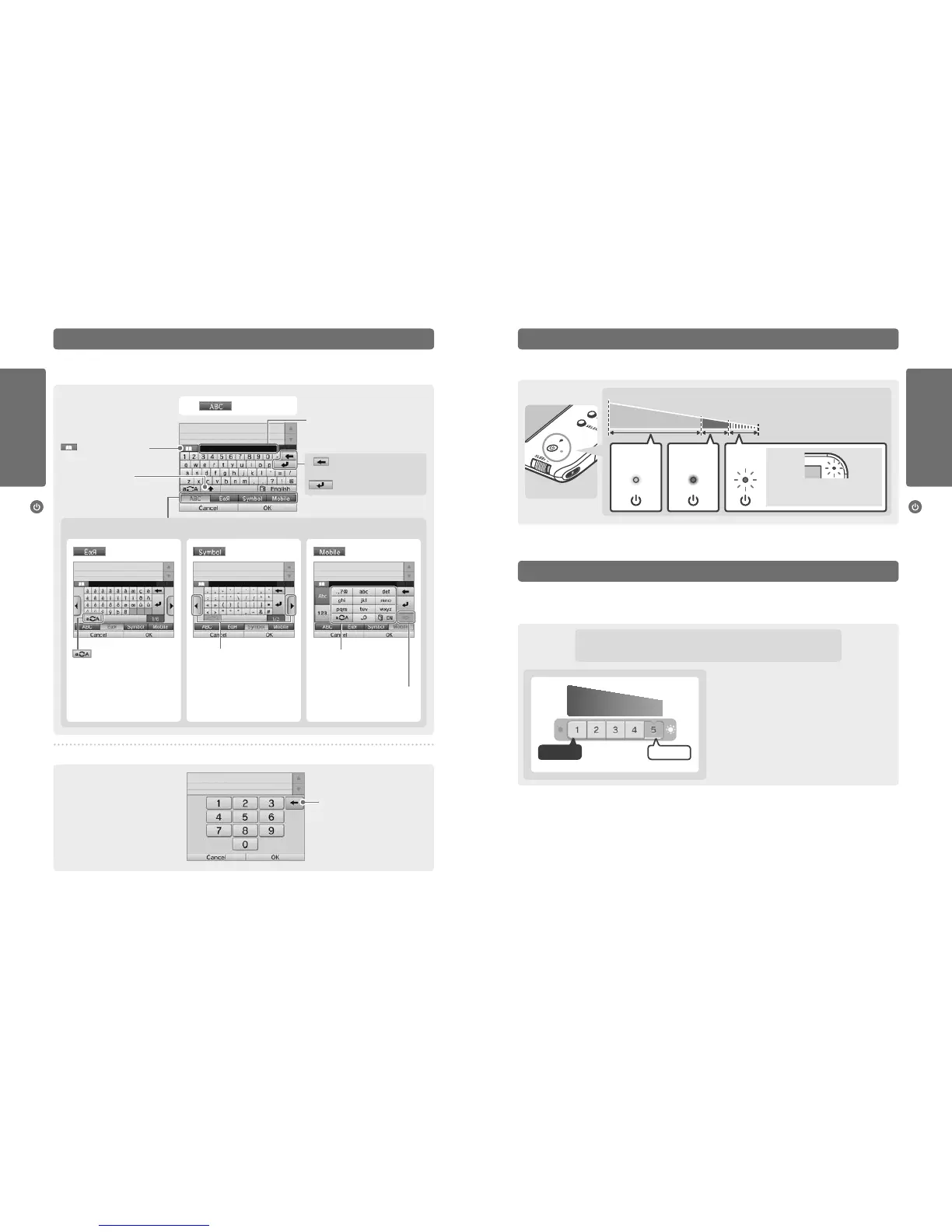
Using the Keyboards Power LED
Turning the power on and o
Turning the power on and o
Delete the last number entered.
Numeric Keyboard
A keyboard will be displayed on the Touch Screen when you are required to input characters. Touch a character to enter it.
Standard
Predictive text
Choose the word you want from a list.
Predictive text on / o
Switch between upper-
and lower case for the next
character entered.
Alphanumeric
The power LED lights up blue when the system is turned on, turns red when the battery charge is low and ashes red when the battery is
starting to run out.
High
Solid Blue Solid Red
Flashes
Red
Low
Almost empty
The notication LED
will also ash.
Remaining battery charge
Battery Life
Battery life will vary depending on a number of factors, such as the software being used, the quantity of wireless data sent and received and
the ambient temperature. As such, these times should only be taken as rough estimates. Using the camera features may reduce the battery
time below the gures shown below.
Playing Nintendo 3DS software: approx. 3.5 – 5.5 hours
Playing Nintendo DS software: approx. 5 – 9 hours
The battery life will change depending on the brightness of the
LCD screens. The system is set to “5” at purchase (for information on
changing the brightness levels, see page 35).
Leaving the system in Sleep Mode (page 24) greatly reduces power consumption while leaving wireless communication such as SpotPass and
StreetPass active. If the battery is fully charged, the system can remain in Sleep Mode for 3 days.
Note: The power LED slowly pulses when the system is in Sleep Mode. Some software titles do not allow the system to enter Sleep Mode while in use,
even if the sleep switch is moved to the right. Enabling Sleep Mode while using such software will result in the power LED remaining solidly lit. For example,
Nintendo 3DS Sound cannot enter Sleep Mode during playback.
Note: If the power LED is red, save your game quickly and recharge. If the battery charge runs out before you save, you may lose unsaved data. If the LED is
blue and slowly brightens and dims, the system is in Sleep Mode (page 24), which will conserve battery power.
Screen
brightness
Delete the character to the
left of the cursor.
Move to the next line.
Switch between input modes
Show additional characters. Cycle through the characters
assigned to each button by
pressing it repeatedly.
Next character
Conrm character input and
move to the next space.
Special characters Symbols Mobile phone
Light
Dark
ShorterBattery lifeLonger
Switch between upper- and
lowercase characters.



 To Next Page