Using Software
Using Software
44 45
Friend List
Friend List
Friend List
Friend List
Play and communicate with registered friends via the internet, wherever they may be.
You can receive notications via the friend list when registered friends go online (connect to the internet).
Touch
on the HOME Menu to open your friend list. When you open it for the rst time, you’ll be
asked to create a friend card by following the on-screen prompts.
The friend data stored by your Nintendo Network ID is dierent to the friend data stored on your
Nintendo 2DS system. Making changes to this friend list will not aect the friend list attached to your
Nintendo Network ID.
To view the friend list while a Nintendo 3DS software title is running, press the HOME Button to bring up
the HOME Menu, then launch the friend list.
Note: The friend list can only be used with Nintendo 3DS software titles. To use wireless play with
Nintendo DS / Nintendo DSi software titles, the relevant settings need to be congured within the software.
Things you’ll need...
Personal Mii
In order to create your own friend card, you rst need to create your own Personal Mii
using Mii Maker (page 32).
This is required to see when friends go online (page 56).
Internet Connection
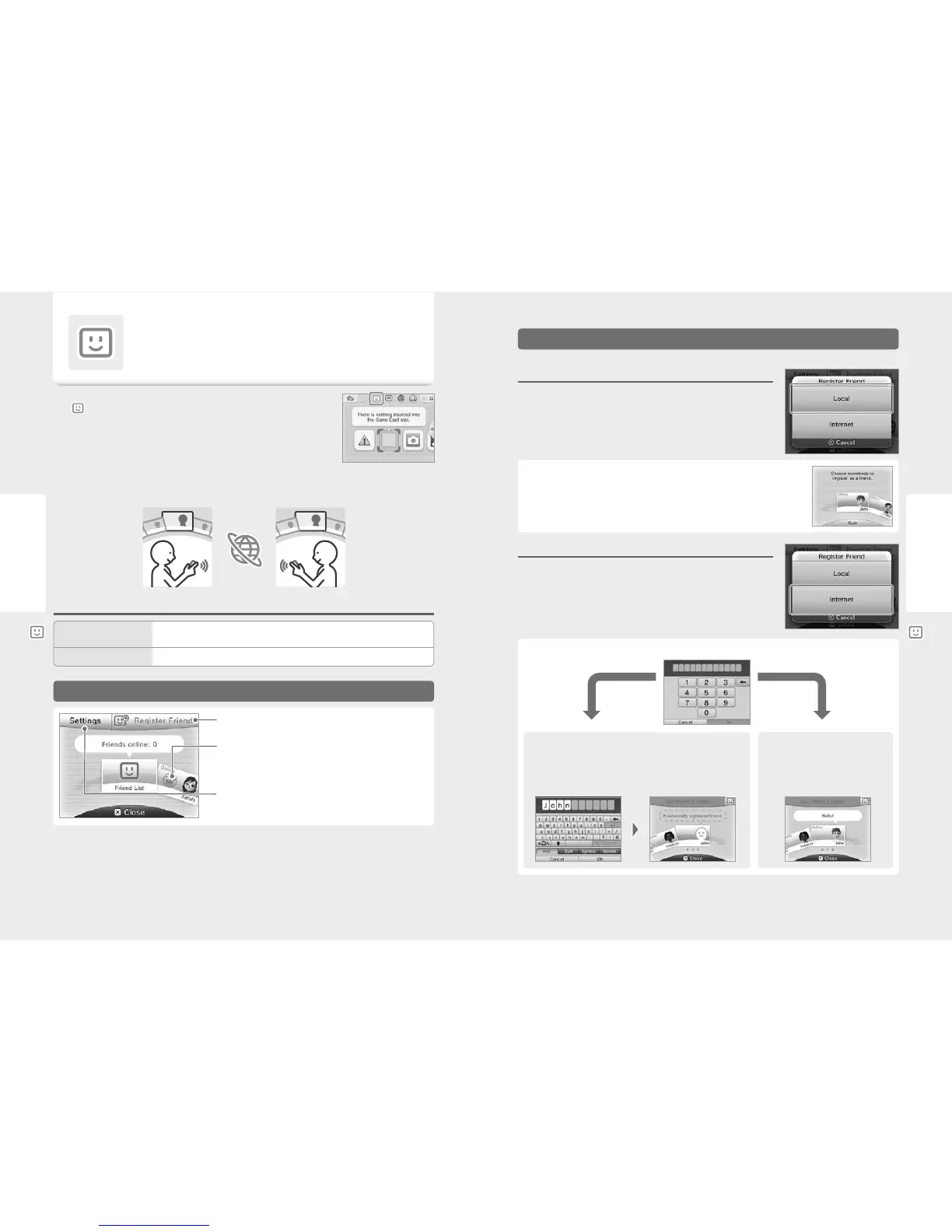
Register Friend (page 45)
Viewing Friend Cards (page 46)
•
Edit your friend card
•
View a friend’s friend card
Friend List Settings (page 48)
•
Friend notication settings
•
Delete friend card
You are not yet registered on the other system
Your friend will be provisionally registered. Enter the name of the person you
want to register. (When the person registers you in return, the status will change
and you will become fully registered friends. That person’s name and Mii will
then be displayed.)
You are already registered
on the other system
The data from the other person’s friend card
will be received automatically and they will be
registered as a friend.
You can register up to 100 friends on your friend list.
Local
Touch LOCAL to connect to another Nintendo 3DS / Nintendo 3DS XL / Nintendo 2DS user within
range and register each other.
Find the friend card of the person you want to register as a friend and touch it.
Your friend cards will be exchanged and you will be registered on each other’s friend lists.
Internet
Touch INTERNET to register friends by exchanging friend codes.
You can check your friend code by looking at your friend card.
Enter the friend code belonging to the person you want to register.
Friend Registration



 To Next Page