Using Software
Using Software
42 43
Download Software
Game Notes
Nintendo 2DS is equipped with RF module (802.11), which has a radiated output power of less than 10 mW e.i.r.p. and a maximum spectrum
power density of less than -30 dBW/1MHz e.i.r.p. These parameters can be maintained when operated within a temperature range of 0 to 40°C.
In accordance with this, Nintendo 2DS is categorised as Class 1 equipment according to Commission Decision 2000/299/EC.
With the exception of Nintendo DSiWare (page 7), downloaded software is saved to an SD card. The corresponding icons are
displayed in the HOME Menu.
You can get new software by...
•
Receiving free software via SpotPass (page 6).
•
Purchasing software via Nintendo eShop (page 6).
Precautions for Download Software
•
Because some software is transmitted automatically via SpotPass (page 6), it is advised that you keep an SD card inserted at all times.
•
Up to 40 Nintendo DSiWare titles can be stored in the system memory and up to 300 download software titles can be stored on an
SD card.
•
Download software (including its save data) can only be used on the system it was originally downloaded to. Software that you
save on an SD card cannot be used with other Nintendo 3DS / Nintendo 3DS XL / Nintendo 2DS systems.
•
A linked Nintendo Network ID is required to download free or demo software (page 54).
•
Demo versions of software may have limitations such as a time limit or number of uses. If you exceed this limit and try to open the
software, a message will be displayed. Follow the instructions to delete the software or open Nintendo eShop.
•
If the system language is set to Dutch, Portuguese or Russian, Nintendo DSiWare titles will default to English. In some cases, this
may be adjustable within the software.
•
Only Nintendo 3DS software and Nintendo DSiWare matching the region of the system will work. Software titles from dierent
regions may not function.
•
The Nintendo 2DS system cannot display 3D visuals even if the software contains 3D content.
Touch the software icon, then touch OPEN
Nintendo DSiWare titles are displayed in an expanded format by default. To load the
software at its original resolution, hold down either START or SELECT when launching
the software. Keep START or SELECT held down until the software has started.
For further instructions, refer to the instruction manual for the software you are using
•
How to view the electronic manual (page 34)
•
About software ratings (page 39)
•
How to close a software title (page 40)
Opening Software
Download Software
Enjoy free software downloaded via SpotPass or software purchased via Nintendo eShop.
1
2
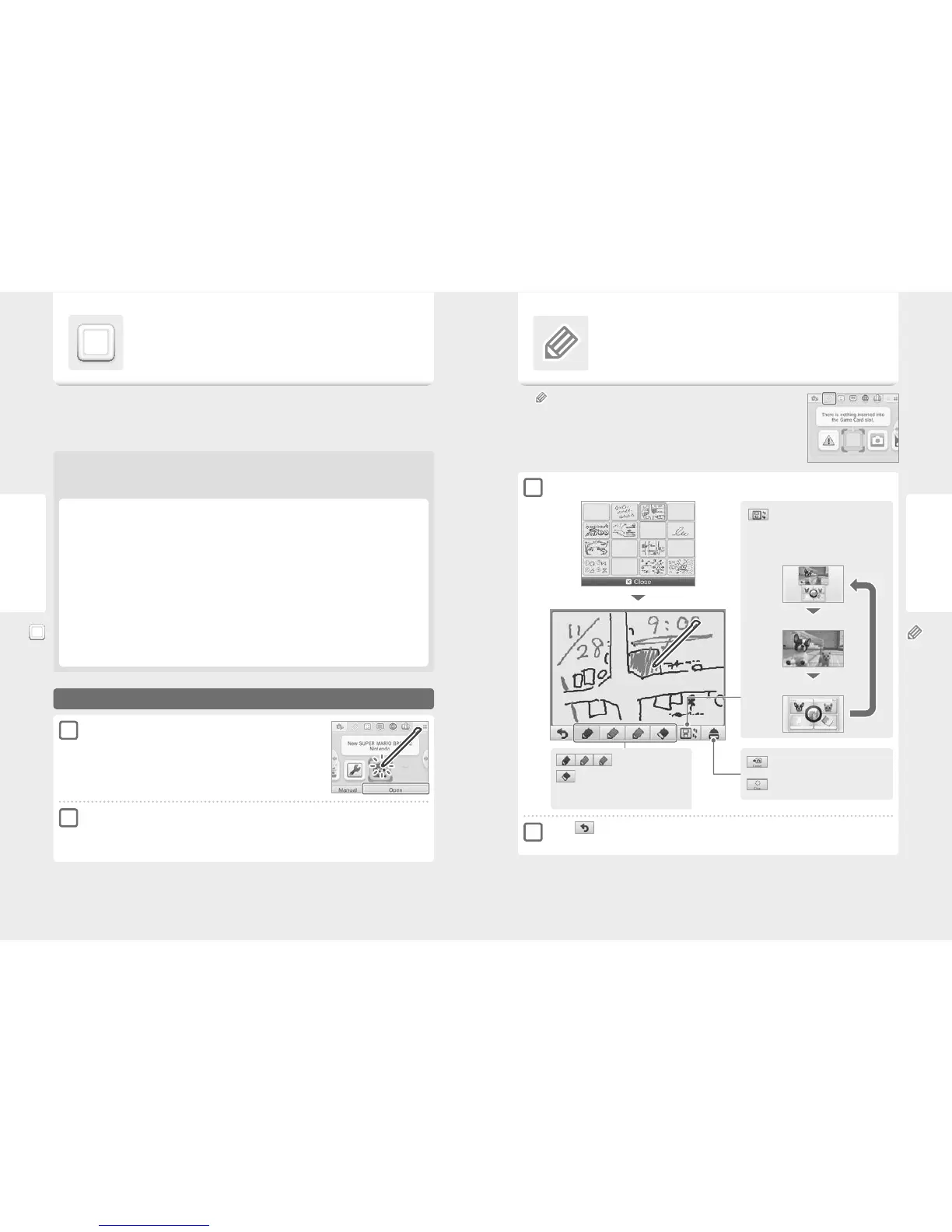
Pens
Eraser
Choose from three coloured pens to write with,
and erase things with the eraser.
Game Notes
Use this application to take notes, even while playing a Nintendo 3DS software title!
Just suspend the software and take notes while looking at the software screen.
Touch on the HOME Menu to show a list of all the notes you’ve created.
•
You can save up to 16 pages of notes. Note pages can be saved as photo data and viewed in
Nintendo 3DS Camera (page 32).
•
To create a note while a Nintendo 3DS software title is running, press the HOME Button to suspend the
software title and bring up the HOME Menu, then launch Game Notes.
Select a note to edit
Switching screens
Touch this icon during a suspended game to
change the display on the upper screen.
Touch when nished
This saves the note and sends you back to the Game Notes Screen.
Notes saved as photo data on an SD card can
be viewed in Nintendo 3DS Camera (page 32).
Make this note blank.
Display both screens
Display upper screen
Display lower screen
1
2



 To Next Page