Troubleshooting
Troubleshooting
76 77
Replacing the Nintendo 3DS Battery Pack
Replacing the Nintendo 3DS Battery Pack
Repeated charging will decrease battery life and reduce the length of time you can use the system before recharging.
If usage time is noticeably reduced, replace the battery pack using the procedure detailed below.
Please contact Nintendo Customer Support for further information on where to purchase a replacement (pages 90 – 91).
•
If the system is used by a young child, a parent or legal guardian should replace the battery pack for them.
•
Always turn the power o and disconnect the AC adapter before replacing the battery pack.
Replacing the Nintendo 3DS Battery Pack
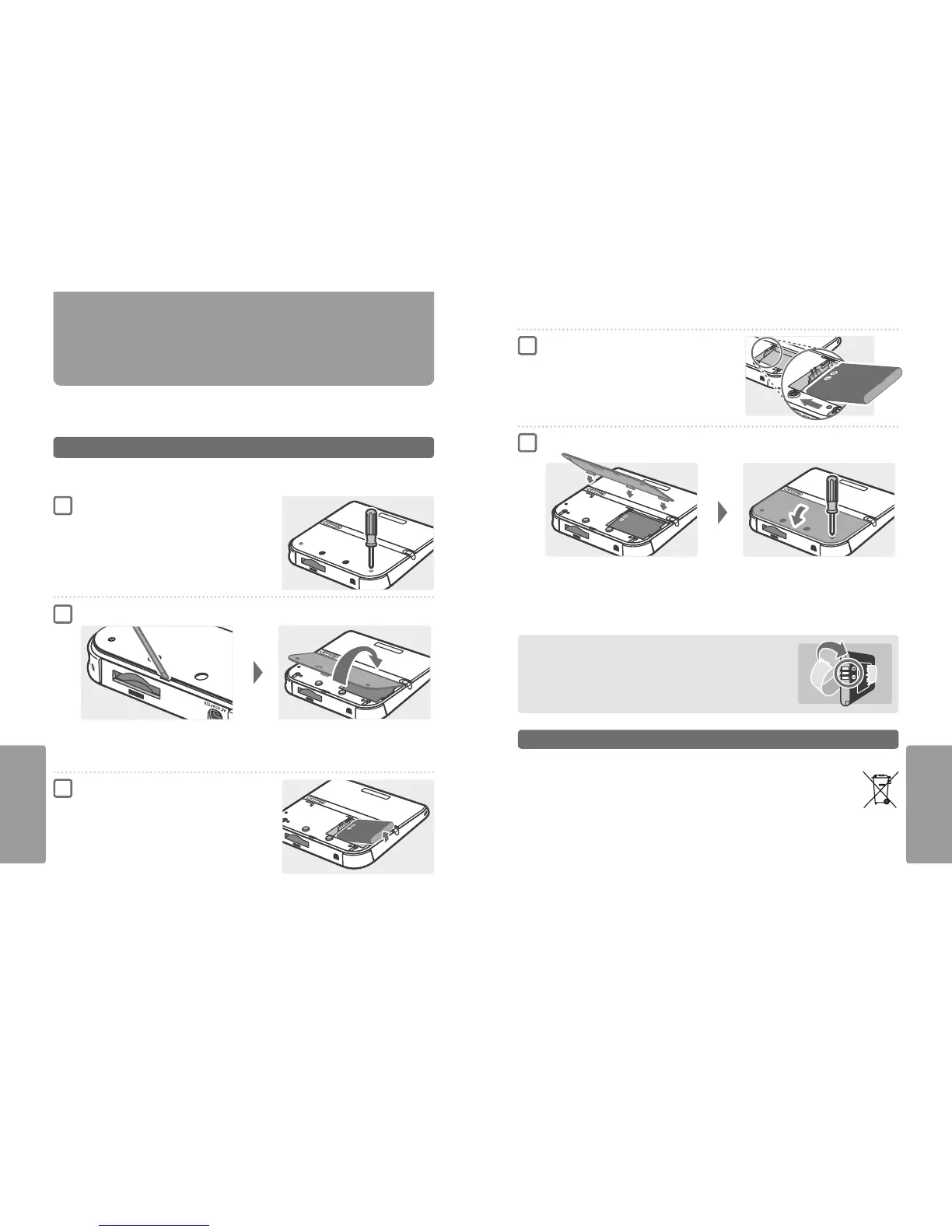
Unscrew the battery cover
Use a screwdriver to loosen the two screws securing the battery cover.
Note: Using the wrong type of screwdriver may damage the head of the screw,
leaving you unable to remove the battery cover.
Remove the battery cover
Remove the battery pack
Remove the battery pack as shown.
Slide a athead screwdriver or similar item in between the battery cover and the system, and prise the two carefully apart.
Note:
•
Do not insert your ngernails in between the battery cover and the system, as this could result in injury.
•
Do not use excessive force, as this could result in damage to your Nintendo 2DS system and/or to the battery cover.
1
2
3
Replacing the Nintendo 3DS Battery Pack
Wait at least 10 seconds, then insert a new
battery pack
Insert the new battery pack as shown.
Note:
•
Ensure that the battery is facing in the right direction.
•
Inserting the new battery pack immediately after removing the old
one can result in the power LED not functioning correctly.
Replace the battery cover, and tighten the two screws
When replacing the battery cover, apply pressure until the clasp in the centre clicks rmly into place.
After removing the battery, the date and time settings will be reset. You should set them again by opening System Settings from the
HOME Menu, selecting OTHER SETTINGS and then DATE & TIME.
Note: Always replace the battery cover. If the system is subjected to a shock while the cover is o, the battery could be damaged leading to re
or explosion.
4
5
Battery Disposal
•
Apply some tape over the positive (+) and negative (–) connectors.
•
Do not remove the label.
•
Do not attempt to disassemble the battery pack.
•
Do not damage the battery.
Disposal of the Battery at the End of its Life [220115/UKV/WEEE-2]
This system contains a lithium-ion rechargeable battery. The disposal of portable and rechargeable batteries is regulated under EU and national laws.
Since batteries contain heavy metals that can cause serious environmental and health problems, they should be separately collected and recycled.
Batteries are labelled with the crossed-out wheeled bin symbol, which means that they must not be discarded as house-
hold waste.
As a consumer, you have a legal duty to separate your used batteries from household waste and take them to a collection point for
proper recycling. There are various battery collection points in your locality that will take back used batteries, including retail stores where
batteries are sold and municipal waste collection sites. In some countries, collection bins and boxes are also set up in schools and other
public buildings.
The sales price of this Nintendo product includes the cost of battery collection and recycling.



 To Next Page