Adjusting System Settings
Adjusting System Settings
68 69
Other Settings
Other Settings
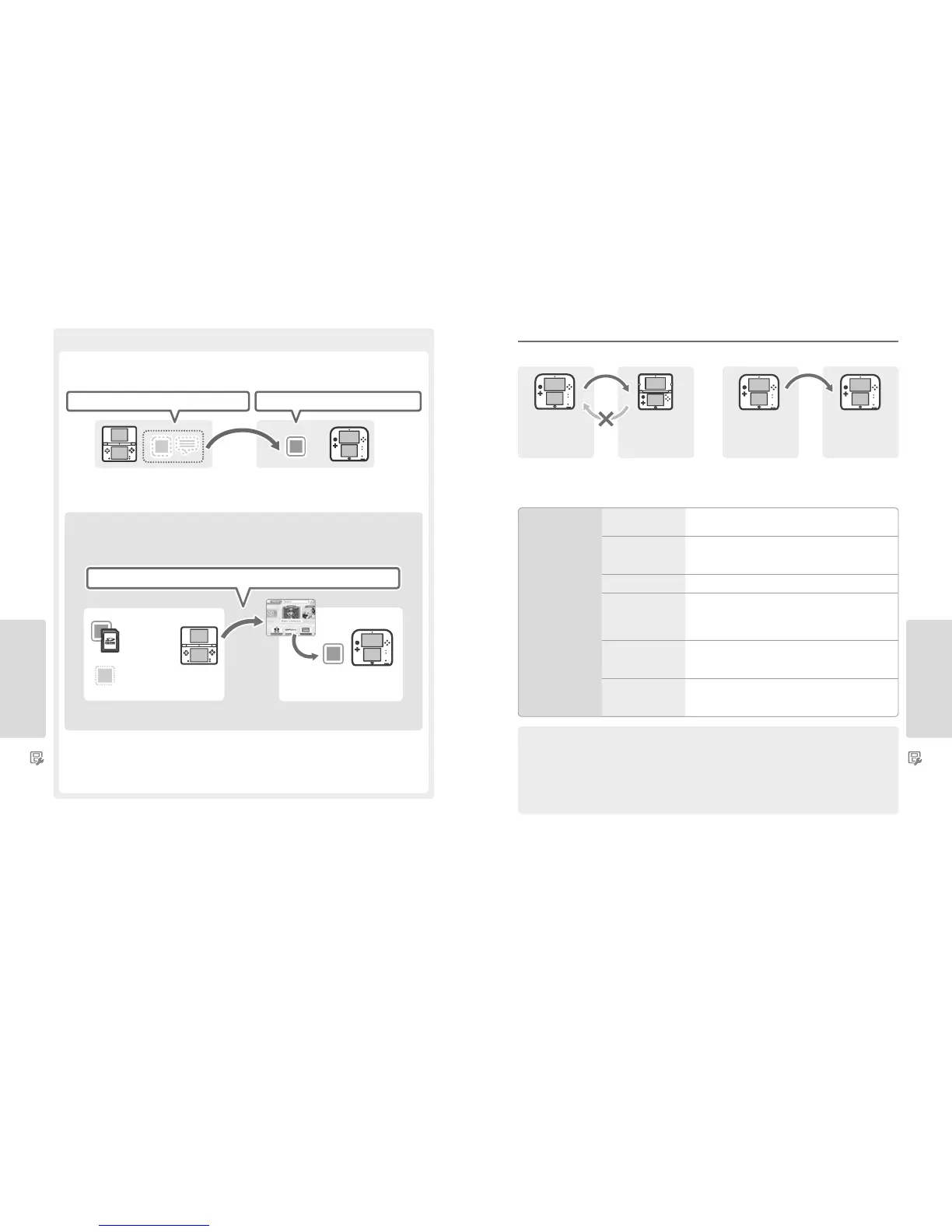
Precautions for Transferring Nintendo DSiWare
Only the software itself will be transferred to the target system. Save data is not transferred. Both the software and
the save data will be deleted from the source system. Please be sure that it is OK to have your save data deleted before you start the
transfer process.
Note: The data will be saved on the system memory of the target system. If there is not enough space in the target system’s system memory, you
will not be able to transfer data. To free up space, go to Data Management in the System Settings to copy any Nintendo DSiWare already saved on
the system to the SD card and delete them from the system memory (page 63).
If purchased Nintendo DSiWare has been deleted or copied to an SD card
If you have purchased any Nintendo DSiWare titles that have subsequently been deleted or copied to an SD card, you can still transfer
the software even though it is no longer in the system memory of the source system. For such software, the actual software will
not be transferred to the target system, but it will be downloadable from Nintendo eShop at no extra cost.
Note: In order to play Nintendo DSiWare titles on the source Nintendo DSi system after they have been transferred, you will need to use
Nintendo DSi Points to purchase them again.
Note:
•
Nintendo DSiWare that is free or is not available on Nintendo eShop cannot be transferred. For details on Nintendo DSiWare that cannot be
transferred, visit the Nintendo website.
•
You cannot transfer Nintendo DSi Points or any software that was pre-installed on the source Nintendo DSi or Nintendo DSi XL system.
•
Software that already exists on the target system will not be transferred.
Nintendo DSiWare and save data deleted Nintendo DSiWare (without save data) transferred
Only Account Activity (record of purchased Nintendo DSiWare) transferred
Nintendo DSiWare
on SD card
(see note below)
Deleted
Nintendo DSiWare
(see note below)
Download from Nintendo eShop at
no extra cost
Transfer save data for built-in applications, Nintendo eShop funds/account activity etc. from a Nintendo 3DS, Nintendo 3DS XL or Nintendo 2DS.
Note:
•
Data is transferred all together. You cannot choose individual software or items to transfer.
•
You cannot transfer data from a New Nintendo 3DS or New Nintendo 3DS XL system to a Nintendo 3DS, Nintendo 3DS XL or Nintendo 2DS system.
Transferring from systems in the Nintendo 3DS family
Transferable Data
Nintendo DS
Software Settings
Transfers Internet Settings (Nintendo DS Connections) and
Nintendo Wi-Fi Connection ID.
Pre-installed Application
Save Data
Transfers data such as the friend list, Nintendo 3DS Camera photos, Nintendo 3DS
Sound recordings and Mii Maker Mii characters from the pre-installed appli-
cations on the Nintendo 3DS/Nintendo 3DS XL/Nintendo 2DS system.
Nintendo DSiWare Transfers Nintendo DSiWare (and its save data) stored on the system memory.
Nintendo eShop Account
Activity / Funds
Transfers your Nintendo eShop account activity and funds to the target
system. This will be merged with that of the target system.
Note: Some account activity may not be transferable. You will be given the chance
to review any untransferable data on screen before the transfer.
Nintendo Network ID
Transfers your Nintendo Network ID information.
Note: A Nintendo Network ID that was previously linked to the source system can
only be linked again to the target system.
Usage Licences for
SD Card Data
Transfers usage licences for data stored on the SD card (e.g. downloadable
software and its save data, add-on content, etc.). For more information on
transferring data on an SD card, see page 70.
Precautions when Transferring a Nintendo Network ID
You will not be able to perform the system transfer if you have a Nintendo Network ID linked to the target system. In this case, you will
need to rst remove the link to the ID by formatting the system (page 75).
•
You cannot merge multiple IDs, so you cannot access software purchased by dierent IDs.
•
Once you remove a Nintendo Network ID from a system, you cannot link it to any other system. You can only link it again to the system it
was removed from. (You can only have one Nintendo Network ID linked to the system at a time. If you remove a Nintendo Network ID and
then link another ID to the system, you will need to format the system memory before you can link the rst ID again.)
TransferTransfer
Source system
(Nintendo 3DS,
Nintendo 3DS XL or
Nintendo 2DS)
Source system
(Nintendo 3DS,
Nintendo 3DS XL
or Nintendo 2DS)
Target system
(New Nintendo 3DS or
New Nintendo 3DS XL)
Target system
(Nintendo 3DS,
Nintendo 3DS XL
or Nintendo 2DS)



 To Next Page