www.nitronic.ch - 34 -
Nitronic AG
Mattenstrasse 11
CH – 2555 Bruegg Tel. +41 32 373 7070
Switzerland Fax +41 32 373 70
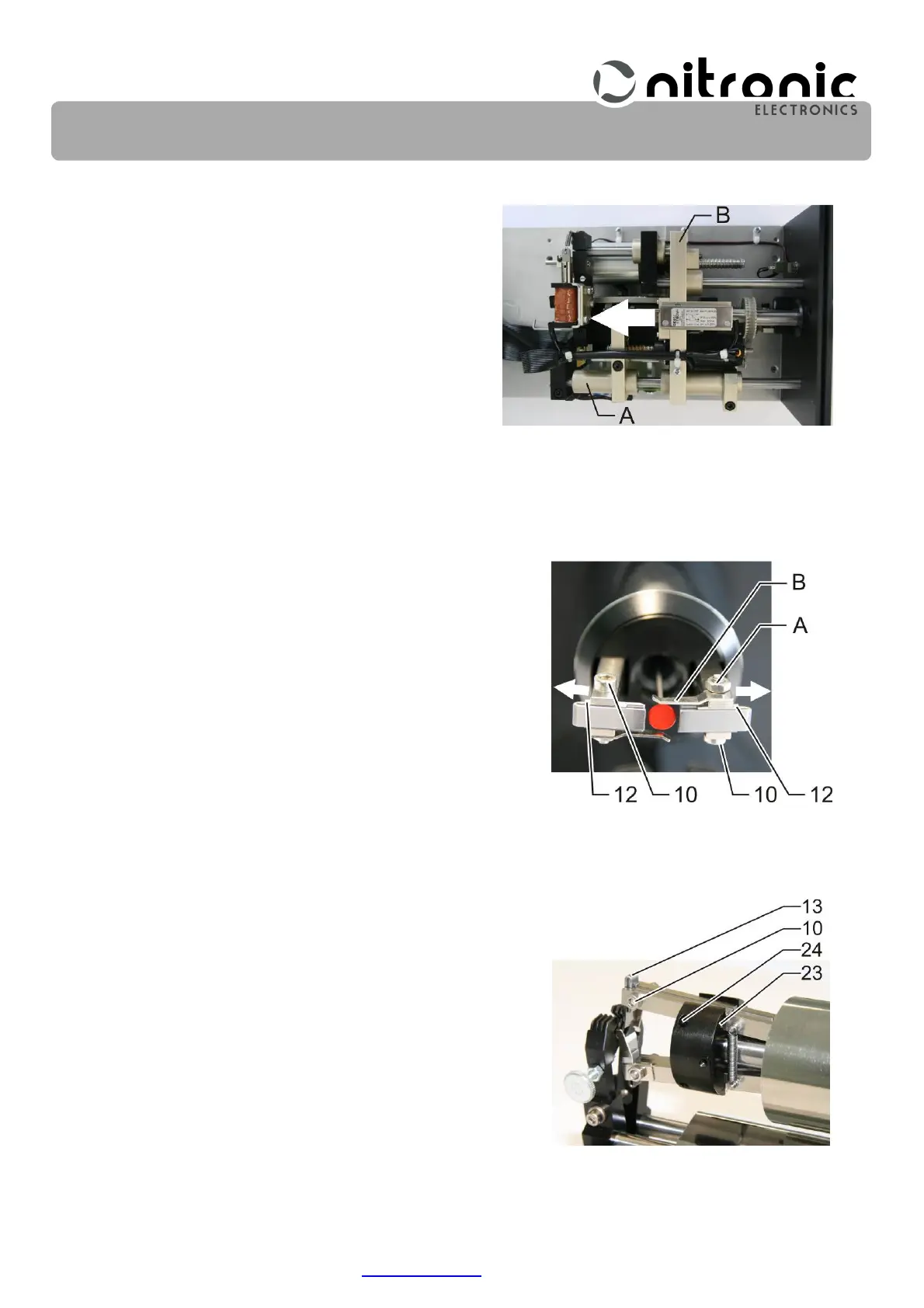
• Move carriages (A) and (B) to the backmost posi-
tion (Fig. 15).
• Loosen locking nuts (A) of the wire catchers (B)
slightly (Fig. 16 and Fig. 17).
• Loosen set screws (10) slightly and push stripping
blades (12) out of the center completely outwards (Fig.
16 and Fig. 17).
• Loosen set screws (23) of eccentrics (24) so that they
are still moderately tight but can still be rotated.
• Rotate the two eccentrics (24) so that the centralizers
(13) are moved to the outermost position (Fig. 17).
Fig. 15. Positioning carriage
Fig. 16. Shift stripping blades out-
wardly
Fig. 17. Adjusting the centralizers
with the eccentric


 To Next Page