www.nitronic.ch - 41 -
Nitronic AG
Mattenstrasse 11
CH – 2555 Bruegg Tel. +41 32 373 7070
Switzerland Fax +41 32 373 70
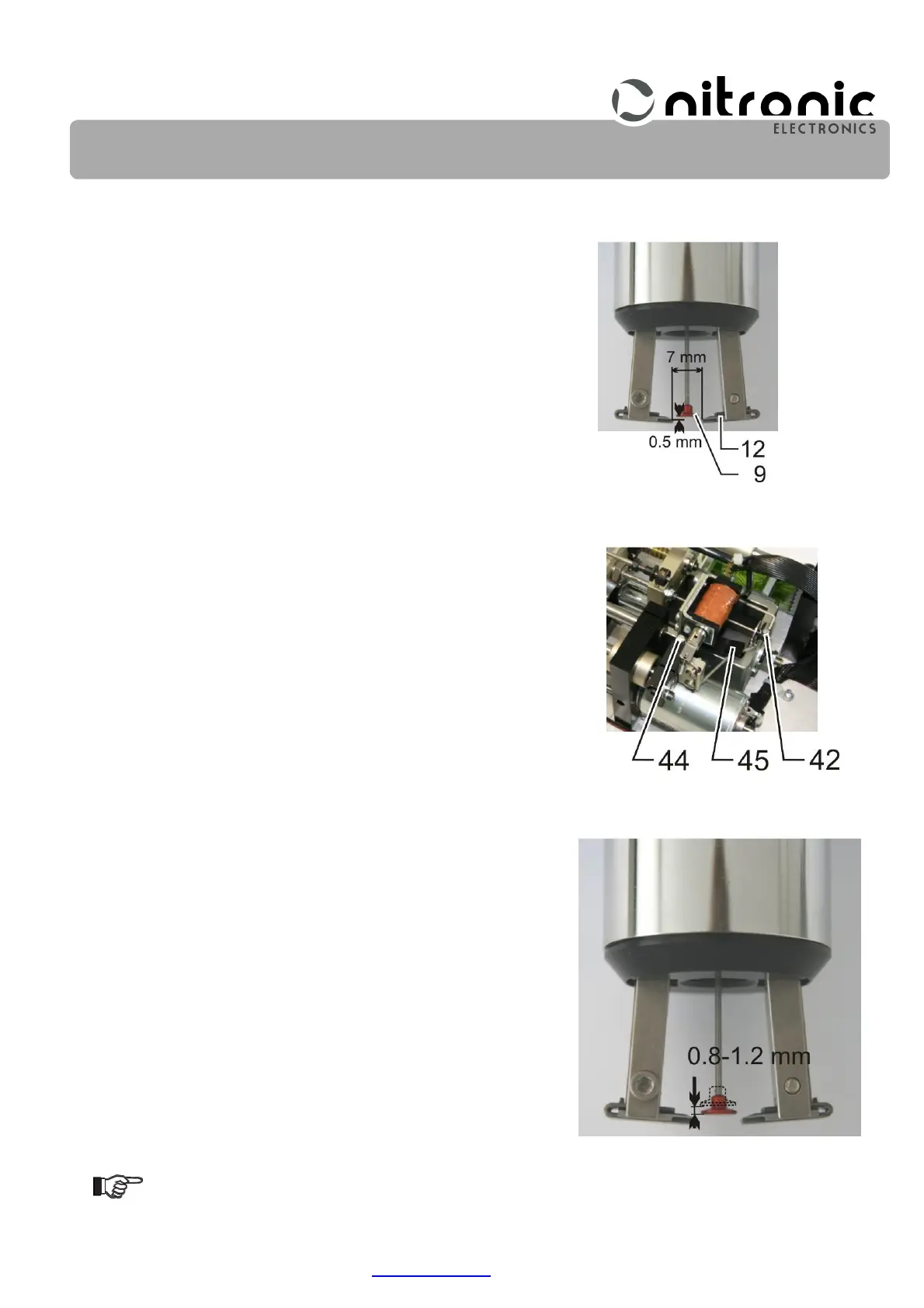
• Rotate the threaded spindle (28) until the distance between the cutting edges of blades (12) is 7
mm (Fig. 32).
• Pull release contact (9) forward until the distance between trig-
ger contact (9) and the cutting edges of blades (12) is 0.5 mm
(Fig. 32).
• Carefully tighten the screws (42) of the drive element (43) (Fig.
31).
• The release travel (Fig. 34) can be varied by moving the con-
tact element (45). For this purpose loosen screw (44) and dis-
place contact element (45) (Fig. 33).
To increase the trigger stroke:
Push stop (45) to the right (clockwise) (Fig. 33).
To decrease the trigger stroke:
Push stop (45) to the left (CCW) (Fig. 33).
• If the trigger stroke is 0.8 - 1.2 mm the screw (44) can be
tightened (Fig. 33 and Fig. 34).
Be sure not to overtighten the screw (44)!
Fig. 32. Adjust trigger contact
Fig. 33. Moving contact ele-
ment
Fig. 34. Adjust trigger stroke


 To Next Page