3. Choose File → Scan Product.
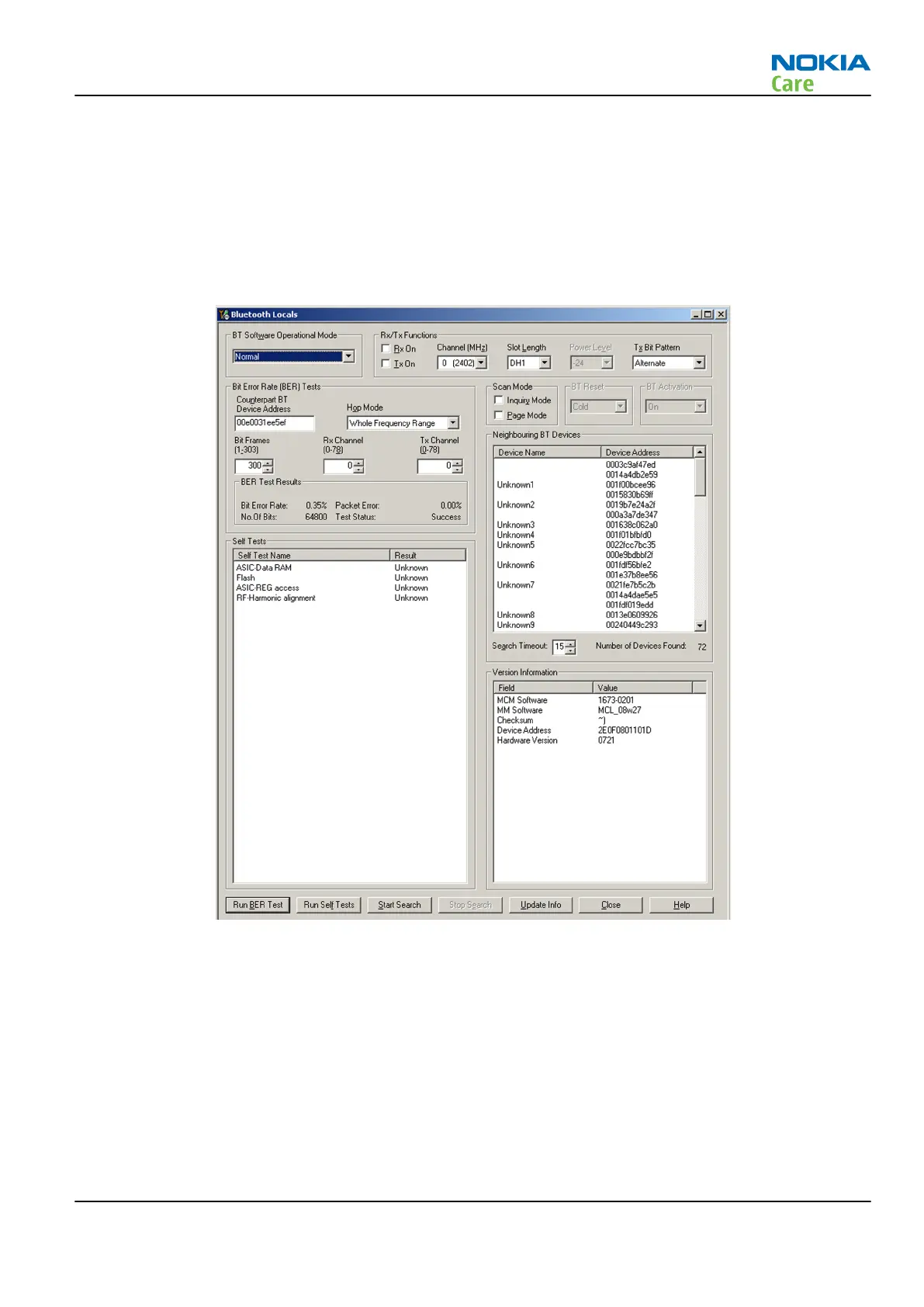
4. Choose Testing → Bluetooth LOCALS .
5. Locate the BT-box serial number (12 digits) found in the type label on the back of the JBT-9, or SB-6
Bluetooth test box.
6. In the Bluetooth
LOCALS
window, write the 12-digit serial number on the
Counterpart BT Device
Address
line.
7. Place the BT-box near (within 10 cm) of the phone and click Start BER Test.
Figure 16 Bluetooth BER test in Phoenix
FMRX radio receiver testing
Steps
1. Set signal generator parameters:
•
FM modulation on
•
Frequency 100MHz
•
FM deviation 22kHz
•
Modulation frequency 1kHz
•
RF level should be varied during the test to obtain good audio signal quality
RM-596
BB Troubleshooting and Manual Tuning Guide
Issue 2 COMPANY CONFIDENTIAL Page 3 – 65
Copyright © 2010 Nokia. All rights reserved.



 To Next Page