WCDMA RX chain activation for manual measurement
Steps
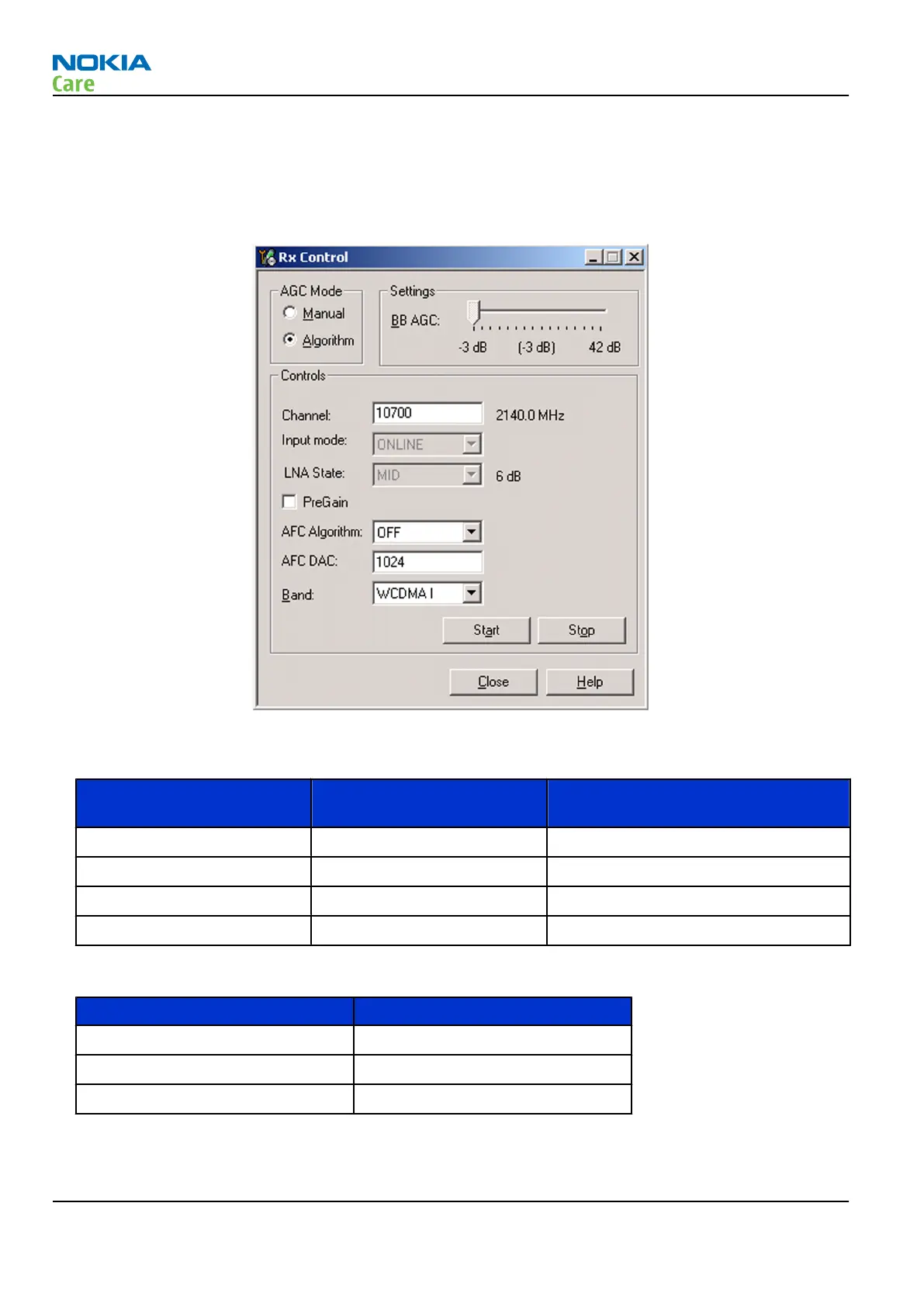
1. In Phoenix, select Testing → WCDMA → Rx Control . The Phoenix Rx Control window opens.
Figure 15 Phoenix Rx Control window with sample settings (WCDMA band I)
2. Make settings for the band to be tested according to the following table:
Band to be tested Phoenix Channel
Signal generator to antenna
connector
WCDMA I 10700 2141 MHz
WCDMA II 9800 1960 MHz
WCDMA V 4408 881.6 MHz
WCDMA VIII 3013 943.6 MHz
3. Make the following general settings (the same values for all bands):
Setting Value
AGC Mode Algorithm
AFC Algorithm OFF
AFC DAC 1024
4. Click Start to activate the settings.
RM-721; RM-722
RF Troubleshooting
Page 4 – 10 COMPANY CONFIDENTIAL Issue 1
Copyright © 2011 Nokia. All rights reserved.



 To Next Page