18
Using the WristOx2, Model 3150
Attaching the Sensor
When applying the device using a single strap, connect the sensor to the device after the
device has been applied to the patient (see “Single Strap Application”).
When using a two-piece wrist band, the sensor can be connected to the device before or
af
ter applying the device to the patient (see “Two-Piece Wrist Band Application”).
The following steps apply to these Nonin sensors:
• 8000SS-WO2, 8000SM-WO2, 8000SL-WO2
• 8000AA-WO2
• 8000J-WO2
If using another Nonin-branded sensor, use sensor adap
ter cable 3150I (see “Parts and
Accessories”).
CAUTION: Only use Nonin-branded sensors with a length of 1 meter or less.
Accuracy may degrade if sensor cable is over 1 meter in length. Using the sensor
cable adapter does not affect accuracy.
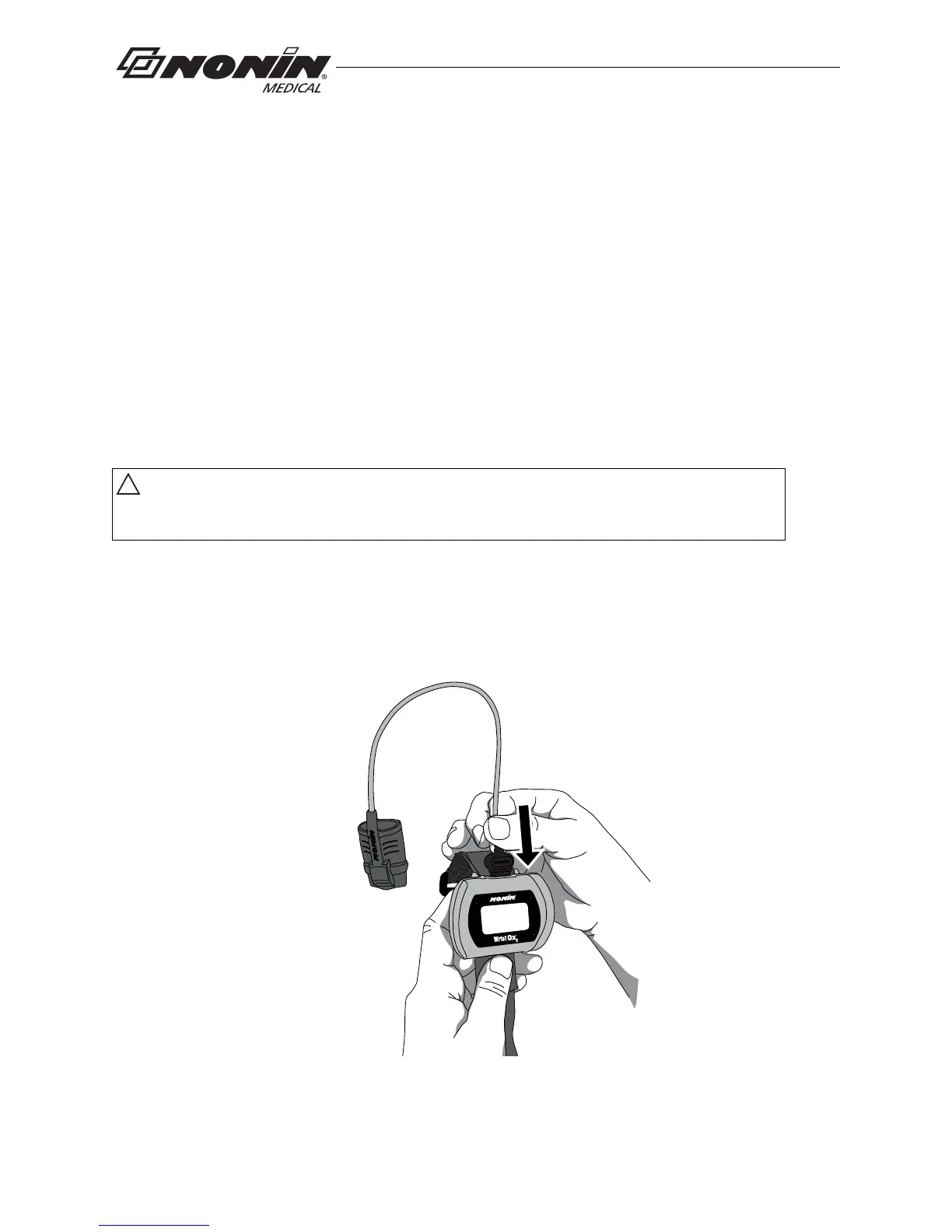
1. Insert the sensor connector into the sensor port at the top of the device (figure 12).
The Non
in logo on the sensor connector should face the front of the device.
2. Push the connector until it clicks into place.
3. The device is ready to use.
Figure 12: Attach Sensor



 To Next Page