24
Using the WristOx2, Model 3150
Verifying Operation
When the WristOx
2
, Model 3150, first turns on, it performs a startup sequence and self-
test. It occurs:
• When a sensor is applied to a patient (Spot Check mode).
• When a sensor is attached to the device (Sensor Activation mode).
• At a programmed start time when a sensor is attached to the device (Programmed
mode).
• After the activation switch is pressed while the device is in Standby mode.
• After the device disconnects from nVISION (Bluetooth connection only).
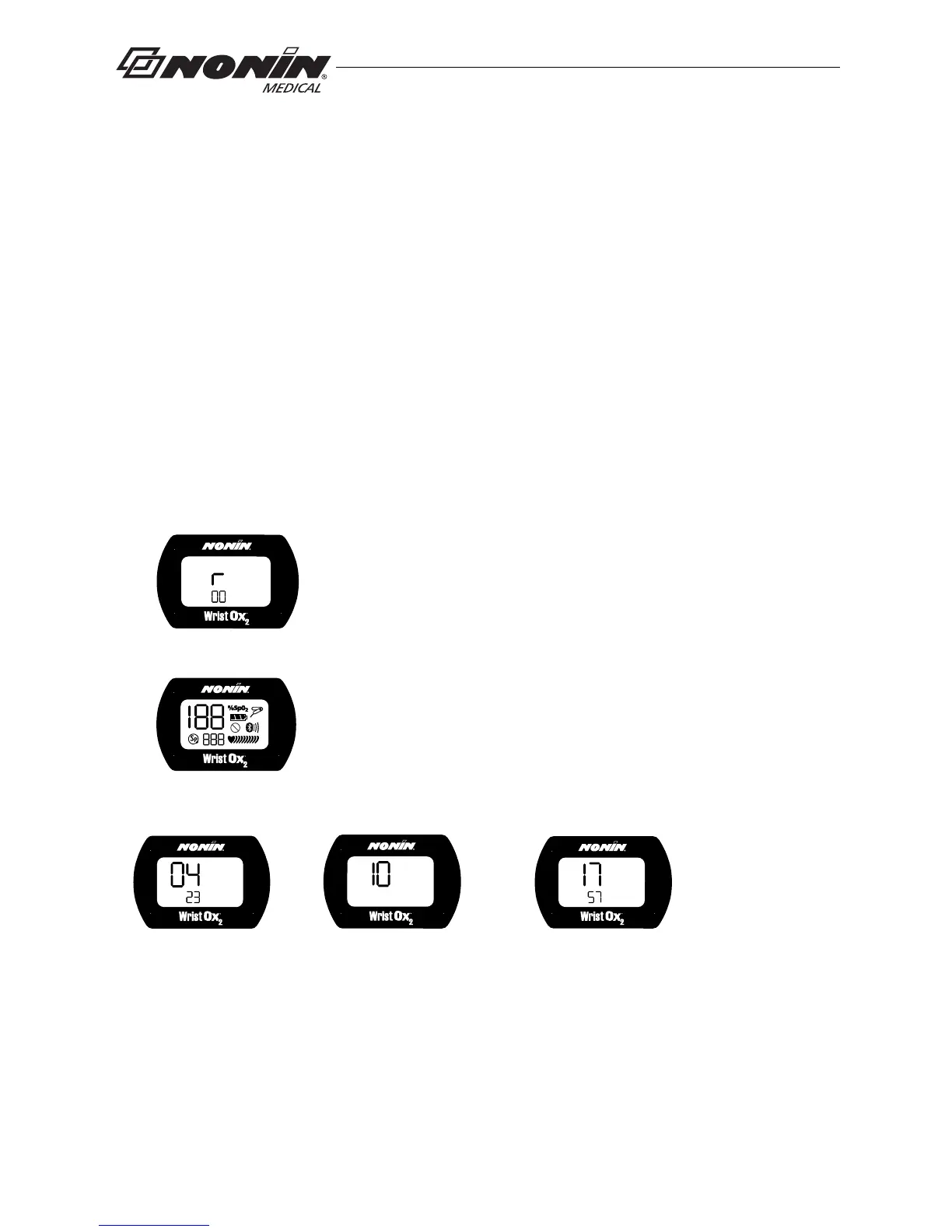
Verify all indicators display during the startup sequence. Indicators appear in the following
order for 1 second each.
Startup Sequence and Self-Test
If the time is not set, the device displays 01:01:10:00:00.
If any indicator does not display, do not use the device. Contact Nonin Technical Service
for assistance.
1. r and the software revision level:
2. All display icons:
3. Date/time using 24-hour clock format (MM:DD:YY:HH:MM)
(example shows 23 April 2010 at 5:57 p.m.):
Month and Day Year
(MM:DD) (YY)
Hour and Minutes
(HH:MM)



 To Next Page