SERVICE AND REPLACEMENT GUIDE OP–2FM OWNER'S MANUAL
NU–VU® FOOD SERVICE SYSTEMS PO BOX 35 MENOMINEE, MICHIGAN 49858-0035
page 30 SALES FAX (906) 863-5889 • SERVICE FAX (906) 863-6322 (800) 338-9886
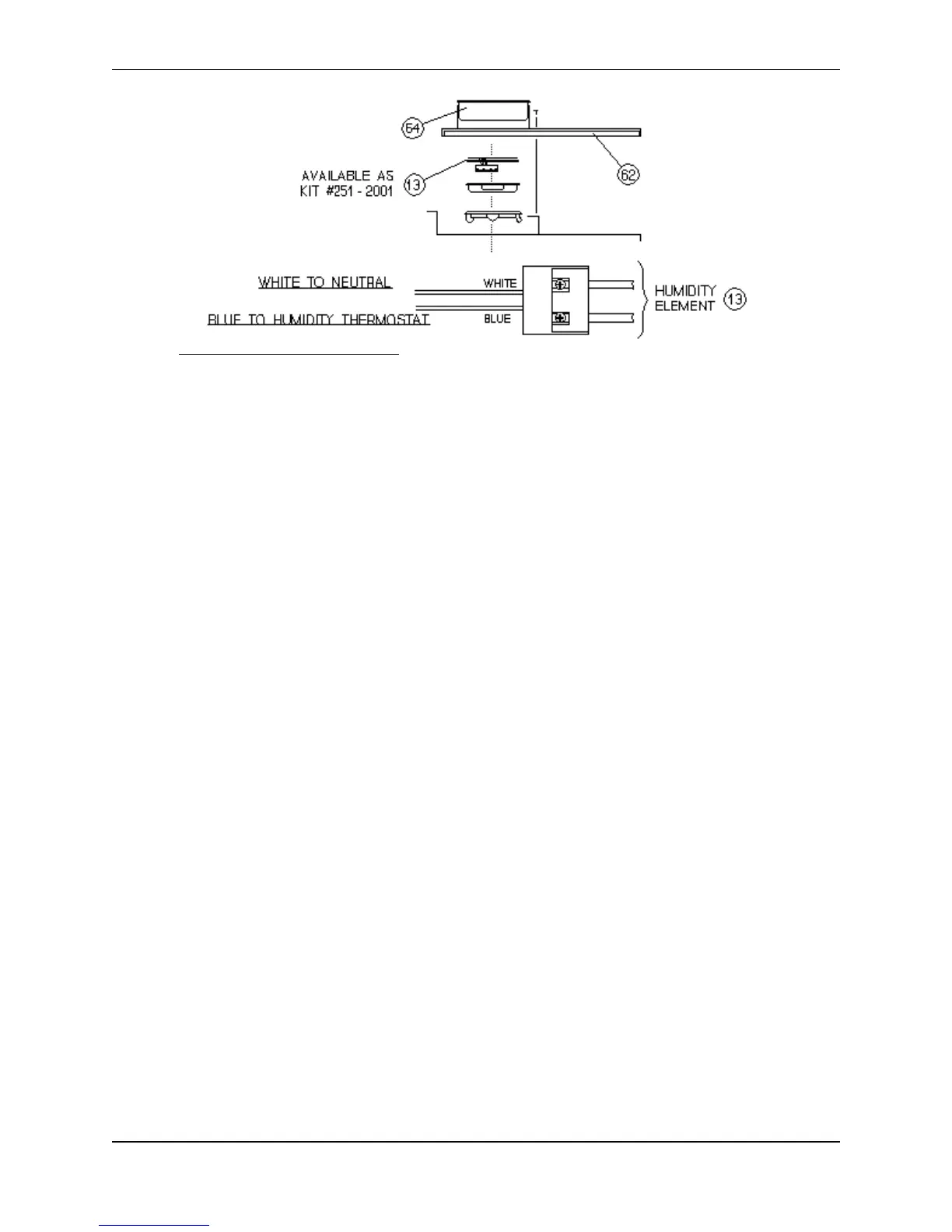
C. Lift the Humidity Element up and out of its mounting ring, and gently pull it away from the
control side of the proofer. Identify, isolate and disconnect the Element wiring leads where they
connect with the unit's control wiring; these should be wire nut junctions. Tag, label or otherwise
identify each wiring connection as you disconnect the Humidity Element.
D. Pull the disconnected Humidity Element and its wires from the proofer.
E. Thoroughly clean under and around the Element mounting area and wipe the area dry.
F. Insert the two wiring leads of the replacement Element down through the Element mounting ring
into the lower box and out through the hole in the side of the box toward the control wiring.
Make sure both wires (WHITE and BLUE) pass through the hole together.
G. Ease the Element into place while continuing to feed the two lead wires through the conduit hole
in the box. Make sure the wiring is not kinked or twisted and that the Element is evenly
supported by the mounting ring.
H. Connect the new leads to the control wiring: WHITE to the tagged group of white wires, BLUE
to the tagged blue (or black) wire leading from the Proofer Humidity Control Circuit Board [10].
All connections must be clean and tight.
I. Replace the Side Access Panel. Be sure not to pull or pinch any wires while replacing the panel.
J. Restore electrical power to the unit and test the new Humidity Element for proper operation.
K. Replace the Water Pan.
TEMPERATURE CONTROL, How To Adjust:
PLEASE CALL THE NU-VU
®
SERVICE DEPARTMENT AT (800) 338-9886
BEFORE ATTEMPTING TO ADJUST THE TEMPERATURE CONTROL!
A. Place a reliable thermometer (or the thermocouple of a test instrument) on a pan in the center of
the Oven or Proofer. Turn the Oven or Proofer ON and set the Temperature Control [22 or 32]
to its normal setting. Allow the equipment to reach a stable operating temperature.
B. Compare the Temperature Control setting to the reading on the test instrument. If there is a
difference of more than 25
°
in the Oven or 15
°
in the Proofer you should call the NU-VU
®
Service Department for advice on adjusting or replacing components.
C. If the difference is less than 25
°
in the Oven or 15
°
in the Proofer a simple dial adjustment may
solve the problem:
1. Remove the Knob of the Temperature Control by pulling it straight out from the face of the
Control Panel.
2. Hold the black plastic Knob securely with the back of the clear plastic dial toward you. Use
a phillips screwdriver to loosen these screws from ¾ to 1 full turn, but do not remove
them!
Fig. #10 – HUMIDITY ELEMENT ASSEMBLY


 To Next Page