7
1
2
3
4
5
6
7
8
9
10
11
12
15
14
13
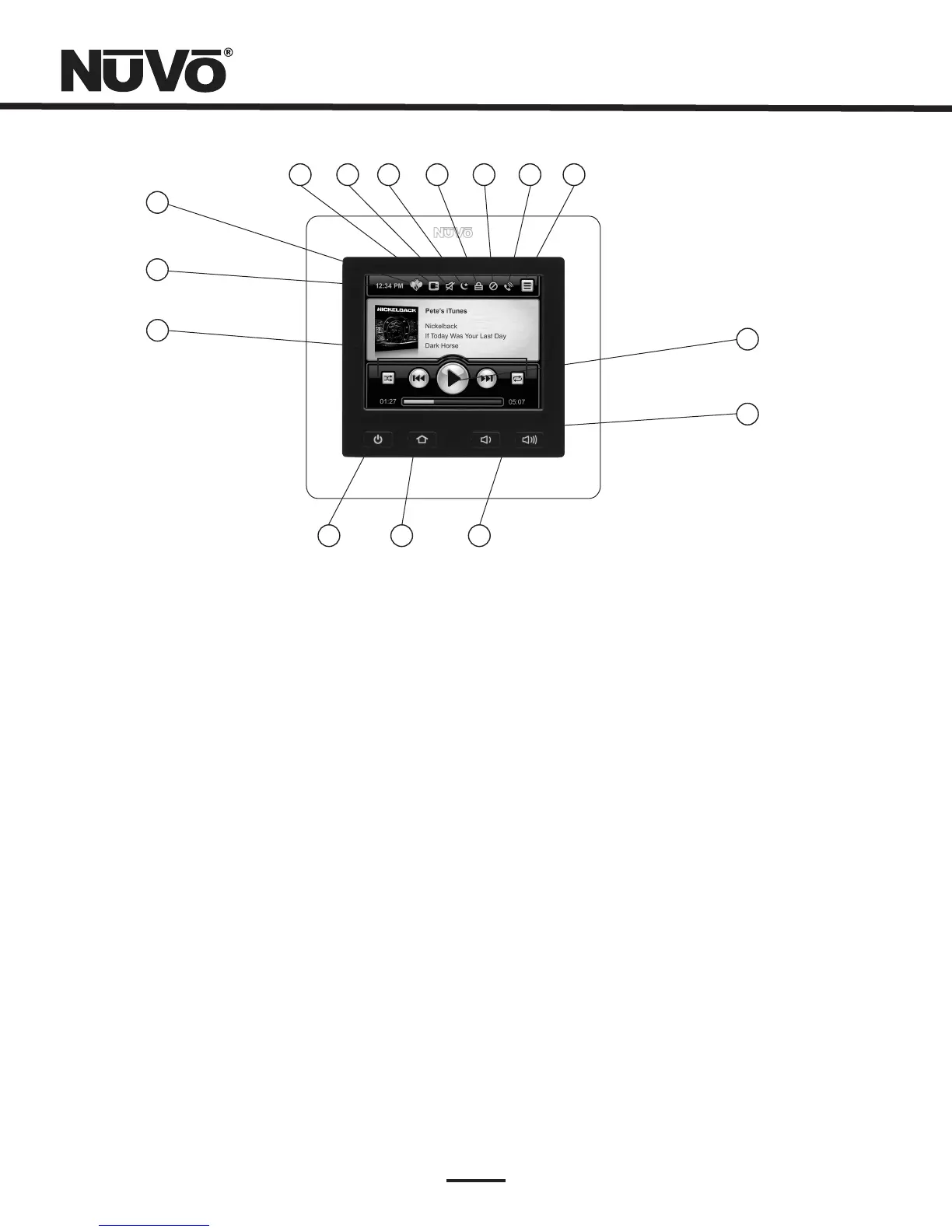
1. Thisdisplayscrucialinformationabouttheselectedsource,suchasartist,album,track,title,frequencyor
station,andmetadataforAM/FMandSatelliteradio.AlbumartisalsodisplayedwhenusedwiththeMusicPortsource.When
inmenumode,themenucontrolchoicesaredisplayed.
2. AtimedisplayisdistributedtoallthezonesintheSystembyNuVoNet.Thisissetwhenaconfigurationis
downloadedtotheSystemoritcanbesetintheSystemMenu.
3. Thisindicatorwilllightwhenthesystemisinpartymode(allzonesturnedonandoperatedfromoneControl
Pad).
4. Whenthisiconislit,ExclusiveSourceisturnedon.ExclusiveSourcelocksoutsourcecontrolfromother
zonesofthechosensource.
5. Thisiconwilllightwhenthezoneistemporarilymuted.
6. Thisiconindicatesthatthezoneisin “Sleep” mode,whichistheabilitytosetanaudiosourcetoplayforaspecified
amountoftime.
7. Thisindicatesthatthezoneislocked.Inthisstate,afour-digitsecuritycodeisrequiredtounlockthezone'scontrol
features.
8. Thisiconindicatesthatthezoneissetfor “DoNotDisturb”.TherearethreeDoNotDisturbchoices;exclude
thezonefromPartyMode,PageMode,and/orSystemMute.
9. Thisiconwilllightwhenthesystemistriggeredtogointo “PageMode”.
10.
11. Thesefunctionbuttonsrepresentbasicsourcecontrol.Theychangeinfunctionalitywiththechosen
audiosource.
12.
15. Thisbuttonturnspowertothezoneonandoff.Whenpushedandhelditwillturnoffallofthezonesinthe
system.
SourceDisplay:
CurrentTime:
PartyMode:
ExclusiveSource:
Mute:
Sleep:
Lock:
DoNotDisturb:
Page:
MenuButton:
TransportFunctions:
PowerButton:
Menuservesasaccesstomusicbrowsing,presets,andfavorites,aswellasallowingaccesstospecificzone
andsystemcontroloperations.
Thisbargraphindicatestheplaybackstatusofdigitalmusicfilesfrommusic
playbacksourcedevicessuchastheMusicPortorNuVoDocksforiPod.Thesamebargraphdisplaytemporarilysupports
volumeleveldisplaywheneveravolumeadjustmentisbeingmade.
13. Thesebuttonsincreaseordecreasethezone'svolume.
14. ThisbuttonreturnstheusertotheHomescreen(theviewshownhere).
PlaybackStatus/VolumeLevelIndicator:
VolumeUpandDownButtons:
HomeButton:
NV-CTP36ColorTouchPad



 To Next Page