8
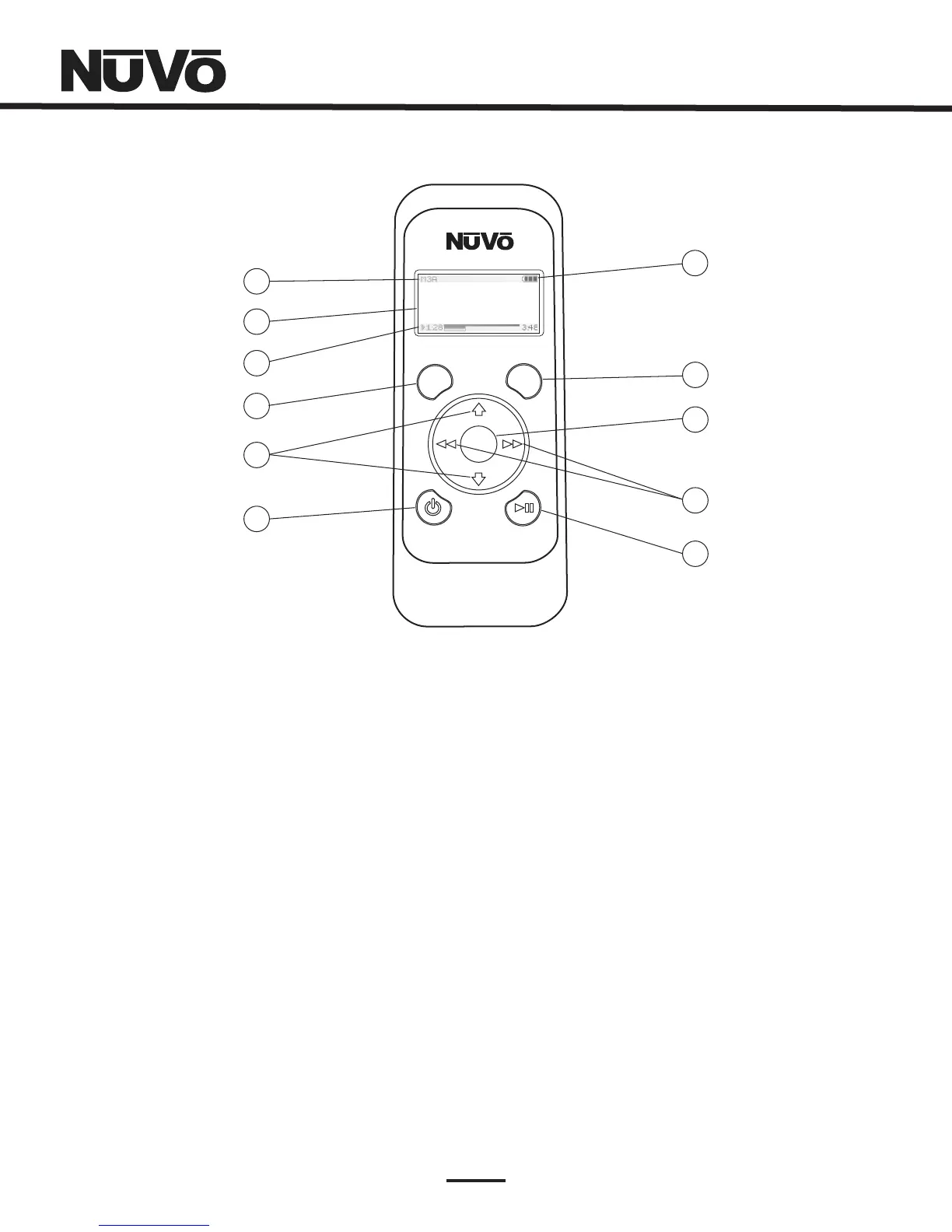
1. AthreecharacterabbreviationoftheselectedsourceappearsinthisportionoftheWirelessControlPad
display.
2. Thedisplayismulti-lineOLED(OrganicLightEmittingDiode).Itshowsalbum,artistandtrackforpersonalmusic,
andchannelandfrequencyinformationforbroadcastmusic.Inmenumode,thedisplaygoestoeightlinesoftext.
3. Thisbargraphindicatestheplaybackstatusofdigitalmusicfilesfrommusicplayback
sourcedevicessuchastheMusicPort,orNuVoDocksforiPod.Thesamebargraphdisplaytemporarilysupportsvolumelevel
displaywheneveravolumeadjustmentisbeingmade.
4. Menuservesasaccesstomusicbrowsing,presets,andfavorites,aswellasallowingaccesstospecificzoneandsystem
controloperations.
5. TheseareusedtoscrollupanddownthroughthemenusandcontrolvolumeUpandDowninnormalplay
mode.
6. Thisbuttonturnsthelocalzoneonandoff,orturnsallzonesoffsimultaneously.
7. Thisindicatesthecurrentbatterychargelevel.
8. Whenthisbuttonispushed,alistofavailablelisteningzonesislistedonthedisplay.Theusercanchangezone
controlbymovingthehighlighttothedesiredzoneandpressingtheOKbutton.
9. TheOKbuttonservesadualfunction.Innormalplaymode,itsequencesthroughtheavailableaudiosources.InMenu
mode,itisusedtoselectthehighlightedmenuitem.
10. InNuVoNetcommunication,thesebuttonswilltrackforwardandbackortuneupanddown.Forthird-
partysources,theseareIRprogrammablebuttonsforsimplesourcetransportfunctions.Anadditional “pressandhold”
commandcanalsobeassignedtothisbuttonforadditionalfunctionality(IRcommandscanonlybeassignedtobuttonsinthe
EssentiaConfiguratorsoftware).
11. ThisIRprogrammablebuttontogglesbetweentheplayandpausefunctionsofthechosensource.Whencontrolling
theT2Tuners,thisbuttontogglesthroughtheTuner'sreceivemodes.Athird “pressandhold” functioncanalsobeassignedto
thisbuttonforadditionalfunctionality.
SelectedSource:
OLEDDisplay:
PlaybackStatus/VolumeLevelIndicator:
Menu:
UpandDownArrows:
Power:
BatteryDisplay:
ZoneButton:
OK:
ForwardandBackArrows:
Play/Pause:
1
2
3
4
5
6
7
8
9
10
11
OK
MENU ZONE
drift
M3A
1of9
FollowtheDay
3:48
1:28
EdgeofTomorr
NV-WCPSWirelessControlPad



 To Next Page