19
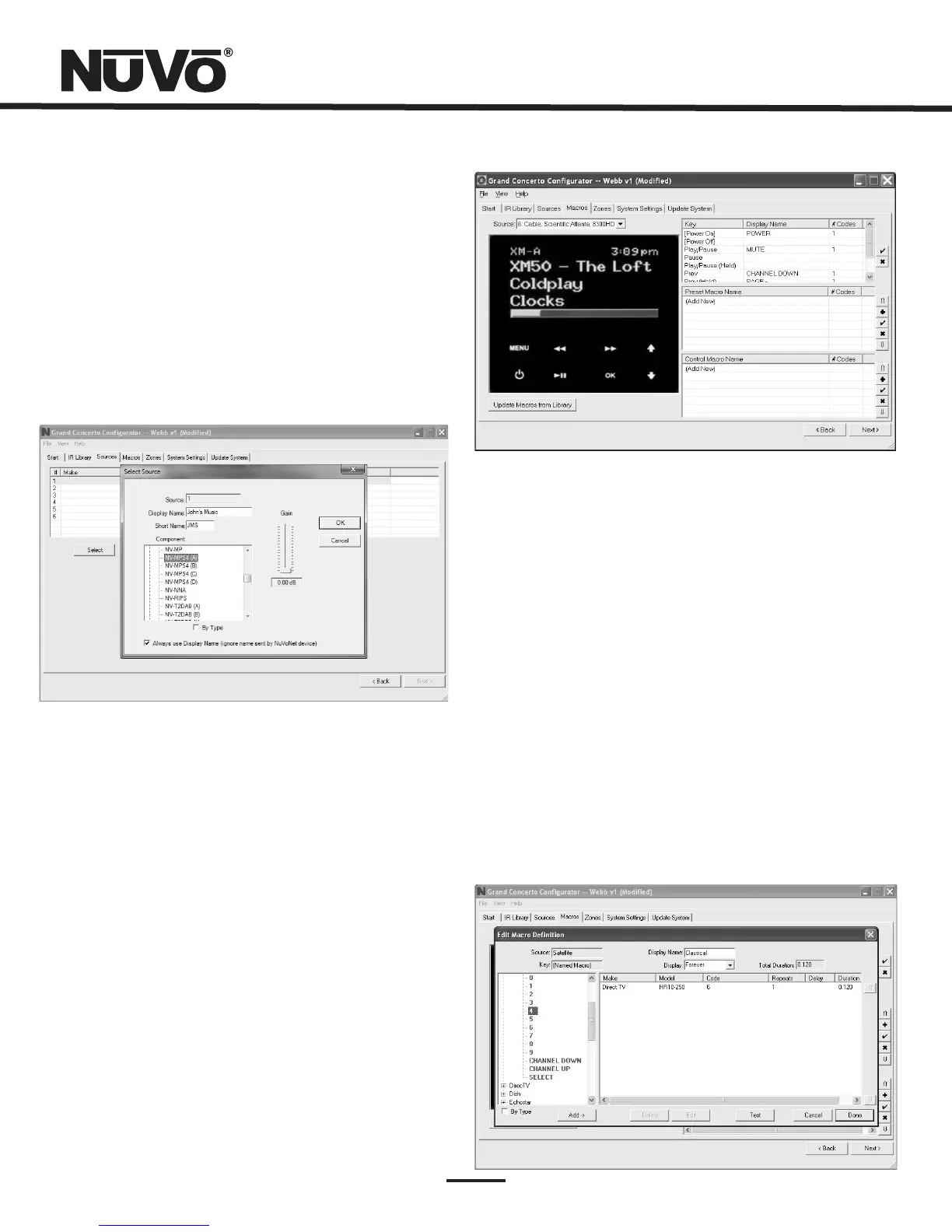
4.Macros(Fig.20)
4.1EditMacroDefinition
AnimportantfeatureoftheConfiguratorprogramisthe
abilitytodefinesourcespecificmacrodefinitionsforthird
partyIRcontrol.TheGrandConcertohasauniqueabilityto
storespecificIRcommandsaspresetnames.Thebest
exampleiscableorsatellite.UsingtheMacrotabyoucan
establishapresetnameandsettheappropriateIR
commandstoselectaspecificstation(thiswillbecoveredin
the section).Macrodefinitiononly
appliestothirdpartynon-NuVoNetsources.
AddingaNuVoNetSource(Fig.19)
SettingUptheT2GTuners,
MusicPort,andNuVoDockforiPod
NuVoNetsourcescanbeplacedintheConfigurationwiththe
sameprocedureasthirdpartyIRcontrollableequipment.
TheConfiguratorprogramcontainslibrariesforeachofthe
NuVoNetcomponentswhichhavetheappropriatebutton
functionspreassigned.Eventhoughthecomponentsare
assigned,youmuststillsettheNuVoNetsourceinputson
eachofthecomponents,see
,pg.9.
Fig.19
Fig.20
4.1EditMacroDefinition(Fig.21)
TheMacrotabhasaSourcepulldownmenuthatdisplaysthe
sixsourcesdefinedintheirorder1-6.Whenanon-NuVoNet
sourceishighlightedandselected,threeseparatepointsof
definitionappearontherightsideofthescreen.Theleft
sideofthescreenisarepresentationoftheControlPad
display.Whenthecurserisscrolledoverthebuttonsonthe
ControlPad,atooltipappearsindicatingthefunction
commandorcommandsthathavebeenassignedtothat
button.Hereyoucandoubleclickonthebuttonwhichopens
theMacroDefinitionWindow.WheninMacroDefinition,if
youchooseto,youcanreassignnewcodes.Youcanalso
doubleclickontheappropriatefunctioninthewindowon
therightsideofthetabandaccesstheMacroDefinition
window.
Fig.21



 To Next Page