20
4.1.1CreatingaMacroPresetString(Fig.22)
AnimportantfunctionoftheMacrotabistocreateamenu
ofpresetchoicesforthirdpartycomponents,suchas
satellite,cableandCDchangers.Whenanon-NuVoNet
sourceisselected,aPresetMacrowindowappearsonthe
rightsideofthescreenwithopenspacesforstoringpreset
stationchoices.Upto250macroscanbedefinedinthis
window.Whenapresetisaddedtoasource,anadditional
Presetmenuitemwillbeaddedtothatsourcebrowsing
capabilityontheControlPads.Thepresetmenuispreceded
bythethreecharactersourcedesignationestablishedinthe
Sourcetab.
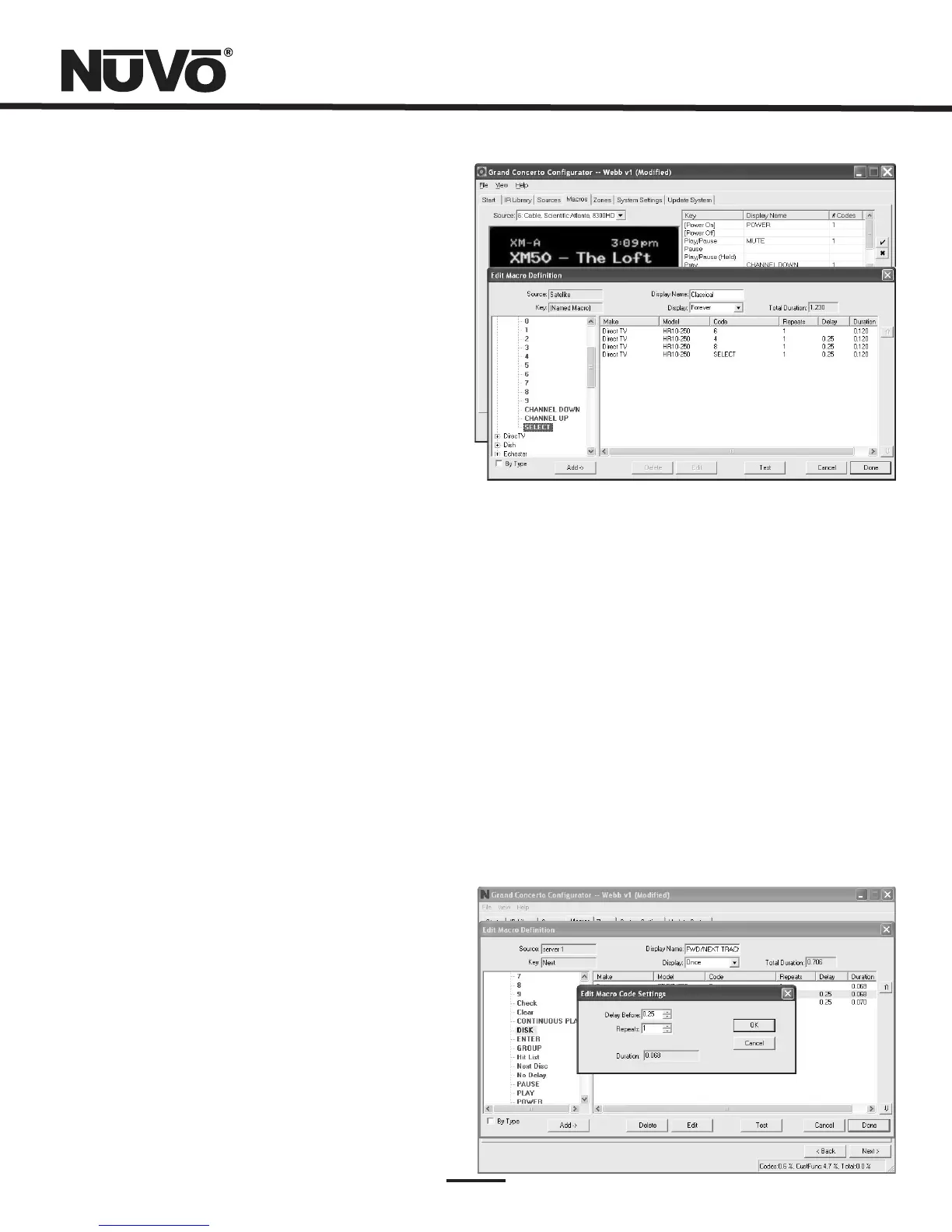
Tocreateapresetmacro,doubleclickonthefirstavailable
presetmacroselection,Fig.20.ThiswillopentheEditMacro
Definitionwindow.Onceinthatwindowyoumusttypea
nameforthepresetintheDisplayNamewindow.Thatwill
establishthepresetnameasitwillappearinthepreset
menu.NotethattheDisplaydropdownmenudirectlybelow
theDisplayNamewindowdefaultstoForever.Thisisthe
desiredchoiceforapresetandwillkeepthepresetnameon
theControlPadwhilethatselectionisbeinglistenedto.
TheavailableIRcodesforthatsourcewillbeexpandedin
greenontheleftsideoftheEditMacroDefinitionwindow.
Asyoudoubleclickonacode,itwillautomaticallybeadded
tothemacrostringontheright.Upto255codescanbe
addedtoasinglemacroandthecodeswillfireintheorder
inwhichtheyareaddedtothestring.Oncethedesired
macrostringiscomplete,clickdoneandreturntothemain
macrotab.ThecompletedmacrowillappearinthePreset
Macrowindow.Tocreateasecondpreset,doubleclickonthe
nextspaceandrepeattheMacroDefinitionsteps.
IfthecomponenthaddefaultkeysdefinedintheIRLibrary,
singleIRcodemacroswillbeautomaticallycreatedforeach
key.HoveringthemouseovereachkeyintheControlPad
pictureontheleftsideofthescreenwillbringupatool-tip
displayingthenameofthemacroassignedtothatkey.
Clickingonthekeyhighlightsthemacroontherightsideof
thescreen.Double-clickingonakeyineitherdisplaywill
allowyoutochangethedefaultassignmentorcreateanew
oneintheEditMacroDefinitionswindow,Fig.21
Fig.22
Fig.23
4.1.2EditingCodesinaMacro(Fig.23)
WhenintheEditMacroDefinitionwindow,double-clicking
onamacrostepontherightsidewillopenan “EditMacro
CodeSettings” window.Thisallowsyoutochangethedelay
timebeforethecommandisissued.Thedefaultdelayis.25
seconds.Thiscanbeincreasedby.25-secondincrementsup
to30.5seconds.Oftenacommandrequiresmechanical
movementinthesourceequipmentand,therefore,the
delayisimportantbeforeinitiatingthenextcommand.
Thenumberofrepeatsforeachcommandcanalsobe
changed.Thisisequivalenttopushingandholdingthe
buttonontheremotecontrol.



 To Next Page