Dev ice1
Con nectto
NV-I 8GM
Con certoE ZPort
Mod elNV-I8 GEZP
www.n uvote chnol ogies .com
NuVoTech nolog iesLLCH ebron ,Kentu ckyUSA
Dev ice2 De vice3
Dev ice4 Dev ice5 Dev ice6
R
SYSON
EXT.MUTE
SUM1
3033 118
C
US
CONF ORMS TO
UL STD .6500
CERT IFIED TO
CAN/ CSA STD. E6006 5
NuVo Tech nolog iesCin cinna tiOhioU SA
FUSE :T5 A
120V6 0Hz500 W
MODEL NV-I8D M
SIXSOU RCEEIG HTZONE
AUDIOD ISTRI BUTIO NSYSTE M
www.n uvote chnol ogies .com
VARI ABLE
OUT PUT
FIX ED
OUT PUT
TIP =L
RIN G=R
RS- 232
CON NECTTO
NV-I 8X
USEN V-SLC1
CAB LE
CON NECTTO
NV-I 8EZP1
USEN V-NC1
CAB LE
USECNLYWITH250VFUSE
SUM2
OUTPUTPOWER
20W/6OHMX2
ZONE7& 8
SYSTE M
NETWO RK DIGITA L LIN K
PROGR AM
12
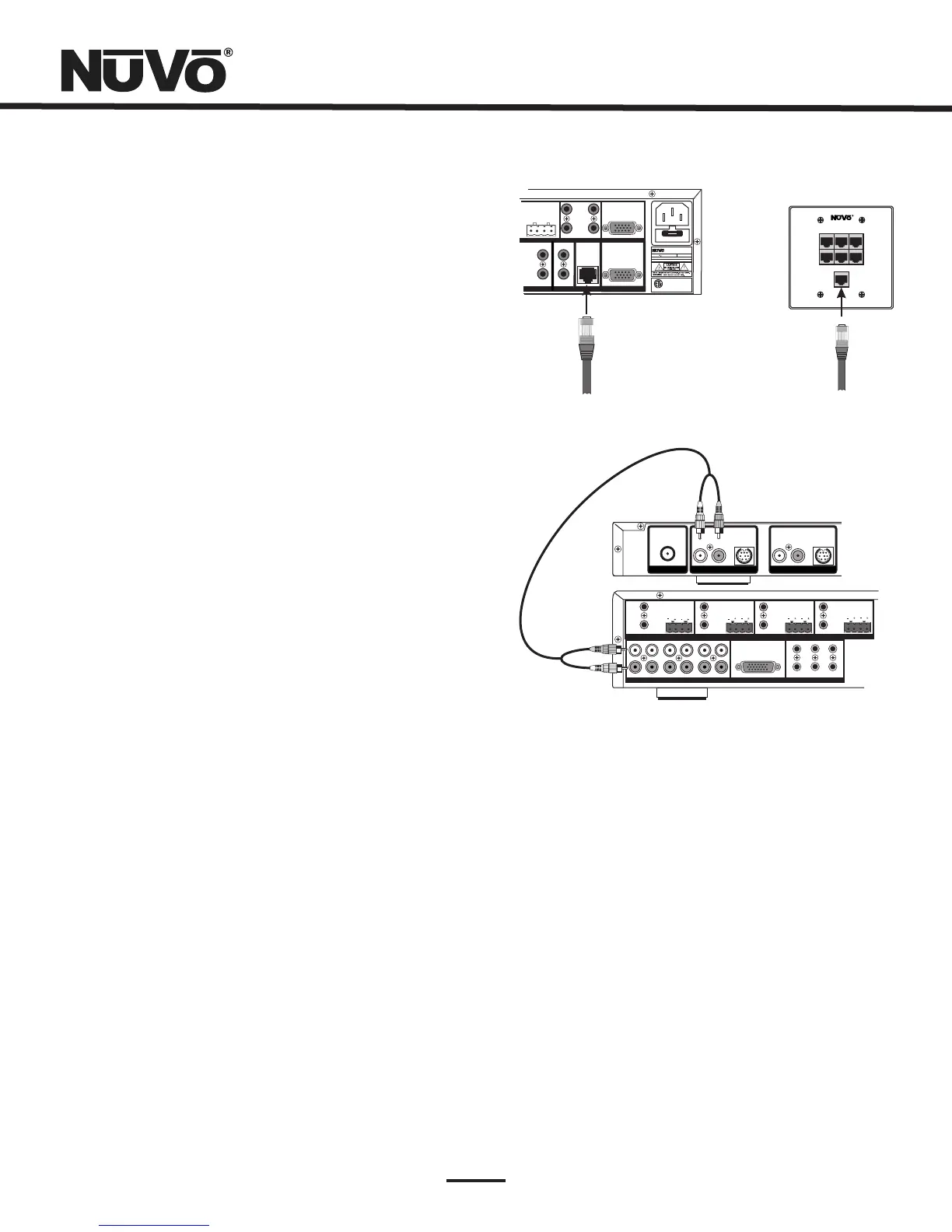
V.ConnectingtheEZPorttotheGrandConcertoAmplifier
(Fig.4)
WhentheEZPortisinstalled,theonlypartvisibleshouldbe
thefaceplateandsevenRJ45ports.Thesuppliedpre-
terminatednetworkcableshouldthenbepluggedintothe
portlabeled “ConnecttoNV-I8GM” andintothe “Network”
connectiononthebackoftheGrandConcertoAmplifier.Any
CAT5cableterminatedusing568Aor568Bnetworkwiring
willsufficeshouldyouneedalongerconnection.
Remember,itisimportanttoterminatethecablethesame
wayonbothends.
Fig.4
VI.AttachingAudioSourceEquipment(Fig.5)
EachpieceofaudioequipmentisconnectedtotheGrand
ConcertoamplifierwithstandardstereoRCAcables.Attach
anRCAcabletothecorrespondingaudiooutputonthe
sourceequipmentandtothedesiredsourceinputonthe
backoftheGrandConcertoamplifier.Thenumberedinput
foreachsourceisimportantintheconfigurationofthe
system.ThiswillbecoveredindetailintheGrandConcerto
Configuratorportionofthismanual.
Fig.5
SettinguptheNuVoSourcesforusewithNuVoNet
IX.GrandConcertoConfiguratorSoftware
.
AfeatureoftheGrandConcertoSystemisitsabilityto
automaticallycommunicatewiththeT2Tuners,MusicPort
and,andtheNuVoDocksforiPod.Thecommunication
happensthroughtheEZPortconnectionhub,acrossa
communicationprotocolcalledNuVoNet.Althoughsoftware
programmingisnotnecessaryforthisfunction,configuring
theinstallationthroughtheConfiguratorSoftwarepriorto
installationhasdistinctadvantagesandishighly
recommended,see ,
pg 11.
T2Tuners(Fig.6)
WheneachmodeloftheT2Tunersarepluggedinforthe
firsttime,theinitialdisplay,
willappear.Whenthe buttonistouched,the
Tunerwillpromptaregionaltuningselection.Itwillthengo
to
and StandAloneisautomatically
highlightedatinitialstartup.
UnitializedStateDetected
(PressOK) OK
TunerA,Standalone,Source1,Source2,Source3,Source4,
Source5, Source6.
Usethearrowstoscrolltotheappropriatesourcenumber.
Whentheselectionismade,theT2willgotothesame
selectionforTunerB.Wheneachoutputselectionis
complete,theGrandConcertoSystemNuVoNetwill
recognizethatsource.
PleasenotethattheSourceselectionswillnotbeselectable
untiltheappropriateaudioconnectionsaremadebetweenthe
T2andtheGrandConcertoamplifier.
ANTENNA
IN
USEN V-T2FAA
ANT ENNA
L
AUDIO
R
TUNER A
SIR IUS
L
AUDIO
R
TUNERB
SIR IU S
SOU RCELIN K
L
R
L
R
L
R
SOU RCEINP UTS
TIP =L
RIN G=R
ZON E2
VARIA BLE
OUT PUT
FIX ED
OUT PUT
TIP =L
RIN G=R
VARIA BLE
OUT PUT
FIX ED
OUT PUT
TIP =L
RIN G=R
VARIA BLE
OUT PUT
FIX ED
OUT PUT
TIP =L
RIN G=R
1 2 3 4 5
6
1 2 3 4 5
6
1 2 3
4
CON NECTTO
NV-I 8X
USEN V-SLC1
CAB LE
5
6
ZON E1
VARIA BLE
OUT PUT
FIX ED
OUT PUT
SPE AKER
40W /6OHMSX2
LEF TRIGHT
ZON E3
ZON E4
SOU RCESTATU S
SPE AKER
40W /6OHMSX2
LEF TRIGHT
SPE AKER
40W /6OHMSX2
LEF TRIGHT
SPE AKER
40W /6OHMSX2
LEF TRIGHT



 To Next Page