HOLD
ALL OFF
NV-GRC1
REMOTECONTROL
FAVORITES
VOLUME
1
2
3
4
5
6
7
8
9
11
10
12
SOURCE/OK
PWR
MUTE
SLEEP
DISP
MENU
G2
G1
F1 F2
F3 F4
1
2
3
4
5
6
7
8
9
10
11
12
13
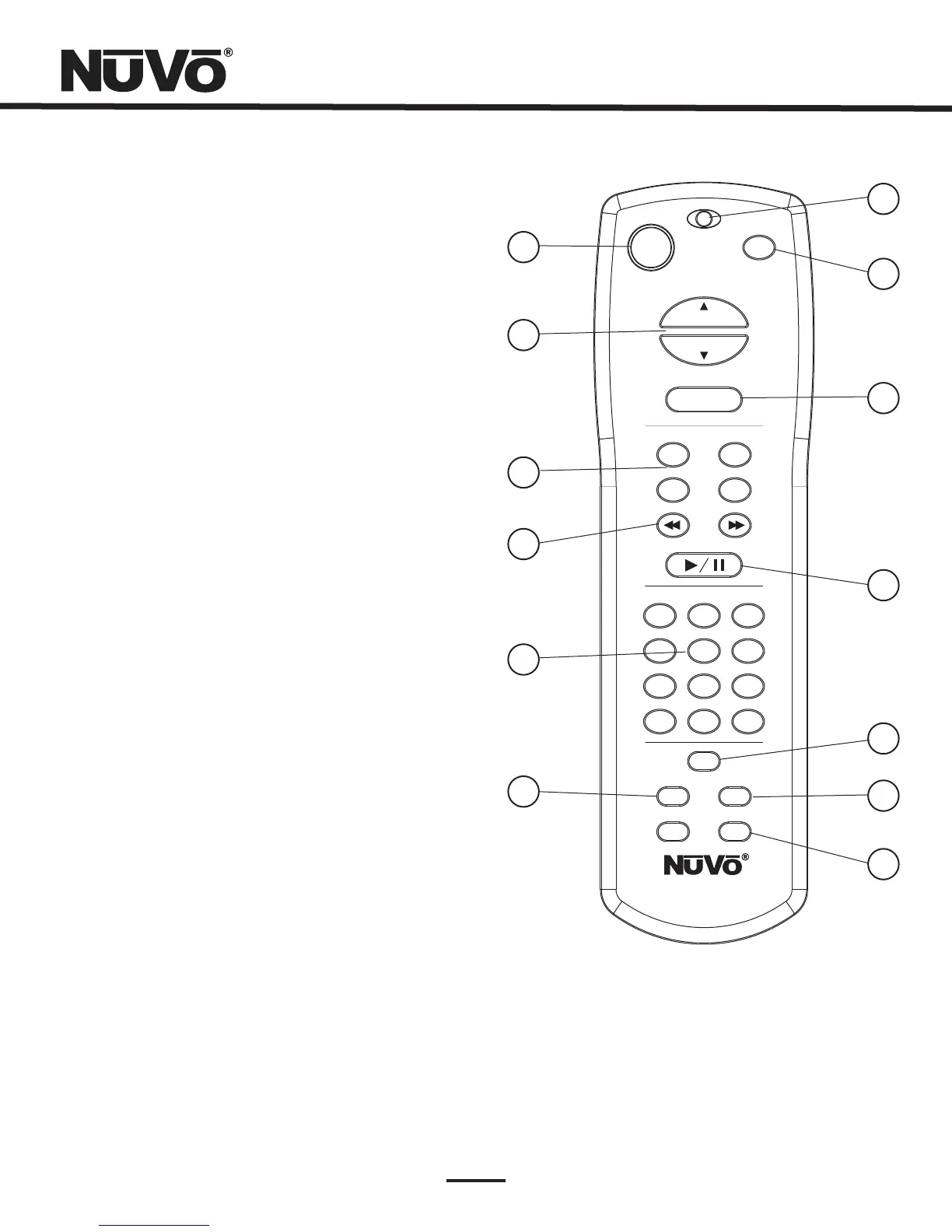
NV-GRC1RemoteControl
9
1. Eachzonecanbeturnedonandoff,orall
zonescanbeturnedoffwiththisbutton.
2. Thisservestwofunctions.Innormal
operationmode,itisavolumecontrol,butwhen
youareusingthemenufeaturesoftheControlPad,
itallowsscrollingupanddown.
3. Thesebuttonsarecurrently
inactiveanddesignedforfutureuse.
4. TheseIRprogrammable
buttonsaredesignedforforwardandreverse
functions.
5. AfunctionoftheGrandConcertoSystem
istheabilitytoaccessuserdefinedfavoritesfor
easyaccess.Thefirsttwelvearedirectlyaccessible
usingtheRC1Favoritesbuttons.
6. ThisbuttonallowsaccesstotheDisplaydim
menuavailableateachControlPad.
7. ThisLED(LightEmittingDiode)lights
toindicateabuttonpush.
8. TheRC1remoteprovidesadiscretemute
functiontoquicklysilencethezone'soutput.
9. Thisisanotherdualfunctionbutton.In
normalplaybackmodeitscrollsthroughthe
sources,orinmenumodeitselectsahighlighted
menuchoice.
10. ThisIRprogrammablebuttontoggles
betweentheplayandpausefunctionsofthechosen
source.WhenusingtheT2GTuners,thisbutton
togglesthroughtheTuner’sreceivemodes.
11. Thisbuttonentersthemenufeaturesofthe
ControlPad.WheninMenumodetheVolumeup
anddownbuttonsscrollthroughthemenuchoices.
12. Thisallowsaccesstothesleeptimermode.
13. Thesebuttonsarecurrentlyinactive.
Power:
Volume:
FunctionButtons:
ForwardandReverse:
Favorites:
DISP:
FunctionLED:
MUTE:
SOURCE/OK:
Play/Pause:
MENU:
Sleep:
G1andG2:



 To Next Page