74 Océ 3050 User Manual
SETUP: Océ 9xxx series
■ Whenever you select a printer of the Océ 9xxx series:
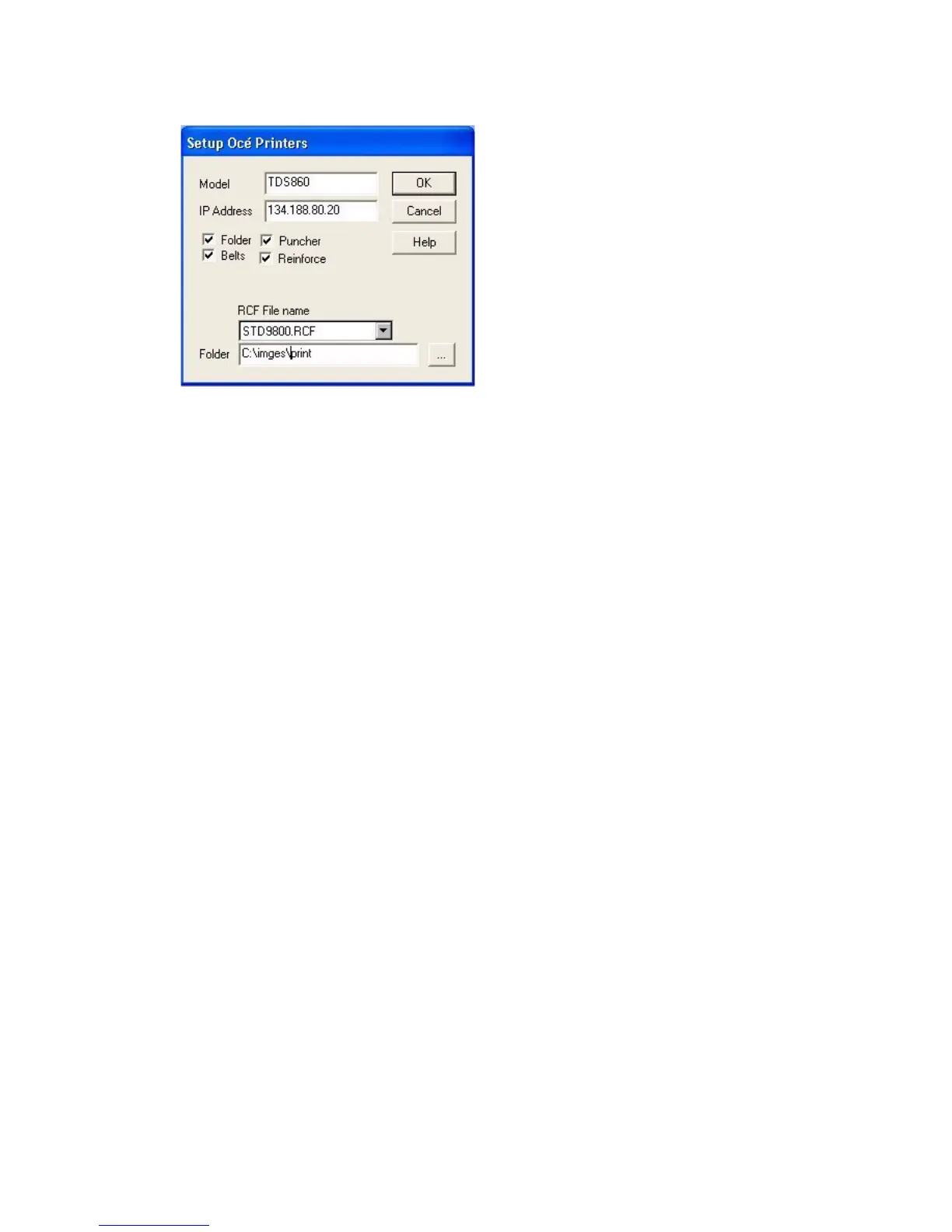
[52] Setup Océ 9xxx series Printers
■ The initial entered "Name" can be changed in the "Model"-field
■ Enter in the "IP-Address"-field the IP-address where the printer is connected.
When no IP-Address is entered the "Folder"-field will be used as
output-destination.
■ Enable the options the printer supports
■ Enter in the "RCF File name" field the Standard RCF file which will be sent
together with the scanned image to the printer.
■ Enter in the "Folder"-field a local folder destination when you would like to
store the scanned image to disk.
■ Press Ok to confirm or Cancel to cancel Add-Printer
Note: Printer settings in the Main Window will overrule the settings in the RCF
file.
Note: Whenever an IP-address is entered the "Folder"-field will not be used.



 To Next Page