98 Océ 3050 User Manual
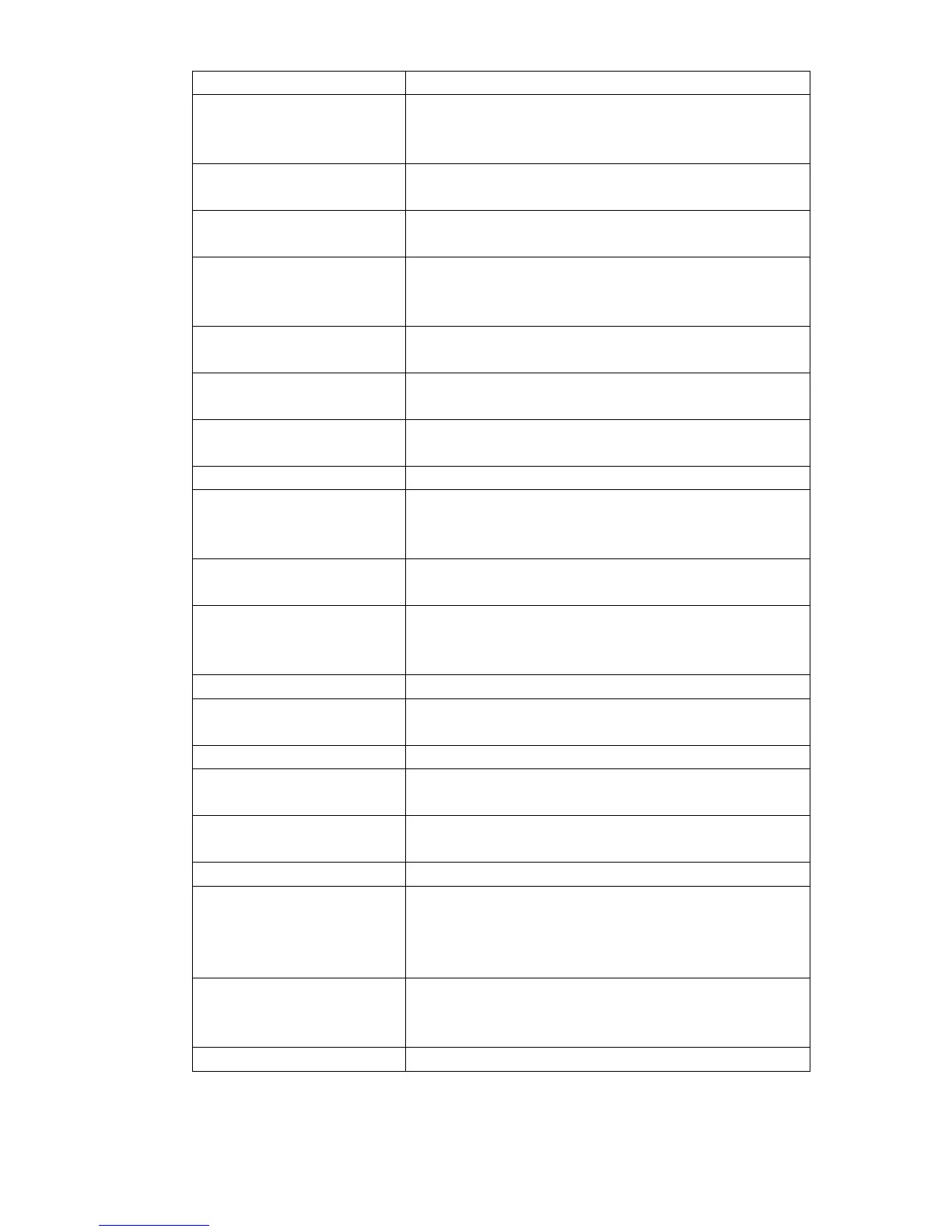
IDS_MSG1115 Unable to open or create Job Management Log files.
Please ensure the Log file directory exists and this PC
has write permission.
IDS_MSG1116 Log file is limited to between one and eight characters.
Please try again.
IDS_MSG1117 Unable to start SCSI printer driver. Printing to a SCSI
printer port will not be possible.
IDS_MSG1118 Unable to communicate with SCSI printer. Please en-
sure the printer is switched on and has the correct ad-
dress.
IDS_MSG1119 No Windows printer currently installed. Use the Con-
trol Panel Utility to install the required printer driver.
IDS_MSG1120 X Machine Offset is in microns and must be in the
range 15000 to 45000.
IDS_MSG1121 Y Machine Offset is in microns and must be in the
range –
2000 to 2000.
IDS_MSG1122 QA Frequency count must be in the range 1 to 250.
IDS_MSG1123 Image data filename exists in the filing directory. The
current image will not be saved. Please try a different
filename or path.
IDS_MSG1124 Image data file failed to open. Please check the filing
directory.
IDS_MSG1125 Disk usage exceeded. The filing hard disk or the print
spool directories have reached the percentage usage
specified in the configuration dialogue box.
IDS_MSG1126 Maximum file out of range.
IDS_MSG1127 Disk % usage exceeded. Press Retry if more disk space
is available or Cancel to stop scanning.
IDS_MSG1128 Image filename exists in the image file directory.
IDS_MSG1129 Failed to open image filename. Please check if the im-
age file directory name is valid and available.
IDS_MSG1130 Scanner initialisation and calibration in progress.
Please wait 20 seconds....
IDS_MSG1131 The minimum print copy count is 1.
IDS_MSG1132 The maximum copy count for a 7700 printer when us-
ing the sorter is 10 times the number of sorters. The
copy count has been set to the maximum possible for
the current configuration.
IDS_MSG1133 Hollerith text is present in the window area of the card.
Press OK to erase the window area text and continue.
Press Cancel to edit the Hollerith text.
IDS_MSG1134 Unable to display the current image.
Error code Error message
[62] Error messages



 To Next Page