Web Based Management
146
10
Error Detection Setting 10
You can choose what action is taken when the print log cannot be stored to the server due to a network error.
a Choose Ignore Log & Print or Cancel Print in Error Detection Setting of
Store Print Log to Network.
Ignore Log & Print
If you choose Ignore Log & Print, the machine prints the document even if the print log cannot be
stored to the server.
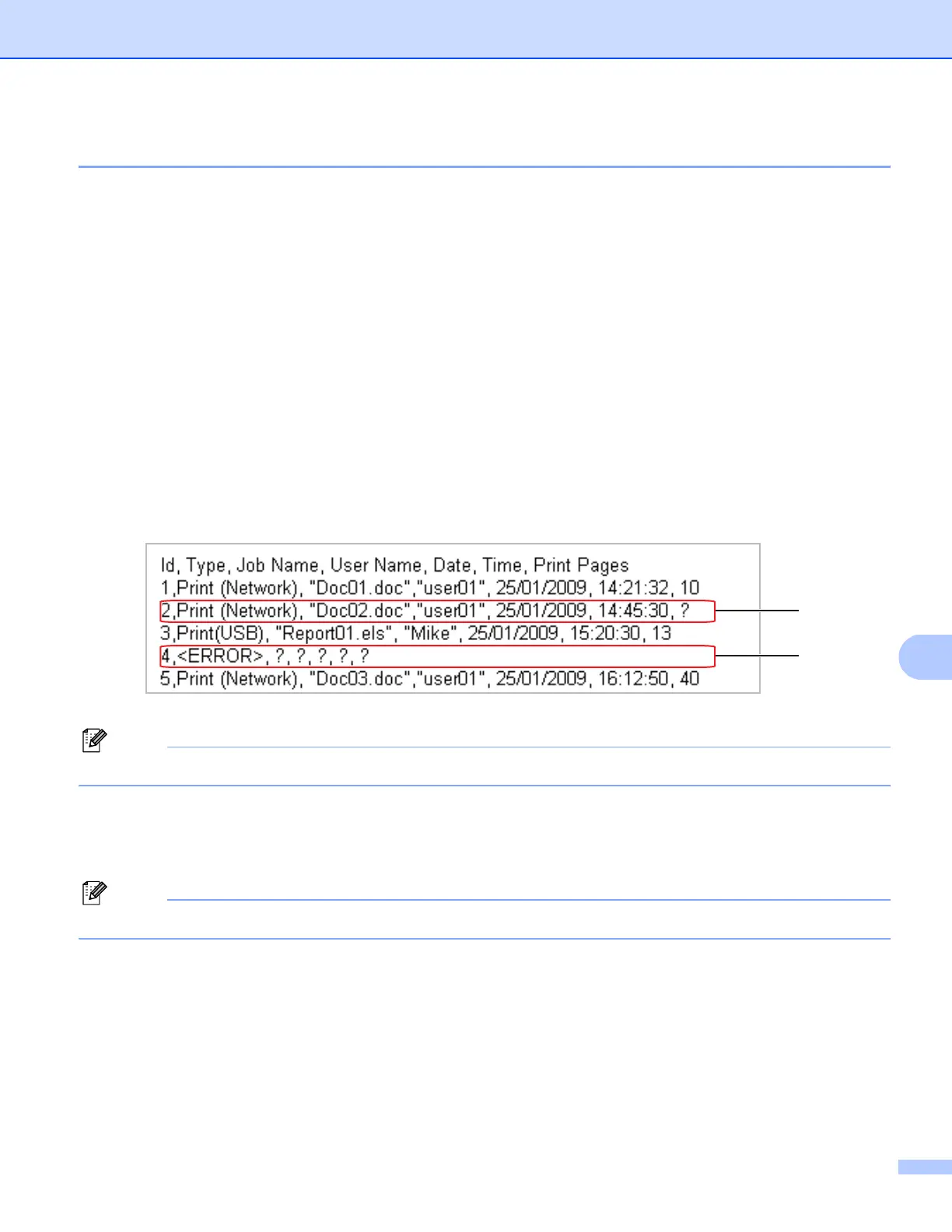
When the store print log function has recovered, the print log is recorded as follows:
• If the log cannot be stored at the end of printing, the print log except the number of printed pages
and color pages will be recorded. (1)
• If the Print Log cannot be stored at the beginning and the end of printing, the print log of the job
will not be recorded. When the function has recovered, the occurrence of an error is shown in the
log. (2)
Example of the print log:
Note
The order of the items are different depending on the countries.
Cancel Print
If you choose Cancel Print, the print jobs are canceled when the print log cannot be stored to the
server.
Note
Even if you choose Cancel Print, your machine will automatically print a copy of the stored fax.
b Click Submit to apply your settings.
(1)
(2)






 To Next Page